1. Introduction
Thank you for choosing the Nakajima WPT-160 Electronic Portable Typewriter. This manual provides detailed instructions to help you set up, operate, and maintain your typewriter effectively. Please read this manual thoroughly before using the device to ensure proper function and longevity.
2. Safety Information
Observe the following safety precautions to prevent damage to the typewriter and ensure user safety:
- Do not expose the typewriter to moisture or extreme temperatures.
- Ensure the power cord is not damaged and is properly connected to a suitable power outlet.
- Avoid placing heavy objects on the typewriter.
- Keep hands clear of moving parts during operation.
- Unplug the typewriter from the power source before cleaning or performing maintenance.
- Do not attempt to disassemble or repair the typewriter yourself. Refer to qualified service personnel.
3. Product Overview
The Nakajima WPT-160 is an electronic portable typewriter designed for efficient document creation. It features a display, memory functions, and various typing options.
3.1 Main Components
Familiarize yourself with the key parts of your typewriter:

Figure 3.1: Front View with Paper Cover Open. This image shows the Nakajima WPT-160 typewriter from the front, with the top cover lifted to reveal the paper feed mechanism and the print area. The keyboard and the LCD display are clearly visible.
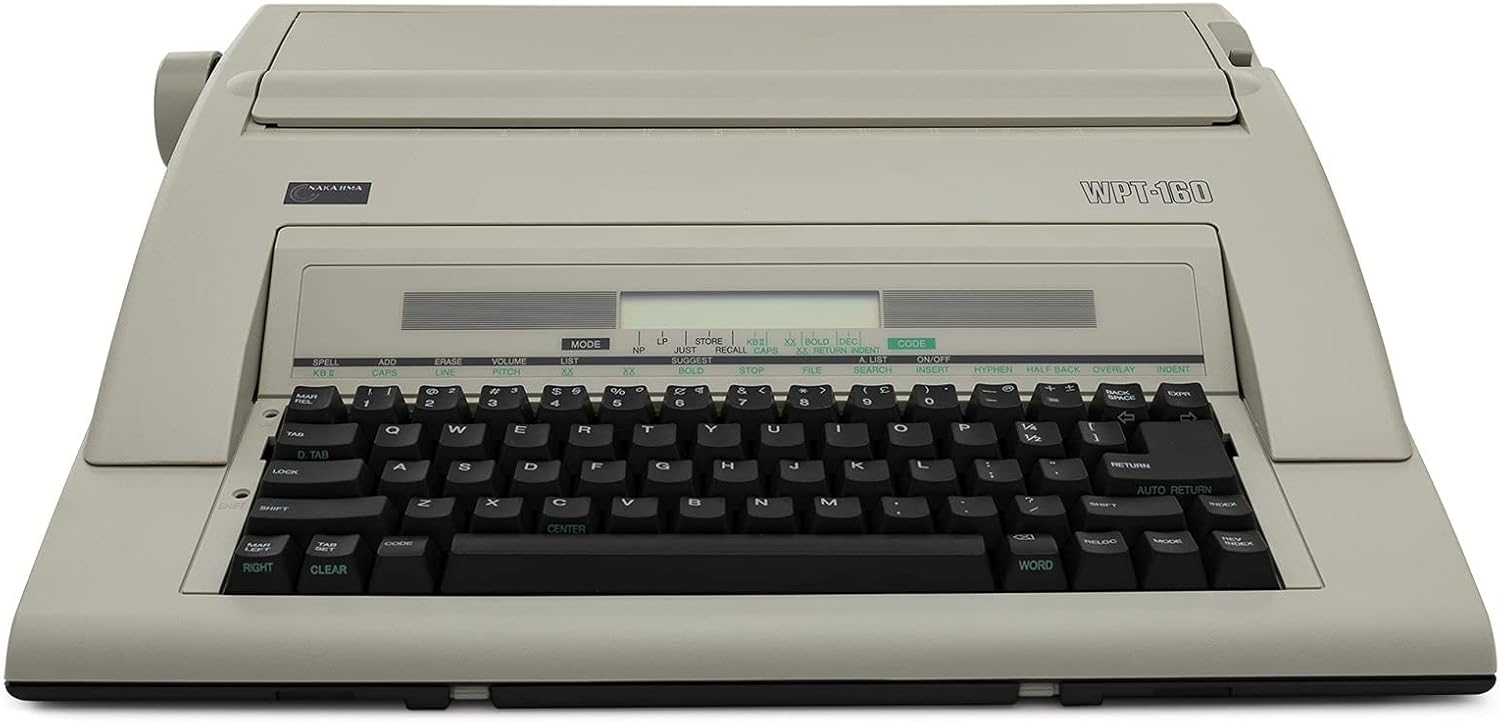
Figure 3.2: Front View with Paper Cover Closed. This image displays the Nakajima WPT-160 typewriter from the front, with the top paper cover closed, showing its compact and portable design. The keyboard and display remain visible.

Figure 3.3: Angled View with Paper Cover Closed. An angled perspective of the Nakajima WPT-160 typewriter, with the paper cover closed, highlighting its side profile and overall form factor.

Figure 3.4: Angled View with Paper Cover Open. This image provides an angled view of the Nakajima WPT-160 typewriter with the top paper cover open, showcasing the internal mechanisms for paper handling and ribbon access.

Figure 3.5: Rear View with Power Cord Compartment Open. The rear of the Nakajima WPT-160 typewriter is shown with the compartment for the power cord open, illustrating its storage solution.
4. Setup
4.1 Unpacking
Carefully remove the typewriter from its packaging. Retain all packing materials for future transport or storage.
4.2 Power Connection
- Locate the power cord compartment at the rear of the typewriter (refer to Figure 3.5).
- Connect the power cord to the typewriter's power input.
- Plug the other end of the power cord into a standard electrical outlet.
- Turn on the typewriter using the power switch, typically located on the side or rear.
4.3 Ribbon Installation
The typewriter uses a drop-in printwheel and ribbon system. Proper installation is crucial for clear printing.
- Open the top cover of the typewriter to access the print mechanism.
- If replacing, remove the old ribbon cartridge and printwheel.
- Insert the new ribbon cartridge, ensuring it clicks into place. Important: Some new ribbons may have protective tabs that prevent unspooling during shipping. Ensure these tabs are removed before installation. Failure to do so will result in blank characters.
- Install the 100-character drop-in printwheel, aligning it correctly with the print head.
- Close the top cover.
4.4 Paper Loading
The typewriter accommodates paper up to 13 inches in width.
- Lift the paper bail rollers.
- Insert the paper from the rear of the carriage, ensuring it is straight.
- Lower the paper bail rollers to secure the paper.
- Adjust the paper guide to align the paper for typing.
5. Operating Instructions
5.1 Basic Typing
Once powered on and paper is loaded, you can begin typing. The typewriter operates similarly to traditional typewriters but with electronic enhancements.
- Keyboard: Use the standard QWERTY keyboard for character input.
- Display: The 20-character LCD display shows the text as you type, allowing for review and correction before printing.
- Pitch Selection: Use the dedicated keys to select typing pitch: 10 (Pica), 12 (Elite), or 15 characters per inch.
5.2 Memory Functions
The WPT-160 includes advanced memory features to assist with typing and editing.
- 16,000 Text Memory: Store frequently used phrases, paragraphs, or entire documents for recall and re-typing. Refer to the "STORE" and "RECALL" functions on the display.
- Full Line Correction Memory: Correct errors on the current line before they are printed. Use the "CORRECT" or "BACKSPACE" key.
- Word and Character Erase: Utilize specific keys for efficient word or single-character deletion from the display or memory.
- 80,000 Word Dictionary: The built-in dictionary assists with spelling and word suggestions. Consult the display for prompts related to the dictionary function.
5.3 Function Keys
The typewriter features 17 function keys that provide quick access to various operations. Refer to the labels on the keyboard and the display for their specific uses, which include but are not limited to: margin settings, tab stops, bolding, underlining, and centering.
6. Maintenance
6.1 Cleaning
Regular cleaning helps maintain the typewriter's performance and appearance.
- Ensure the typewriter is unplugged before cleaning.
- Use a soft, dry cloth to wipe the exterior surfaces.
- For the keyboard, use a soft brush or compressed air to remove dust and debris between keys.
- Do not use liquid cleaners directly on the display or internal components.
6.2 Ribbon and Printwheel Replacement
Replace the ribbon cartridge and printwheel as needed to ensure optimal print quality. Follow the steps outlined in Section 4.3 "Ribbon Installation". Genuine Nakajima replacement parts are recommended.
7. Troubleshooting
This section addresses common issues you might encounter with your Nakajima WPT-160 typewriter.
7.1 Common Issues and Solutions
| Problem | Possible Cause | Solution |
|---|---|---|
| Typewriter does not power on. | Power cord not connected; power outlet issue; power switch off. | Ensure power cord is securely plugged in. Check the power outlet. Verify the power switch is in the "ON" position. |
| Characters are not printing or are very faint. | Ribbon is exhausted; ribbon protective tabs not removed; ribbon incorrectly installed. | Replace the ribbon cartridge. Check for and remove any protective tabs on a new ribbon. Reinstall the ribbon correctly. |
| Print quality is poor or characters are misaligned. | Printwheel incorrectly installed; printwheel damaged; dirty print head. | Reinstall the printwheel, ensuring proper alignment. Replace the printwheel if damaged. Gently clean the print head area with a soft, dry cloth. |
| Paper does not feed correctly. | Paper not inserted straight; paper bail rollers not lowered; paper jam. | Ensure paper is inserted straight and aligned with guides. Lower paper bail rollers. Carefully remove any jammed paper. |
If you encounter issues not listed here, or if the suggested solutions do not resolve the problem, please contact customer support.
8. Specifications
Key technical specifications for the Nakajima WPT-160 Electronic Portable Typewriter:
- Model: WPT-160
- Display: 20-character LCD
- Memory: 16,000 character text memory, Full line correction memory
- Dictionary: 80,000 word dictionary
- Printwheel: 100-character drop-in printwheel (Prestige Pica 10 included)
- Pitch Selections: 10, 12, 15 characters per inch
- Carriage Width: Approximately 13 inches (paper capacity)
- Function Keys: 17
- Dimensions: Approximately 20.2 x 18.8 x 7.7 inches
- Weight: Approximately 0.01 ounces (Note: This weight seems unusually low and may be a data entry error. Actual weight is likely higher for a typewriter.)
9. Warranty and Support
9.1 Limited Warranty
The Nakajima WPT-160 Electronic Portable Typewriter comes with a 1-year limited warranty from the date of purchase. This warranty covers manufacturing defects under normal use. It does not cover damage caused by misuse, accidents, unauthorized repairs, or consumable items such as ribbons and printwheels.
Please retain your proof of purchase for warranty claims.
9.2 Customer Support
For technical assistance, warranty inquiries, or to order replacement parts, please contact Nakajima customer support. Refer to the contact information provided with your purchase documentation or visit the official Nakajima website.
When contacting support, please have your model number (WPT-160) and purchase date available.