
1. Introduction
The Werkzeyt B29820 is a digital moisture meter designed for accurately determining moisture content in various materials, including wood, firewood, and common building materials. It also measures ambient air temperature. This device features a backlit LCD display for easy readability and an automatic shut-off function to conserve battery life.
Key features include:
- Measurement of moisture in wood and building materials (e.g., cement, screed, concrete, plaster, anhydrite screed, cement mortar, lime mortar, brick).
- Measurement of ambient air temperature.
- Backlit, easy-to-read LCD display.
- Automatic shut-off function.
- Includes 3x LR44 batteries.
2. Safety Information
Please read and understand all safety instructions before using the device. Keep this manual for future reference.
- Sharp Probes: The device has sharp measurement probes. Handle with care to avoid injury. Keep out of reach of children.
- Electrical Safety: Do not use the device on live electrical circuits or materials. This can cause electric shock and damage the device.
- Battery Safety: Ensure batteries are inserted with correct polarity. Do not mix old and new batteries or different types of batteries. Remove batteries if the device will not be used for an extended period.
- Environmental Conditions: Do not expose the device to extreme temperatures, high humidity, or direct sunlight.
- Cleaning: Clean the device with a soft, dry cloth. Do not use abrasive cleaners or solvents.
3. Package Contents
- Werkzeyt B29820 Digital Moisture Meter
- 3 x LR44 Batteries (pre-installed or included separately)
- User Manual (this document)
4. Product Overview
Familiarize yourself with the components of your moisture meter:

Figure 1: Front view of the Werkzeyt B29820 Digital Moisture Meter. It shows the digital display, the yellow measurement button, and indicator lights (green, yellow, red) below the display. The two sharp probes are visible at the top.
- Measurement Probes: Two sharp pins at the top for penetrating materials.
- LCD Display: Backlit screen showing moisture percentage and temperature.
- Measurement Button (Yellow): Press to initiate a measurement.
- Indicator Lights (Green, Yellow, Red): Provide a quick visual indication of moisture levels (e.g., green for dry, red for wet).
- Battery Compartment: Located on the back of the device.
5. Setup
5.1 Battery Installation
The Werkzeyt B29820 requires 3x LR44 button cell batteries. These are typically included with the device.
- Locate the battery compartment cover on the back of the device.
- Open the cover (you may need a small screwdriver or coin).
- Insert the 3 LR44 batteries, ensuring correct polarity (+/-) as indicated inside the compartment. If there is a plastic tab, remove it before use.
- Close the battery compartment cover securely.

Figure 2: This image illustrates the device's display showing "Lo %" and the indicator lights. It also details the measurement ranges for wood (6%-48%), building materials (0.1%-11.0%), and temperature in Celsius (0°C-50°C) and Fahrenheit (32°F-122°F). The bottom left confirms the use of 3x LR44 batteries.
6. Operating Instructions
6.1 Powering On/Off
The device powers on automatically when the measurement button is pressed. It features an automatic shut-off function to conserve battery life after a period of inactivity.
6.2 Taking a Moisture Measurement
To measure the moisture content of a material:
- Ensure the probes are clean and free from debris.
- Carefully press the two sharp measurement probes into the material you wish to test. Ensure both probes penetrate the surface adequately for an accurate reading.
- Press and hold the yellow measurement button. The moisture percentage will be displayed on the LCD screen.
- Observe the indicator lights for a quick assessment:
- Green Light: Indicates low moisture content.
- Yellow Light: Indicates moderate moisture content.
- Red Light: Indicates high moisture content.
- Release the button to turn off the display or wait for automatic shut-off.

Figure 3: A hand holding the Werkzeyt B29820 moisture meter, pressing its probes into a piece of firewood to measure its moisture content. The display shows "10.8%".
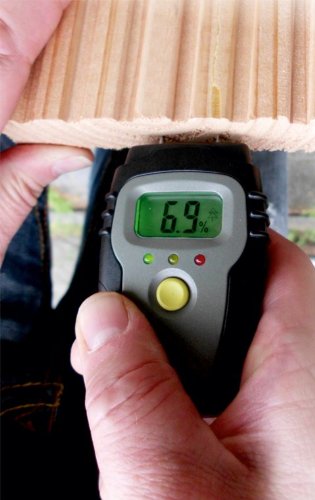
Figure 4: A close-up view of the Werkzeyt B29820 moisture meter with its probes inserted into a piece of wood, displaying a reading of "6.9%".

Figure 5: The Werkzeyt B29820 moisture meter being used to measure the moisture content of a wooden panel, showing a reading of "7.3%".

Figure 6: The Werkzeyt B29820 moisture meter with its probes inserted into a textured wall or building material, displaying a reading of "0.1%".
6.3 Measuring Air Temperature
The device also measures ambient air temperature. This reading is typically displayed alongside the moisture reading or can be accessed by a specific mode (if available, though not explicitly stated for this model, it's usually automatic or a button press). Refer to the display for the temperature value, usually indicated with °C or °F.
7. Measurement Ranges and Accuracy
The Werkzeyt B29820 provides the following measurement capabilities:
| Measurement Type | Range | Accuracy |
|---|---|---|
| Wood Moisture | 6% - 48% | ±2% (for 11-48%), ±2.5% (for 6-10%) |
| Building Material Moisture | 0.1% - 11.0% | ±0.4% |
| Air Temperature (Celsius) | 0°C - 50°C | ±1°C |
| Air Temperature (Fahrenheit) | 32°F - 122°F | ±2°F |
8. Maintenance
- Cleaning: After each use, wipe the measurement probes and the device body with a soft, dry cloth. Ensure no moisture or debris remains on the probes.
- Storage: Store the device in a dry, cool place, away from direct sunlight and extreme temperatures.
- Battery Replacement: When the display indicates low battery or the device fails to power on, replace all three LR44 batteries. Refer to Section 5.1 for battery installation instructions.
- Probe Care: The measurement probes are sharp. If they become dull or damaged, contact customer support for advice on replacement or service.
9. Troubleshooting
| Problem | Possible Cause | Solution |
|---|---|---|
| Device does not turn on. | Dead or incorrectly installed batteries. | Check battery polarity. Replace batteries (3x LR44). Ensure the plastic tab is removed if new. |
| Inaccurate readings. | Probes not fully inserted; probes dirty; material too dry/wet for range; device malfunction. | Ensure probes are fully inserted. Clean probes. Verify material is within measurement range. If issues persist, contact support. |
| Display is dim or flickering. | Low battery power. | Replace batteries (3x LR44). |
| No temperature reading. | Not all models display temperature continuously; device malfunction. | Ensure you are in the correct mode (if applicable). If the feature is supported and not working, contact support. |
10. Specifications
- Model Number: B29820
- Manufacturer: Conmetall
- Power Source: 3 x LR44 batteries
- Product Dimensions: Approximately 17 x 11.8 x 3.2 cm (Package dimensions)
- Product Weight: Approximately 96 g (Package weight)
- Wood Moisture Range: 6% - 48%
- Building Material Moisture Range: 0.1% - 11.0%
- Temperature Range: 0°C - 50°C (32°F - 122°F)
- Display: Backlit LCD
- Features: Automatic shut-off
- Country of Origin: China
11. Warranty and Support
For warranty information and customer support, please refer to the documentation provided at the time of purchase or contact your retailer. Keep your proof of purchase for any warranty claims.
For further assistance, you may visit the official Conmetall website or contact their customer service department.