
Introduction
Thank you for choosing the Fossil FS4791 Men's Quartz Chronograph Watch. This manual provides essential information for the proper setup, operation, maintenance, and troubleshooting of your timepiece. Please read these instructions carefully to ensure optimal performance and longevity of your watch.
The Fossil FS4791 features a striking blue dial with white baton markers, a date display, and chronograph subdials, all housed within a durable stainless steel case and bracelet. It is powered by a precise quartz movement.
Setup
1. Unboxing
Carefully remove the watch from its packaging. Inspect the watch for any visible damage. Retain all packaging materials for future reference or warranty claims.
2. Setting the Time
- Pull the crown (the knob on the side of the watch) out to the second click position.
- Rotate the crown clockwise or counter-clockwise to set the hour and minute hands to the correct time. Ensure the AM/PM is correctly set if your watch has a 24-hour indicator or date function (the date changes around midnight).
- Once the time is set, push the crown back into its normal operating position.
3. Setting the Date
- Pull the crown out to the first click position.
- Rotate the crown to set the date. Avoid setting the date between 9 PM and 3 AM, as this can interfere with the automatic date change mechanism.
- Once the date is set, push the crown back into its normal operating position.
4. Bracelet Adjustment
The stainless steel bracelet may require adjustment for a comfortable fit. It is recommended to have this procedure performed by a qualified jeweler or watch technician to avoid damage to the bracelet or watch.

Image: Side view of the Fossil FS4791 watch, illustrating the crown and pushers for time and date adjustment, and chronograph operation.
Operating the Watch
1. Basic Timekeeping
Your Fossil FS4791 watch is a quartz timepiece, known for its accuracy. Once the time and date are set, the watch will keep accurate time as long as the battery is functional.
2. Chronograph Function
The chronograph function allows you to measure elapsed time independently of the main time display. Your watch features three subdials and two pushers (buttons) located above and below the crown.
- Start/Stop: Press the top pusher to start the chronograph. Press it again to stop the measurement.
- Reset: While the chronograph is stopped, press the bottom pusher to reset all chronograph hands back to their zero positions.
3. Date Display
The date window is typically located at the 3 o'clock position on the dial, displaying the current day of the month.
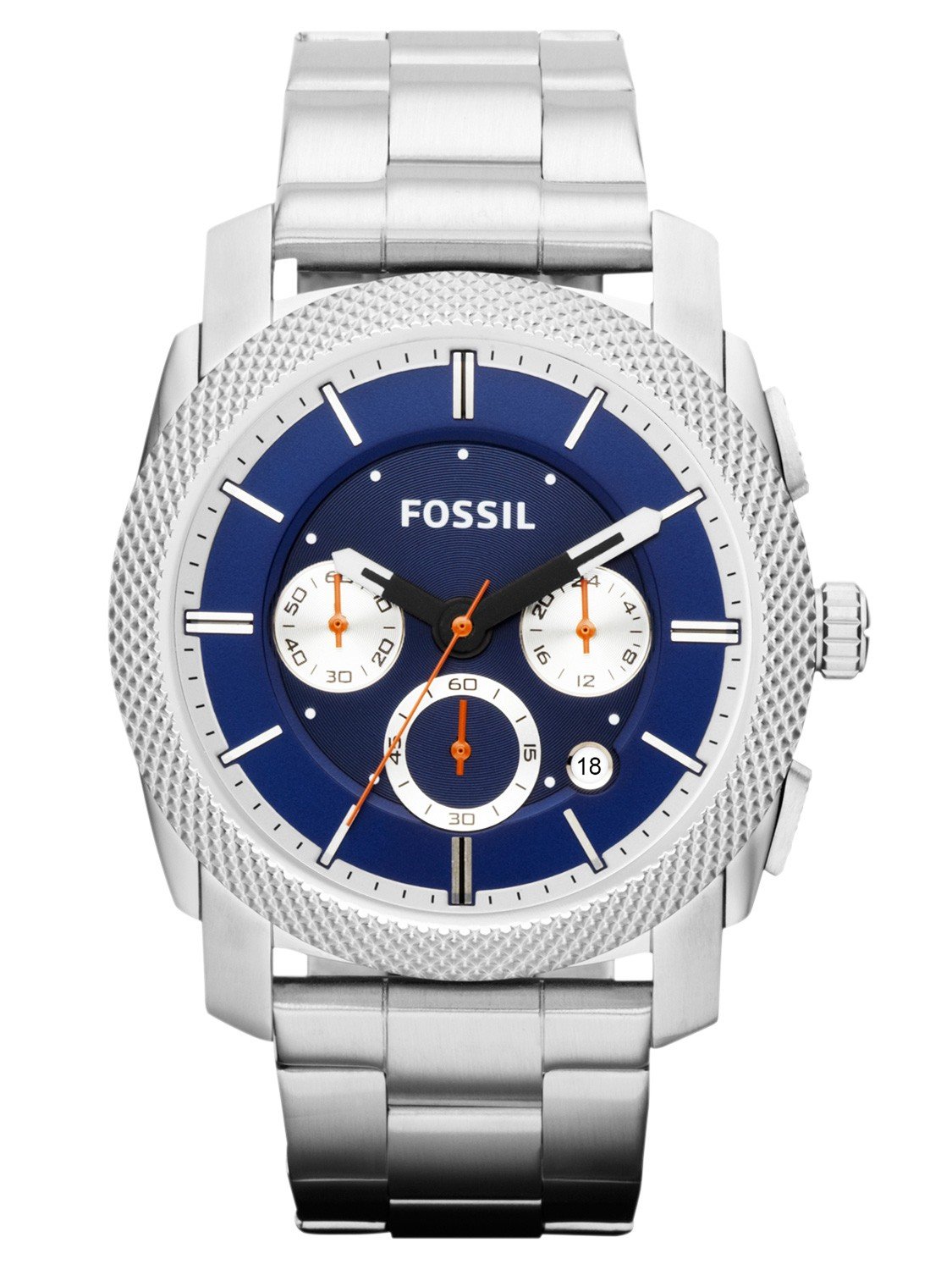
Image: Front view of the Fossil FS4791 watch, showcasing the blue dial, white baton markers, date window, and chronograph subdials.
Maintenance
1. Cleaning
To maintain the appearance of your watch, wipe the case and bracelet regularly with a soft, dry cloth. For stainless steel, a slightly damp cloth can be used, followed by a dry cloth. Avoid using harsh chemicals or abrasive materials.
2. Water Resistance
While your watch may offer some level of water resistance, it is generally recommended to avoid prolonged exposure to water, especially hot water or steam. Do not operate the crown or pushers when the watch is wet. Refer to the watch back for specific water resistance ratings, if available.
3. Battery Replacement
The quartz movement is powered by a battery. When the watch stops or the second hand begins to jump erratically (if applicable), it indicates a low battery. Battery replacement should be performed by a qualified watch technician to ensure proper sealing and function.
4. Storage
When not wearing your watch, store it in a cool, dry place away from direct sunlight and extreme temperatures. A watch box or pouch can protect it from dust and scratches.

Image: Back view of the Fossil FS4791 watch, displaying the stainless steel case back and the clasp mechanism of the bracelet.
Troubleshooting
- Watch not running: Ensure the crown is fully pushed in. If the watch still does not run, the battery may need replacement.
- Date not changing at midnight: This usually indicates the time is set incorrectly (e.g., AM/PM is reversed). Reset the time, ensuring the date changes at 12 AM.
- Chronograph hands not resetting to zero: If the chronograph hands do not return to their zero positions after pressing the reset pusher, a calibration may be required. Consult a watch technician.
- Condensation under the crystal: This can indicate a breach in the watch's water resistance. Have the watch inspected by a professional immediately to prevent internal damage.
Specifications
| Brand | Fossil |
| Model Number | FS4791 (Machine) |
| Movement Type | Quartz |
| Case Diameter | 45 Millimetres |
| Band Material Type | Synthetic (Stainless Steel) |
| Band Colour | Silver |
| Item Weight | 172 g |
| Product Dimensions | 15.01 x 15.01 x 15.01 cm |
Warranty and Support
Your Fossil FS4791 watch comes with a manufacturer's warranty. Please refer to the warranty card included with your purchase for specific terms, conditions, and duration. For warranty service or technical support, please contact Fossil customer service or visit their official website. Keep your proof of purchase for any warranty claims.
For further assistance, you may visit the official Fossil Store on Amazon.
