
Sirui T-005KX
Sirui T-005KX Aluminum Alloy Tripod with C-10X Ball Head User Manual
Model: T-005KX
1. Introduction
Thank you for choosing the Sirui T-005KX Aluminum Alloy Tripod with C-10X Ball Head. This manual provides detailed instructions for the proper setup, operation, and maintenance of your new equipment. Please read this manual thoroughly before use to ensure optimal performance and longevity of your tripod system.
Package Contents:
- Sirui T-005KX Aluminum Alloy Tripod
- Sirui C-10X Ball Head
- Quick Release Plate (Arca-compatible)
- Carrying Case
- Tools (e.g., Allen wrench)
- Instruction Manual
2. Safety Instructions
- Do not exceed the maximum load capacity of 8.8 lb (4 kg). Overloading can cause instability and damage to equipment.
- Ensure all leg locks and the ball head lock are securely tightened before mounting a camera or leaving the tripod unattended.
- Avoid placing the tripod on uneven or unstable surfaces. Always check for stability before use.
- Do not expose the tripod to extreme temperatures or corrosive environments.
- Keep hands and fingers clear of moving parts, especially when folding or unfolding the legs.
- When carrying the tripod with a camera mounted, always support the camera with one hand.
3. Product Overview
The Sirui T-005KX is a compact and lightweight aluminum alloy tripod designed for portability and stability. It features a removable center column for low-angle shooting and a C-10X ball head with an Arca-compatible quick release plate.
Key Components:
- Tripod Legs: Three-section aluminum alloy legs with twist locks.
- Leg Angle Locks: Mechanisms to adjust leg spread to three positions.
- Center Column: Extendable column for additional height, reversible for low-angle shots.
- Ball Head (C-10X): Provides smooth movement and secure locking for camera positioning.
- Quick Release Plate: Arca-compatible plate for quick attachment and detachment of your camera.
- Hook: Located at the bottom of the center column for attaching counterweights.
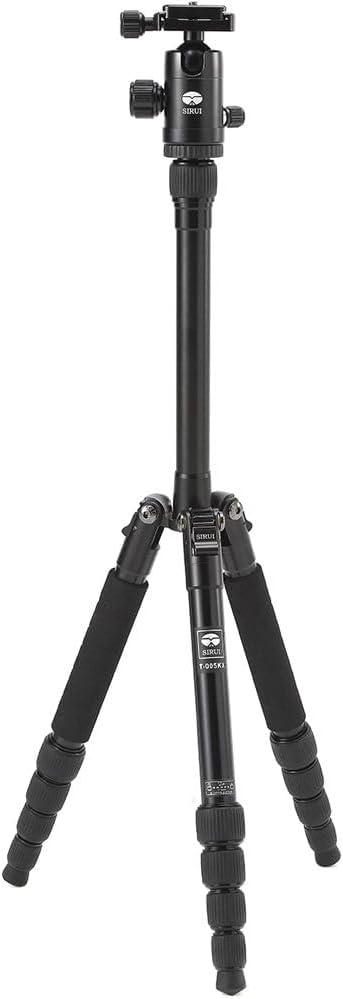
Figure 1: The Sirui T-005KX Aluminum Alloy Tripod fully assembled with the C-10X Ball Head. This image shows the tripod in its standard upright position, ready for camera mounting.
4. Setup
4.1 Unfolding the Tripod:
- Grasp the tripod legs and rotate them 180 degrees upwards until they are in the standard operating position.
- Extend each leg section by twisting the leg locks counter-clockwise to loosen, pulling the section out, and then twisting clockwise to secure. Repeat for all sections of each leg.
- Adjust the leg angles by pressing the leg angle lock mechanism at the top of each leg and setting it to one of the three available positions. Ensure all three legs are set to the same angle for stability.

Figure 2: The Sirui T-005KX Tripod with its legs fully extended. This illustrates the tripod's maximum height configuration, showcasing the extended leg sections and center column.
4.2 Attaching the Ball Head:
- The C-10X ball head is typically pre-attached. If not, screw the ball head onto the 3/8" mounting screw on the tripod's center column platform until secure.
- Ensure the ball head is firmly tightened to prevent rotation during use.
4.3 Mounting Your Camera:
- Attach the quick release plate to the bottom of your camera. Use a coin or the provided Allen wrench to tighten the screw securely.
- Loosen the quick release clamp knob on the C-10X ball head.
- Slide the camera with the attached quick release plate into the clamp. Ensure it is seated correctly and then tighten the clamp knob firmly.
- Gently test the camera's security before releasing your grip.
5. Operating Instructions
5.1 Adjusting Tripod Height:
- Leg Sections: Loosen the twist locks on each leg section, extend to the desired length, and then tighten the locks securely.
- Center Column: To extend the center column, loosen the center column lock knob, raise the column to the desired height, and then tighten the knob.
- Low-Angle Shooting: The center column can be removed or inverted for extremely low-angle shots. To remove, fully extend and pull out. To invert, remove, flip, and reinsert.

Figure 3: A close-up view of the twist leg locks on the Sirui T-005KX Tripod. This image highlights the textured grip of the leg locks, which are used to extend and secure the tripod legs at various heights.
5.2 Adjusting Ball Head:
- Ball Lock Knob: Loosen the main ball lock knob to allow free movement of the camera. Position your camera as desired, then tighten the knob firmly to secure it.
- Panning Lock Knob: The C-10X ball head features a separate panning lock knob. Loosen this knob to rotate the camera horizontally (360 degrees) without affecting the ball's tilt. Tighten to lock the panning movement.
6. Maintenance
- Cleaning: Wipe down the tripod with a soft, damp cloth after use, especially if exposed to sand, dust, or saltwater. Avoid harsh chemicals.
- Lubrication: Do not apply lubricants to the leg locks or ball head mechanism unless specifically instructed by Sirui. This can attract dirt and impair function.
- Storage: Store the tripod in its carrying case in a dry, cool place away from direct sunlight.
- Inspection: Periodically check all screws and connections for tightness. Use the provided Allen wrench to tighten if necessary.
7. Troubleshooting
| Problem | Possible Cause | Solution |
|---|---|---|
| Tripod is unstable. | Legs not fully extended or locked; uneven surface; leg angles not set correctly; overloaded. | Ensure all leg sections are extended and twist locks are tight. Adjust leg angles to match. Use on a level surface. Do not exceed load capacity. |
| Ball head movement is stiff or loose. | Ball lock knob not adjusted correctly; dirt in mechanism. | Loosen or tighten the ball lock knob. Clean the ball head area if dirt is visible. |
| Quick release plate not securing camera. | Plate not fully seated; clamp knob not tightened; plate screw loose on camera. | Ensure the quick release plate is correctly inserted into the clamp. Tighten the clamp knob firmly. Check the screw connecting the plate to the camera. |
8. Specifications
| Feature | Detail |
|---|---|
| Model | T-005KX |
| Material | Aluminum Alloy |
| Maximum Height | 54.5 inches (138 cm) |
| Minimum Height | 11.8 inches (30 cm) |
| Folded Length | 11.8 inches (30 cm) |
| Weight | 1.9 lb (0.86 kg) |
| Load Capacity | 8.8 lb (4 kg) |
| Leg Sections | 5 |
| Tripod Head Type | Ball Head (C-10X) |
| Quick Release Plate | Arca-compatible |
9. Warranty and Support
Sirui products are manufactured to high-quality standards and come with a limited warranty. For specific warranty terms and conditions, please refer to the warranty card included with your product or visit the official Sirui website. For technical support, spare parts, or service inquiries, please contact Sirui customer service through their official channels.
Manufacturer: Sirui
Date First Available: February 13, 2013
Ask a question about this manual
Ask about setup, troubleshooting, compatibility, parts, safety, or missing instructions. Manuals+ will review the question and use this page’s manual context to help answer it.