
Introduction
The iLive Wireless Bluetooth Adapter (Model IAB13B) allows you to convert any audio system with an audio line input, such as a boombox, stereo, sound bar, or speaker, into a Bluetooth-enabled speaker. This device provides wireless audio streaming capabilities, extending the life and functionality of your existing audio equipment.
Features
- Converts any audio system (boombox, stereo, sound bar, speaker) into a Bluetooth speaker via audio line input/output.
- Equipped with a built-in rechargeable lithium-ion battery for portable use.
- Features a charge indicator and an LED pairing indicator for status updates.
- Micro-USB port for convenient battery recharging.
Package Contents
Please check to ensure all items are present:
- iLive Wireless Bluetooth Adapter (IAB13B)
- Micro-USB to USB cable
- 3.5mm audio cable
Product Overview
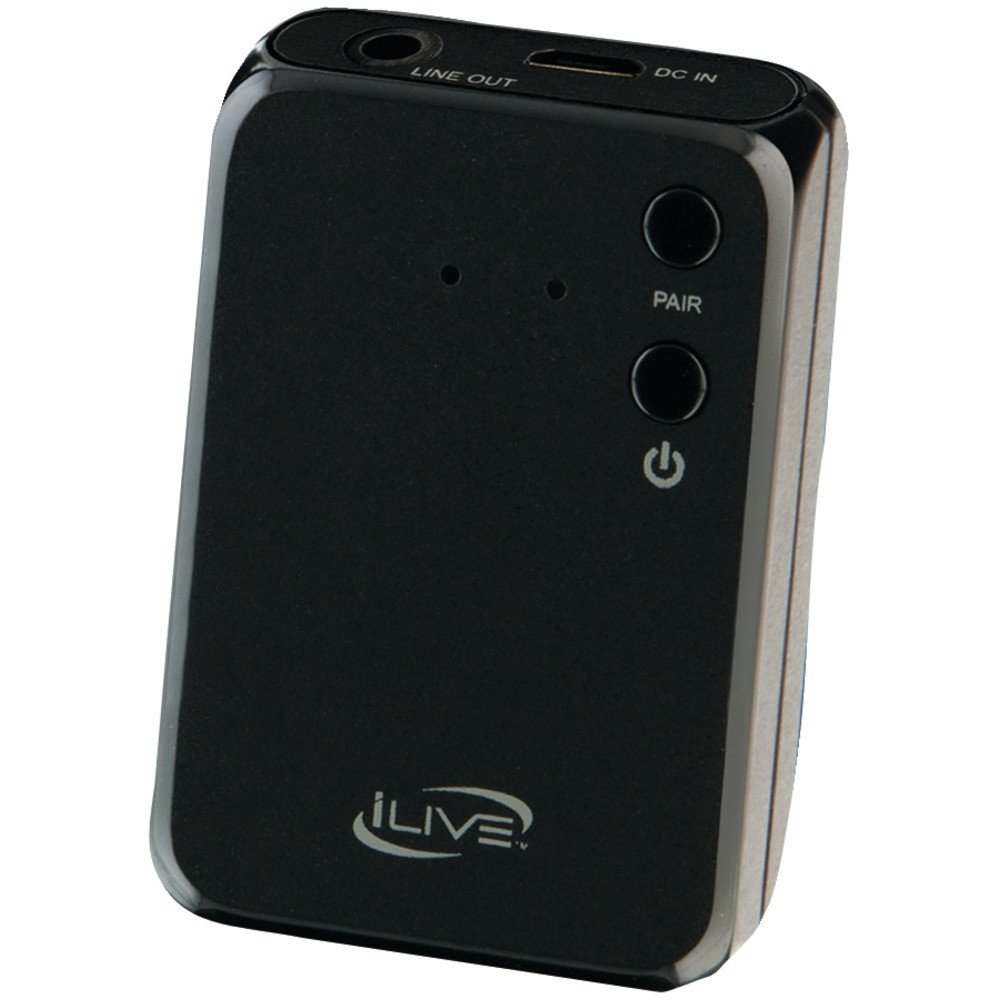
Image: The iLive Wireless Bluetooth Adapter (IAB13B). This image displays the compact, rectangular device, typically black, with visible ports for charging and audio output, and an indicator light. It is designed to be small and portable for easy integration with various audio systems.
Controls and Indicators
- Power Button: Typically located on the device, used to turn the adapter on/off.
- Micro-USB Port: For charging the internal battery.
- 3.5mm Audio Output Jack: Connects to your audio system's auxiliary input.
- LED Indicator: Displays charging status (e.g., red for charging, off for fully charged) and pairing status (e.g., blinking for pairing mode, solid for connected).
Setup
- Charge the Adapter: Before first use, fully charge the adapter. Connect the included Micro-USB to USB cable to the adapter's Micro-USB port and the other end to a powered USB port (e.g., computer, USB wall adapter). The LED indicator will typically show red while charging and turn off when fully charged.
- Connect to Audio System: Use the included 3.5mm audio cable to connect the adapter's 3.5mm audio output jack to the auxiliary (AUX) input of your boombox, stereo, sound bar, or speaker. Ensure your audio system is set to the correct AUX input source.
Operating Instructions
Powering On/Off
- To Power On: Press and hold the Power button (if present) or ensure the device is charged and connected. The LED indicator will typically flash to indicate it's searching for a device.
- To Power Off: Press and hold the Power button (if present) until the LED indicator turns off.
Bluetooth Pairing
- Enter Pairing Mode: With the adapter powered on, the LED indicator will typically flash rapidly, indicating it is in pairing mode and discoverable by Bluetooth devices. If it doesn't enter pairing mode automatically, consult the device for a dedicated pairing button or sequence.
- Enable Bluetooth on Your Device: On your smartphone, tablet, or computer, go to the Bluetooth settings and ensure Bluetooth is enabled.
- Select the Adapter: In the list of available Bluetooth devices, look for "iLive IAB13B" or a similar name. Select it to initiate the pairing process.
- Confirm Pairing: Once successfully paired, the LED indicator on the adapter will usually turn solid blue or flash slowly. Your device may also confirm the connection.
- Play Audio: You can now play audio from your Bluetooth-enabled device, and it will stream wirelessly to your connected audio system.
Charging the Battery
The iLive Wireless Bluetooth Adapter features a built-in rechargeable lithium-ion battery. When the battery is low, the LED indicator may change color or flash differently. To charge:
- Connect the Micro-USB end of the charging cable to the adapter's Micro-USB port.
- Connect the standard USB end of the charging cable to a powered USB port (e.g., computer, USB wall adapter, car charger).
- The LED indicator will illuminate (typically red) to show that charging is in progress.
- Once fully charged, the LED indicator will usually turn off or change to a different color. Disconnect the adapter from the charging source.
Maintenance
- Cleaning: Use a soft, dry cloth to clean the adapter. Do not use liquid cleaners or solvents.
- Storage: Store the adapter in a cool, dry place away from direct sunlight and extreme temperatures.
- Battery Care: To prolong battery life, avoid fully discharging the battery frequently. If storing for an extended period, charge the battery periodically.
- Avoid Moisture: Keep the device away from water and excessive humidity.
Troubleshooting
- No Power / Device Not Turning On:
- Ensure the adapter is fully charged. Connect it to a power source using the Micro-USB cable.
- Verify the charging cable and USB power source are functional.
- Cannot Pair with Bluetooth Device:
- Make sure the adapter is in pairing mode (LED indicator flashing).
- Ensure Bluetooth is enabled on your source device (smartphone, tablet, etc.).
- Move the adapter closer to your source device.
- Turn off and on both the adapter and your source device, then try pairing again.
- If previously paired, try "forgetting" or "unpairing" the adapter from your device's Bluetooth settings and then re-pairing.
- No Audio Output:
- Verify the adapter is successfully paired and connected to your source device.
- Ensure the 3.5mm audio cable is securely connected to both the adapter and your audio system's AUX input.
- Check that your audio system is set to the correct AUX input source.
- Adjust the volume on both your source device and your audio system.
Specifications
| Model Number: | IAB13B |
| Connectivity Technology: | Bluetooth, USB |
| Wireless Communication: | Bluetooth |
| Power Source: | Built-in Rechargeable Lithium-ion Battery, Micro-USB charging |
| Product Dimensions: | 1.9 x 4.4 x 5.3 inches |
| Item Weight: | 0.3 ounces |
| Included Accessories: | Micro-USB to USB cable, 3.5mm audio cable |
Warranty and Support
For warranty information or technical support, please refer to the documentation included with your purchase or visit the official iLive Electronics website. Keep your proof of purchase for warranty claims.
iLive Electronics Official Website: iLive Electronics Store
