
Introduction
This manual provides essential information for the safe and effective operation of your Panasonic Lumix DMC-ZS25 digital camera. Please read it thoroughly before using the camera and keep it for future reference. The DMC-ZS25 is a compact digital camera featuring a 16.1-megapixel sensor and a powerful 20x optical zoom lens, designed for capturing high-quality photos and Full HD videos.
Product Overview
Key Features
- 16.1 Megapixel High Sensitivity MOS Sensor
- LEICA DC VARIO-ELMAR 20x Optical Zoom Lens (24-480mm equivalent)
- POWER O.I.S. (Optical Image Stabilizer) with Active Mode
- Full HD 1920 x 1080 Video Recording in AVCHD / MP4 Format
- 3.0-inch TFT LCD Display (460K dots)
- Intelligent Auto (iA) Mode for simplified shooting
- Creative Panorama and Creative Control/Retouch functions
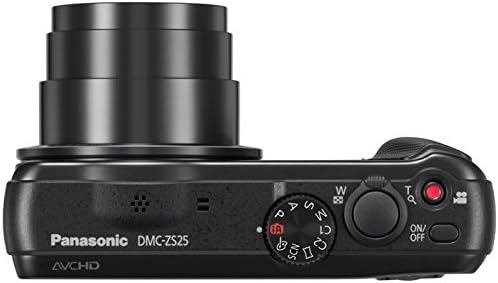
Camera Components


Setup
Battery Installation and Charging
Insert the supplied Li-ion Battery Pack (3.6V) into the battery compartment located at the bottom of the camera. Ensure it clicks into place. Charge the battery using the supplied AC adapter and USB cable. The charging indicator will illuminate during charging and turn off when complete. A full charge typically takes approximately 2 hours and 30 minutes.
Memory Card Insertion
Open the battery/card compartment cover. Insert an SD/SDHC/SDXC memory card into the slot with the label facing the rear of the camera until it clicks. Close the cover securely. The camera also has 90MB of internal memory for temporary storage.
Initial Settings (Date/Time)
Upon first power-on or after the battery has been removed for an extended period, the date/time setting screen will appear. Use the directional buttons to set the current date and time, then press [MENU/SET] to confirm.
Operating the Camera
Power On/Off
To turn the camera on, slide the [ON/OFF] switch located on the top panel. To turn it off, slide the switch again.
Basic Photography (Still Images)
- Set the mode dial to [iA] (Intelligent Auto) for automatic scene detection and optimal settings.
- Frame your shot using the LCD monitor.
- Press the shutter button halfway down to focus. The focus frame will turn green when focus is achieved.
- Press the shutter button fully down to take the picture.
Zoom Functionality: Use the zoom lever around the shutter button to zoom in (T) or out (W).
Video Recording
To start recording a video, press the dedicated movie recording button (red dot icon) on the top panel. Press it again to stop recording. Videos are recorded in Full HD (1920x1080) at 60i in AVCHD format or 30pfs in MP4 format.
Playback Mode
Press the playback button (triangle icon) on the rear panel to view your captured photos and videos. Use the directional buttons to navigate through your media.
Shooting Modes
Rotate the mode dial to select various shooting modes:
- iA (Intelligent Auto): Camera automatically selects optimal settings.
- P (Program AE): Camera sets aperture and shutter speed, you control other settings.
- A (Aperture Priority AE): You set aperture, camera sets shutter speed.
- S (Shutter Priority AE): You set shutter speed, camera sets aperture.
- M (Manual Exposure): You control both aperture and shutter speed.
- C (Custom): Recall your registered custom settings.
- SCN (Scene Mode): Select from various scene presets (e.g., Portrait, Scenery, Night Portrait).
Maintenance
Cleaning the Camera
- Use a soft, dry cloth to clean the camera body.
- For the lens, use a lens brush or a blower to remove dust, then gently wipe with a lens cleaning cloth.
- Clean the LCD monitor with a soft, dry cloth.
Battery Care
- Charge the battery fully before each use.
- Store the battery in a cool, dry place when not in use.
- Avoid exposing the battery to extreme temperatures.
Storage
When storing the camera for extended periods, remove the battery and memory card. Store the camera in a dry, dust-free environment, ideally in a camera bag or case.
Troubleshooting
| Problem | Solution |
|---|---|
| Camera does not turn on | Ensure battery is charged and correctly inserted. |
| Cannot take pictures | Check if memory card is inserted and has free space. Ensure lens cap is removed. |
| Images are blurry | Ensure proper focus. Check for sufficient lighting. Use POWER O.I.S. or a tripod. |
| Battery drains quickly | Reduce LCD brightness. Limit video recording. Turn off camera when not in use. |
Specifications
| Feature | Detail |
|---|---|
| Effective Pixels | 16.1 Megapixels |
| Sensor Size | 1/2.3-inch High Sensitivity MOS Sensor |
| Lens | LEICA DC VARIO-ELMAR, 20x Optical Zoom |
| Focal Length | f = 4.3 - 86.0mm (24 - 480mm in 35mm equiv.) |
| Optical Image Stabilizer | POWER O.I.S. |
| LCD Monitor | 3.0-inch TFT LCD Display (460K dots) |
| Video Recording | Full HD 1920 x 1080 (AVCHD, MP4) |
| Storage Media | SD/SDHC/SDXC Memory Card, 90MB Internal Memory |
| Interface | HDMI (mini HDMI), AV Output, USB |
| Battery Life (CIPA standard) | Approx. 260 photos |
What's in the Box
- Panasonic Lumix DMC-ZS25 Digital Camera
- Li-ion Battery Pack (3.6V)
- AC Adapter
- USB Cable
- Hand Strap
- Instruction Manual (this document)
Legal & Warranty
Legal Disclaimer
FULL 14 DAY SATISFACTION GUARANTEE AND A 90 DAY PARTS AND LABOR WARRANTY. SERIAL #FA3CA005797