
1. Introduction
This manual provides essential instructions for the safe and efficient operation of your Astron SS-25 Switching Power Supply. Please read this manual thoroughly before installation and use to ensure proper functionality and to prevent damage to the unit or connected equipment. Retain this manual for future reference.
2. Safety Information
Observe the following safety precautions to prevent electric shock, fire, or damage to the power supply and connected devices:
- Ventilation: Ensure adequate airflow around the unit. Do not block ventilation openings. Operating the unit in an enclosed space without proper ventilation can lead to overheating.
- Power Source: Connect the power supply only to an AC outlet with the specified voltage (120V AC).
- Moisture: Do not expose the unit to rain, moisture, or excessive humidity.
- Overload: Do not exceed the rated output current (20A continuous, 25A peak). Overloading can cause damage to the power supply.
- Grounding: Ensure the power supply is properly grounded.
- Servicing: Do not attempt to open or service the unit yourself. Refer all servicing to qualified personnel.
- Placement: Place the unit on a stable, level surface away from direct sunlight, heat sources, and flammable materials.
3. Product Overview
The Astron SS-25 is a compact and efficient switching power supply designed to provide stable 13.8V DC output for various electronic devices, including amateur radio equipment. It features a robust metal casing and convenient front-panel connections.
3.1 Features
- Output Voltage: 13.8V DC
- Output Current: 20 Amperes (continuous), 25 Amperes (peak)
- Input Voltage: 120V AC
- Compact Design: 7 x 9.37 x 2.87 inches
- Lightweight: Approximately 4.2 pounds
- Integrated USB Ports: Two USB ports (USB1, USB2) for charging or powering low-current devices.
3.2 Components
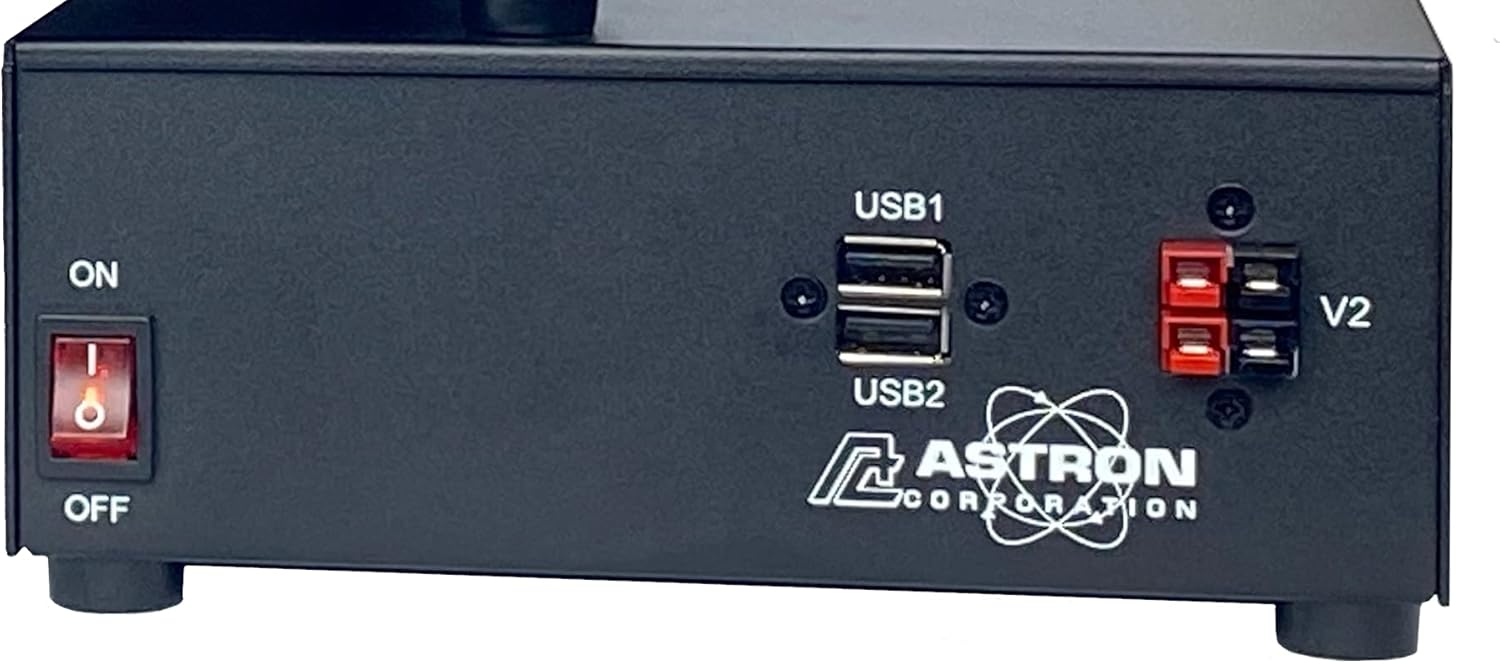
The front panel of the SS-25 power supply includes the following:

- ON/OFF Power Switch: Controls the main power to the unit.
- USB Ports (USB1, USB2): Provide 5V DC output for charging or powering USB-compatible devices.
- Output Terminals (V2): Red (+) and Black (-) terminals for connecting devices requiring 13.8V DC.
4. Setup
- Unpacking: Carefully remove the power supply from its packaging. Inspect the unit for any signs of damage during transit.
- Placement: Position the power supply on a flat, stable surface. Ensure there is at least 4 inches (10 cm) of clear space around all sides of the unit for proper ventilation. Do not place it near heat sources or in direct sunlight.
- AC Power Connection: Connect the supplied AC power cord to the power supply's AC input receptacle and then to a standard 120V AC wall outlet. Ensure the outlet is properly grounded.
- DC Output Connection:
- Identify the positive (red) and negative (black) output terminals on the front panel.
- Connect the positive lead of your DC device to the red terminal and the negative lead to the black terminal. Ensure connections are secure to prevent arcing or poor contact.
- Verify that the current draw of your connected device does not exceed the power supply's continuous rating of 20A.
5. Operating Instructions
- Powering On: After all connections are made, flip the ON/OFF power switch to the "ON" position. The power supply will begin to deliver 13.8V DC to the output terminals.
- Connecting USB Devices: Insert USB cables from your devices into the USB1 or USB2 ports for charging or powering. These ports provide 5V DC.
- Powering Off: To turn off the power supply, flip the ON/OFF power switch to the "OFF" position. Disconnect devices when not in use.
6. Maintenance
- Cleaning: Periodically clean the exterior of the unit with a soft, dry cloth. Do not use liquid cleaners or solvents.
- Ventilation: Regularly check that the ventilation openings are free from dust and obstructions. Accumulated dust can impede airflow and lead to overheating.
- Connections: Ensure all power and output connections remain secure. Loose connections can cause intermittent operation or damage.
7. Troubleshooting
If you encounter issues with your Astron SS-25 power supply, refer to the following common problems and solutions:
- No Power Output:
- Check if the ON/OFF switch is in the "ON" position.
- Verify the AC power cord is securely plugged into both the power supply and the wall outlet.
- Test the wall outlet with another device to ensure it has power.
- Unit Shuts Off During Operation:
- This may indicate an overload condition. Disconnect some of the connected devices and restart the unit. Ensure the total current draw does not exceed 20A continuous.
- Overheating can also cause shutdown. Check for blocked ventilation openings and ensure adequate airflow. Allow the unit to cool down before restarting.
- USB Ports Not Functioning:
- Ensure the power supply is turned on.
- Verify the USB device is compatible and not drawing excessive current.
If problems persist after attempting these solutions, contact Astron customer support for assistance.
8. Specifications
| Parameter | Value |
|---|---|
| Model Number | SS-25 |
| Output Voltage | 13.8V DC |
| Continuous Output Current | 20 Amperes |
| Peak Output Current | 25 Amperes |
| Input Voltage | 120V AC |
| Product Dimensions (L x W x H) | 9.37 x 7 x 2.87 inches |
| Item Weight | 4.2 pounds |
| Material | Metal |
| USB Output | 5V DC (via USB1, USB2 ports) |
9. Warranty and Support
Astron products are designed for reliability and performance. For specific warranty details, please refer to the warranty card included with your product or visit the official Astron website. If you require technical assistance or support, please contact Astron customer service directly. Do not attempt to repair the unit yourself, as this may void your warranty and pose safety risks.
For the most up-to-date support information, please visit: www.astroncorp.com