
Diamond C101NMO
Diamond C101NMO Antenna Mount Cable Assembly User Manual
Model: C101NMO
1. Introduction
The Diamond C101NMO Antenna Mount Cable Assembly is designed for connecting NMO-style mobile antennas to radio equipment. This assembly features a durable 6-foot RG316 Teflon cable, ensuring reliable signal transmission and longevity. It includes a PL-259 adapter for versatile connectivity with various radio systems.
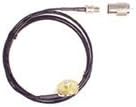
This image displays the complete Diamond C101NMO Antenna Mount Cable Assembly. It features a black, coiled 6-foot RG316 Teflon cable, an NMO connector at one end, and a separate PL-259 adapter for connecting to radio equipment.
2. Package Contents
Please verify that all items are present in the package:
- 1x Diamond C101NMO Antenna Mount Cable Assembly (6ft RG316 Teflon cable with NMO connector)
- 1x PL-259 Adapter
3. Setup and Installation
Follow these steps for proper installation of your C101NMO cable assembly:
- Step 1: Mount Preparation
Ensure the NMO mount point on your vehicle (e.g., trunk, roof) is clean, dry, and securely installed. The mounting surface should be free of debris or corrosion to ensure a good electrical connection. - Step 2: Cable Routing
Carefully route the 6ft RG316 Teflon cable from the NMO mount location to your radio equipment. Avoid sharp bends, kinks, or areas where the cable could be pinched, abraded, or exposed to excessive heat. Secure the cable along its path to prevent movement and damage. - Step 3: Antenna Connection
Securely attach your NMO-style antenna to the NMO connector on the cable assembly. Hand-tighten the antenna until snug, ensuring a firm electrical and mechanical connection. Do not overtighten. - Step 4: Radio Connection
The cable assembly terminates with a standard coaxial connector. If your radio has a PL-259 (UHF) connector, attach the included PL-259 adapter to the end of the cable assembly and then connect it to your radio. If your radio uses a different connector type, an appropriate adapter (not included) may be required. Ensure all connections are tight. - Step 5: System Testing
After installation, perform a system test to ensure proper antenna functionality and signal transmission. Check your radio's SWR (Standing Wave Ratio) to confirm optimal performance and minimize potential damage to your radio.
4. Operating Guidelines
Once installed, the C101NMO cable assembly facilitates the transmission of radio signals between your antenna and radio. For optimal performance:
- Ensure all connections (antenna to NMO, cable to radio/adapter) remain tight and free from corrosion.
- Avoid placing heavy objects on the cable or subjecting it to sharp impacts.
- Regularly check the cable's routing to ensure it has not become dislodged or damaged.
5. Care and Maintenance
Proper care will extend the life and performance of your cable assembly:
- Regular Inspection: Periodically inspect the entire cable for any signs of wear, cuts, cracks, or damage to the outer jacket. Check connectors for corrosion, looseness, or bent pins.
- Cleaning: Keep connectors clean and free of dirt, dust, or moisture. Use a dry, lint-free cloth for cleaning. Avoid using harsh chemicals or abrasive materials.
- Cable Management: Ensure the cable is not subjected to excessive tension, sharp bends, or abrasion, which can degrade performance or cause internal damage. Re-secure any loose sections of the cable.
- Environmental Protection: While the RG316 Teflon cable is durable, prolonged exposure to extreme weather conditions or harsh chemicals should be minimized where possible.
6. Troubleshooting
If you experience issues with your C101NMO cable assembly, consider the following:
- No Signal or Poor Performance:
- Check all connections (antenna to NMO, cable to radio/adapter) for tightness. Loose connections are a common cause of signal loss.
- Inspect the cable for visible damage, such as cuts, kinks, or severe bends.
- Ensure the antenna itself is properly tuned and functional. Test with a known good antenna if possible.
- Verify the PL-259 adapter is correctly installed and making good contact.
- Intermittent Connection:
- Tighten all connectors. Vibration during vehicle operation can sometimes loosen connections.
- Check for any movement or vibration that might cause connections to become intermittent.
- Inspect for internal cable damage, though this is less common with RG316 Teflon cable.
If troubleshooting steps do not resolve the issue, contact customer support.
7. Specifications
| Feature | Specification |
|---|---|
| Brand | Diamond Antenna |
| Model Name | C101NMO |
| Connector Type (Antenna End) | NMO |
| Cable Type | RG316 Teflon |
| Cable Length | 6 feet (approx. 1.83 meters) |
| Included Adapter | PL-259 (UHF Male) |
| Compatible Devices | NMO Antennas, Two-way Radios |
| Recommended Uses | Vehicle trunk mount or remote head installations for two-way radio antennas |
| Color | Black |
| Outer Material | Teflon |
| Item Weight | 0.24 Pounds (approx. 109 grams) |
| Country of Origin | Japan |
8. Warranty Information
The Diamond C101NMO Antenna Mount Cable Assembly is covered by a 1-year manufacturer warranty from the date of purchase. This warranty covers defects in materials and workmanship under normal use. It does not cover damage resulting from misuse, accident, unauthorized modification, or improper installation.
To make a warranty claim, please retain your original proof of purchase (receipt or invoice) and contact Diamond Antenna customer support. The manufacturer reserves the right to repair or replace the defective product at its discretion.
9. Customer Support
For technical assistance, troubleshooting guidance, or warranty inquiries regarding your Diamond C101NMO Antenna Mount Cable Assembly, please contact Diamond Antenna customer support.
Please refer to the official Diamond Antenna website or your product packaging for the most current contact information, including phone numbers, email addresses, and support hours.
Related documentsC101NMO


Ask a question about this manual
Ask about setup, troubleshooting, compatibility, parts, safety, or missing instructions. Manuals+ will review the question and use this page’s manual context to help answer it.