
1. Introduction and Product Overview
The DECA Class Booster 400E is a versatile battery charger and booster designed for charging 12V and 24V lead-acid batteries and providing assistance for engine starting. This unit incorporates essential safety features such as thermostatic protection, short-circuit protection, and protection against polarity inversion to ensure safe and reliable operation.
This manual provides detailed instructions for the safe and effective use, maintenance, and troubleshooting of your DECA Class Booster 400E.
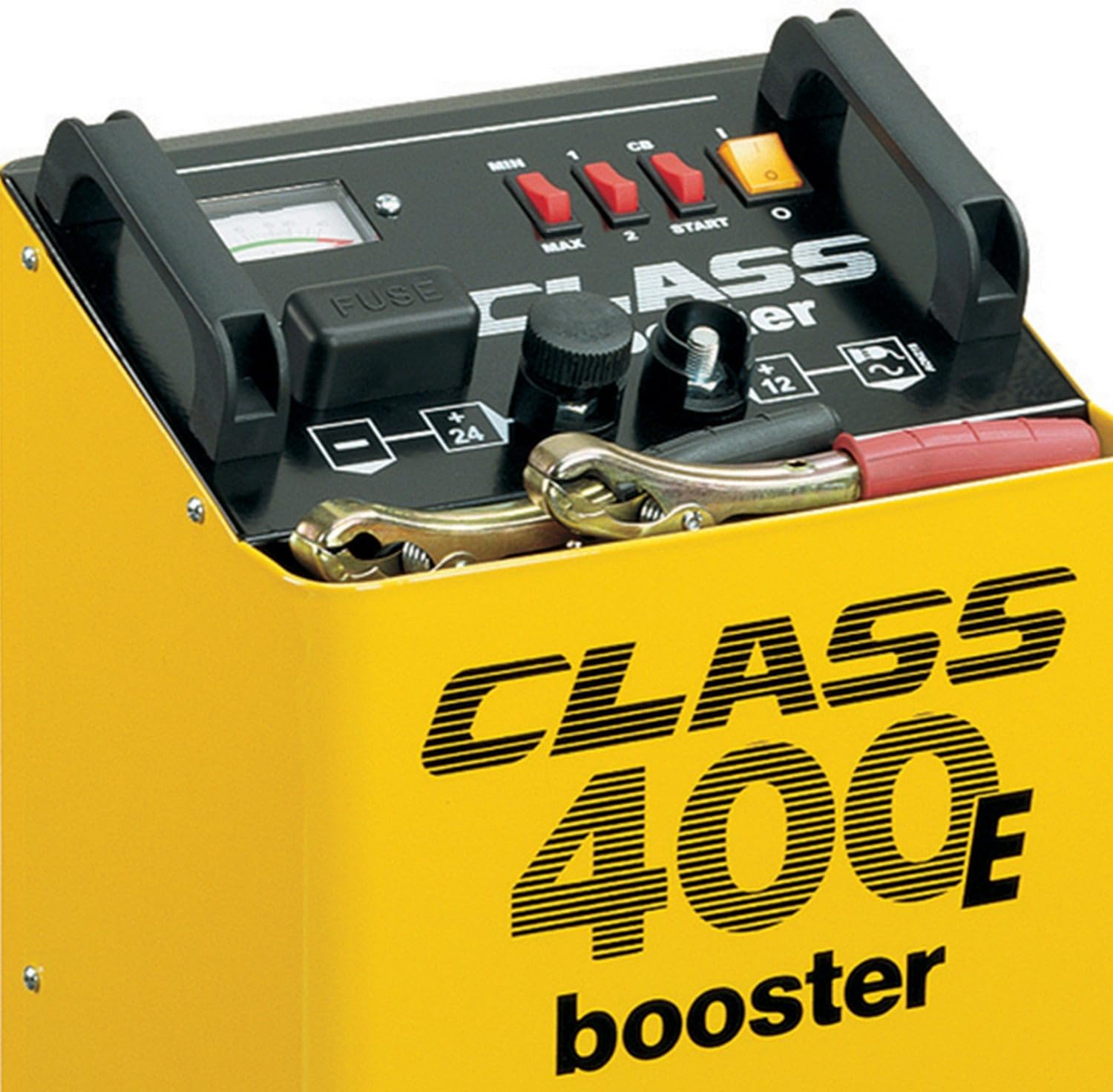
Figure 1: Front view of the DECA Class Booster 400E, showing the control panel, fuse, and battery clamps.
2. Safety Instructions
Read all safety warnings and instructions carefully before using this product. Failure to follow the warnings and instructions may result in electric shock, fire, and/or serious injury.
- Ventilation: Batteries generate explosive gases during charging. Ensure the work area is well-ventilated. Do not charge in a confined space.
- Eye and Face Protection: Always wear appropriate eye and face protection (safety glasses, face shield) when working near batteries. Battery acid is corrosive.
- Electrical Safety: Do not expose the charger to rain or wet conditions. Never operate the charger with damaged cables or clamps. Ensure the power cord is properly grounded.
- Flammable Materials: Keep sparks, flames, and smoking materials away from the battery and charger.
- Disconnect Power: Always disconnect the charger from the mains power supply before making or breaking connections to the battery.
- Children and Unauthorized Persons: This appliance is not intended for use by persons (including children) with reduced physical, sensory or mental capabilities, or lack of experience and knowledge, unless they have been given supervision or instruction concerning use of the appliance by a person responsible for their safety.
- Thermal Protection: The unit is equipped with thermostatic protection. If the unit overheats, it will automatically shut down. Allow it to cool before resuming operation.
3. Setup
- Unpacking: Carefully remove the DECA Class Booster 400E from its packaging. Inspect the unit for any signs of damage.
- Placement: Place the charger on a stable, level surface in a well-ventilated area. Ensure there is sufficient space around the unit for air circulation.
- Battery Preparation: Ensure the battery terminals are clean and free of corrosion. If the battery has removable caps, check the electrolyte level and top up with distilled water if necessary, ensuring caps are securely replaced before charging.
- Connecting to Battery:
- Connect the RED (+) clamp to the positive (+) terminal of the battery.
- Connect the BLACK (-) clamp to the negative (-) terminal of the battery. If the battery is in a vehicle, connect the black clamp to the vehicle chassis away from the battery and fuel line.
- Ensure connections are firm and secure.
- Connecting to Mains Power: Plug the charger's power cord into a suitable grounded electrical outlet.

Figure 2: DECA Class Booster 400E showing approximate dimensions for placement.
4. Operating Instructions
4.1. Battery Charging
- Select Battery Voltage: Use the voltage selector switch (typically labeled 12V/24V) to match the voltage of the battery being charged.
- Select Charging Mode: The unit may have MIN/MAX or 1/2 settings for charging current. Select MIN for slower, gentler charging or MAX for faster charging. Refer to the battery manufacturer's recommendations for optimal charging rates.
- Start Charging: Turn on the power switch (often labeled 'ON/OFF' or 'START'). The ammeter on the front panel will indicate the charging current. The current will gradually decrease as the battery charges.
- Monitor Charging: Periodically check the ammeter. When the current drops to a very low level (near zero), the battery is fully charged.
- End Charging: Turn off the power switch. Disconnect the charger from the mains power supply. Then, disconnect the BLACK (-) clamp, followed by the RED (+) clamp from the battery.
4.2. Engine Boosting (Starting Assistance)
The boosting function provides a high current for a short period to assist in starting an engine with a discharged battery. Do not use the booster function for prolonged periods.
- Connect to Battery: Follow the connection steps as described in Section 3.4.
- Select Battery Voltage: Ensure the voltage selector switch matches the vehicle's battery voltage (12V or 24V).
- Select Booster Mode: Set the switch to the 'START' or 'BOOST' position.
- Attempt Start: Turn the ignition key to start the engine. Do not crank the engine for more than 5-10 seconds. If the engine does not start, wait for at least 60 seconds before attempting again to allow the charger to cool.
- Disconnect: Once the engine starts, immediately turn off the charger's power switch. Disconnect the BLACK (-) clamp, then the RED (+) clamp.
5. Maintenance
- Cleaning: Keep the charger clean and dry. Wipe the exterior with a soft, damp cloth. Do not use solvents or abrasive cleaners.
- Cable and Clamp Inspection: Regularly inspect the charging cables and clamps for any signs of damage, fraying, or corrosion. Replace damaged components immediately.
- Fuse Replacement: The unit is equipped with a fuse for protection. If the charger stops working, check the fuse (visible on the front panel, labeled 'FUSE'). Replace it only with a fuse of the same type and rating as specified by the manufacturer. Always disconnect from mains power before replacing the fuse.
- Storage: Store the charger in a cool, dry place, away from direct sunlight and moisture, when not in use. Ensure cables are neatly coiled.
6. Troubleshooting
- Charger Not Turning On:
- Check if the power cord is securely plugged into a live outlet.
- Verify the mains power supply is active.
- Inspect the fuse. Replace if blown (refer to Section 5).
- Battery Not Charging / Low Ammeter Reading:
- Ensure battery clamps are securely connected to the battery terminals.
- Confirm the correct battery voltage (12V or 24V) is selected on the charger.
- Check if the battery is severely discharged or faulty. Some deeply discharged batteries may not accept a charge immediately.
- The battery may be fully charged if the current is very low.
- Booster Function Not Working:
- Ensure all connections are secure and the correct voltage is selected.
- The vehicle's battery might be completely dead, or there might be a larger issue with the vehicle's starting system.
- Allow the unit to cool if it has recently activated thermal protection.
- Charger Shuts Down During Operation:
- This indicates the thermal protection has activated due to overheating. Allow the unit to cool down in a well-ventilated area before resuming use. Reduce the load or charging rate if possible.
- Check for proper ventilation around the unit.
7. Specifications
- Model: CB400E
- Part Number: 0400207
- Input Voltage: Standard AC Mains (e.g., 230V AC)
- Output Voltage: 12V / 24V DC
- Average Charging Current: 26 A
- Rated Charging Current: 30 A
- Booster Power: Up to 7.5 kW (for starting assistance)
- Protection: Thermostatic, Short Circuit, Polarity Inversion
- Weight: 19.6 Kilograms
- Dimensions (H x W x D): Approximately 64.01 cm x 30 cm x 40.01 cm
- Certifications: CE
- Country of Origin: San Marino
8. Warranty and Support
For warranty information, technical support, or service inquiries, please refer to the documentation provided with your purchase or contact your retailer or the DECA customer service directly. Please have your model number (CB400E) and part number (0400207) available when contacting support.

