
Haier 0010403767
Haier Air Conditioner Remote Control 0010403767 User Manual
Model: 0010403767 | Brand: Haier
Introduction
This manual provides detailed instructions for the proper setup, operation, maintenance, and troubleshooting of your Haier Air Conditioner Remote Control, model 0010403767. Please read this manual thoroughly before using the remote control to ensure optimal performance and longevity.
Setup
Battery Installation
The remote control requires two AAA batteries (not included). Follow these steps to install the batteries:
- Locate the battery compartment on the back of the remote control.
- Slide the battery compartment cover downwards to open it.
- Insert two AAA batteries, ensuring the positive (+) and negative (-) terminals align correctly with the markings inside the compartment.
- Slide the battery compartment cover back into place until it clicks securely.
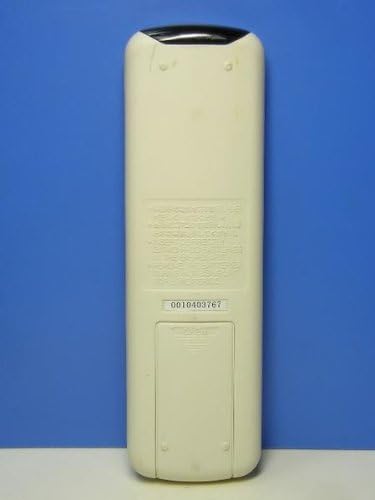
Figure 1: Back view of the remote control, highlighting the battery compartment.
Note: If the remote control is not used for an extended period, remove the batteries to prevent leakage and damage.
Operation
Familiarize yourself with the buttons on your remote control. Point the remote control directly at the air conditioner's receiver when operating.

Figure 2: Front view of the remote control, showing all operational buttons.
Button Functions
- 運転入/切 (Operation On/Off) Button: Press to turn the air conditioner on or off.
- 温度設定 (Temperature Setting) Buttons (▲/▼): Press ▲ to increase the temperature and ▼ to decrease it.
- モード (Mode) Button: Cycles through operating modes such as Cool, Heat, Fan, Dry, and Auto.
- 風量 (Fan Speed) Button: Adjusts the fan speed (e.g., Low, Medium, High, Auto).
- 自動 (Auto) Button: Activates the automatic operating mode, where the unit adjusts settings based on room temperature.
- ドライ (Dry) Button: Activates the dehumidification mode.
- 送風 (Fan) Button: Activates fan-only mode without cooling or heating.
- おやすみ (Sleep) Button: Activates sleep mode for comfortable night operation.
- 時間 (Timer) Button: Used to set the on/off timer for the air conditioner.
- マイナスイオン (Minus Ion) Button: Activates the negative ion generator function (if available on your AC unit).
Maintenance
Battery Replacement
Replace the batteries when the remote control's display becomes dim or the air conditioner no longer responds to commands. Follow the battery installation steps outlined in the "Setup" section.
Cleaning the Remote Control
To clean the remote control, wipe it gently with a soft, dry cloth. Do not use liquid cleaners, waxes, or solvents, as these may damage the surface or internal components.
Troubleshooting
If you experience issues with your remote control, refer to the following common problems and solutions:
- Remote control is not responding:
- Check if the batteries are inserted correctly with the correct polarity.
- Replace old batteries with new ones.
- Ensure there are no obstacles between the remote control and the air conditioner's receiver.
- Make sure you are within the effective operating range of the air conditioner.
- Air conditioner is not responding to commands:
- Verify that the air conditioner is powered on and plugged in.
- Confirm that the remote control is compatible with your specific air conditioner model.
- Try resetting the air conditioner by turning off its power for a few minutes and then turning it back on.
If the problem persists after trying these solutions, please contact Haier customer support.
Specifications
| Attribute | Detail |
|---|---|
| Manufacturer | Haier |
| Model Number | 0010403767 |
| Package Dimensions | 17.2 x 6.3 x 2.5 cm |
| Color | White |
| Other Features | Remote Control Functionality |
| Package Weight | 0.07 kg |
| Batteries Required | Yes (AAA x 2, not included) |
| Batteries Included | No |
| Item Weight | 65 grams |
| ASIN | B00AMB1AFQ |
| Customer Rating | 3.6 out of 5 stars (55 ratings) |
| Amazon Best Sellers Rank | #1,572 in Air Conditioner Remote Controls (within Home & Kitchen) |
| Date First Available on Amazon.co.jp | December 11, 2012 |
| Controller Type | Remote Control |
Warranty and Support
For warranty information or technical support regarding your Haier Air Conditioner Remote Control, please refer to the documentation provided with your air conditioner unit or visit the official Haier website. You may also contact Haier customer service directly for assistance.
For general inquiries or to view other Haier products, visit the Haier Brand Store on Amazon.co.jp.