1. Introduction and Overview
This manual provides essential information for the safe and effective operation, maintenance, and troubleshooting of your Makita 4-Mode Impact Driver, model TP131 (14.4V). Please read this manual thoroughly before using the tool and keep it for future reference.
The Makita TP131 is a versatile cordless power tool designed for various fastening and drilling applications. It features a compact and slim body, offering enhanced maneuverability and control. The tool integrates four distinct operating modes, along with an electronic clutch for precise screw tightening.

Figure 1: Front-side view of the Makita TP131 4-Mode Impact Driver.
2. Safety Instructions
Always observe basic safety precautions to reduce the risk of fire, electric shock, and personal injury when using power tools.
- Work Area Safety: Keep your work area clean and well-lit. Cluttered or dark areas invite accidents. Do not operate power tools in explosive atmospheres, such as in the presence of flammable liquids, gases, or dust.
- Electrical Safety: Avoid body contact with earthed or grounded surfaces (e.g., pipes, radiators, ranges, refrigerators). Do not expose power tools to rain or wet conditions.
- Personal Safety: Always wear eye protection. Use hearing protection when operating the tool for extended periods. Dress properly; avoid loose clothing or jewelry. Secure long hair.
- Tool Use and Care: Do not force the power tool. Use the correct power tool for your application. Disconnect the battery pack from the power tool before making any adjustments, changing accessories, or storing power tools.
- Battery Tool Use and Care: Recharge only with the charger specified by the manufacturer. Use power tools only with specifically designated battery packs.
3. Components and Features
The Makita TP131 is equipped with advanced features for diverse applications:
- 4 Operating Modes:
- Impact Mode: For driving screws and fasteners with high torque (Rotation + Impact).
- Vibration Drill Mode: For drilling into masonry and concrete (Rotation + Vibration). Maximum vibration drill capacity: Φ8mm.
- Drill Mode: For standard drilling into wood, metal, and plastic (Rotation only). Features 2 speeds.
- Screw Tightening Mode (Electronic Clutch): For precise fastening with controlled torque, preventing overtightening.
- Clutch Settings: 1 to 9 steps for the electronic clutch, plus high/low speed 18-step torque setting for driver drill applications.
- Compact Design: Ensures ease of use in confined spaces and reduces user fatigue.

Figure 2: Rear view of the tool, highlighting the battery interface and model information.
4. Setup
Before initial use, ensure the tool is properly set up.
4.1 Battery Installation (Battery and charger sold separately)
- Ensure the tool is switched off.
- Align the battery pack with the battery housing on the tool.
- Slide the battery pack into the housing until it clicks securely into place.
- To remove, press the release button on the battery pack and slide it out.
4.2 Bit Installation
- Pull the sleeve of the chuck forward.
- Insert the bit into the chuck as far as it will go.
- Release the sleeve. Ensure the bit is firmly secured.
5. Operating Instructions
Understand the different modes and settings for optimal performance.
5.1 Mode Selection
The tool features a mode selector switch, typically located near the top of the tool, allowing you to choose between Impact, Vibration Drill, Drill, and Screw Tightening modes. Select the appropriate mode for your task.
5.2 Torque Adjustment (Screw Tightening Mode)
In Screw Tightening Mode, the electronic clutch allows for precise torque control. Adjust the clutch ring to select a torque setting from 1 to 9. A lower number indicates lower torque, suitable for smaller screws or softer materials. A higher number provides more torque for larger screws or harder materials.
5.3 Speed Selection (Drill Mode)
For Drill Mode, the tool offers two speed settings. Use the speed selector switch (usually a slider on top of the tool) to choose between high speed for faster drilling in softer materials and low speed for higher torque applications or drilling in harder materials.
5.4 Operation
- Select the desired mode and adjust settings (torque/speed) as needed.
- Position the bit on the workpiece.
- Press the trigger switch to start the tool. The speed is variable depending on the pressure applied to the trigger.
- Release the trigger to stop the tool.

Figure 3: The Makita TP131 in use, demonstrating a typical application.
6. Maintenance
Regular maintenance ensures the longevity and optimal performance of your tool.
- Cleaning: Regularly clean the tool's ventilation openings to prevent overheating. Use a soft, damp cloth to wipe down the exterior. Do not use harsh chemicals or abrasive cleaners.
- Bit Maintenance: Ensure bits are clean and sharp. Dull or damaged bits can reduce efficiency and put strain on the tool.
- Storage: Store the tool and battery in a cool, dry place, away from direct sunlight and moisture. Ensure the battery is not fully discharged before storage.
- Inspection: Periodically inspect the tool for any signs of damage, loose screws, or worn parts. If any issues are found, contact a qualified service center.
7. Troubleshooting
This section addresses common issues you might encounter.
| Problem | Possible Cause | Solution |
|---|---|---|
| Tool does not start | Battery not charged or improperly installed. | Ensure battery is fully charged and correctly inserted. |
| Reduced power or performance | Battery low, dull bit, or incorrect mode/setting. | Recharge battery, replace bit, or adjust mode/torque settings. |
| Excessive vibration or noise | Loose components or damaged bit. | Check for loose parts, tighten if necessary. Replace damaged bits. If problem persists, seek professional service. |
8. Specifications
Detailed technical specifications for the Makita TP131 (14.4V) Impact Driver.
| Feature | Specification |
|---|---|
| Brand | Makita |
| Model Number | TP131DZ Blue |
| Product Dimensions (L x W x H) | 17.1 x 7.9 x 25 cm |
| Item Weight | 1.37 kg |
| Color | Blue |
| Power Source | Rechargeable (Cordless) |
| Voltage | 14.4 Volts |
| Maximum Tightening Torque | 145 Newton Meters |
| Vibration Drill Capacity | Φ8mm |
| Drill Speeds | 2 Speeds |
| Driver Drill Clutch | 9-step Clutch |
| Battery Included | No (Sold Separately) |
| Accessories Included | None (Body Only) |
| UPC | 088381623520 |
| First Available Date | December 1, 2012 |
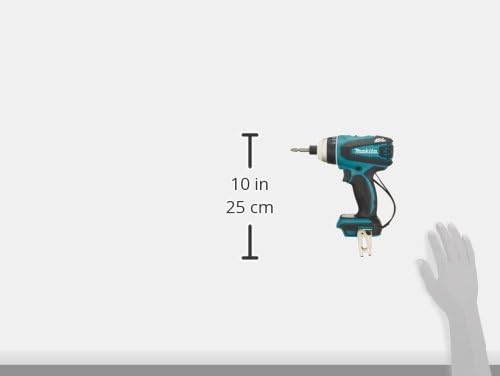
Figure 4: Dimensional diagram of the Makita TP131.
9. Warranty and Support
Makita products are manufactured under strict quality control standards. For warranty information, please refer to the warranty card included with your purchase or visit the official Makita website for details specific to your region.
For technical support, service, or genuine replacement parts, please contact your local authorized Makita service center. Using non-genuine parts may void your warranty and compromise tool safety and performance.
You can find more information and locate service centers through the official Makita website: www.makita.com


