
Rollei P3800
Instruction Manual
Rollei ROLLEIVISION P3800 Slide Projector Lamp (24V 250W)
1. Introduction
This manual provides essential information for the safe and effective use of your Rollei ROLLEIVISION P3800 Slide Projector Lamp. This 24V, 250W lamp is designed specifically for the Rollei ROLLEIVISION P3800 slide projector, ensuring optimal performance and brightness for your projections. Please read these instructions carefully before installation and operation.
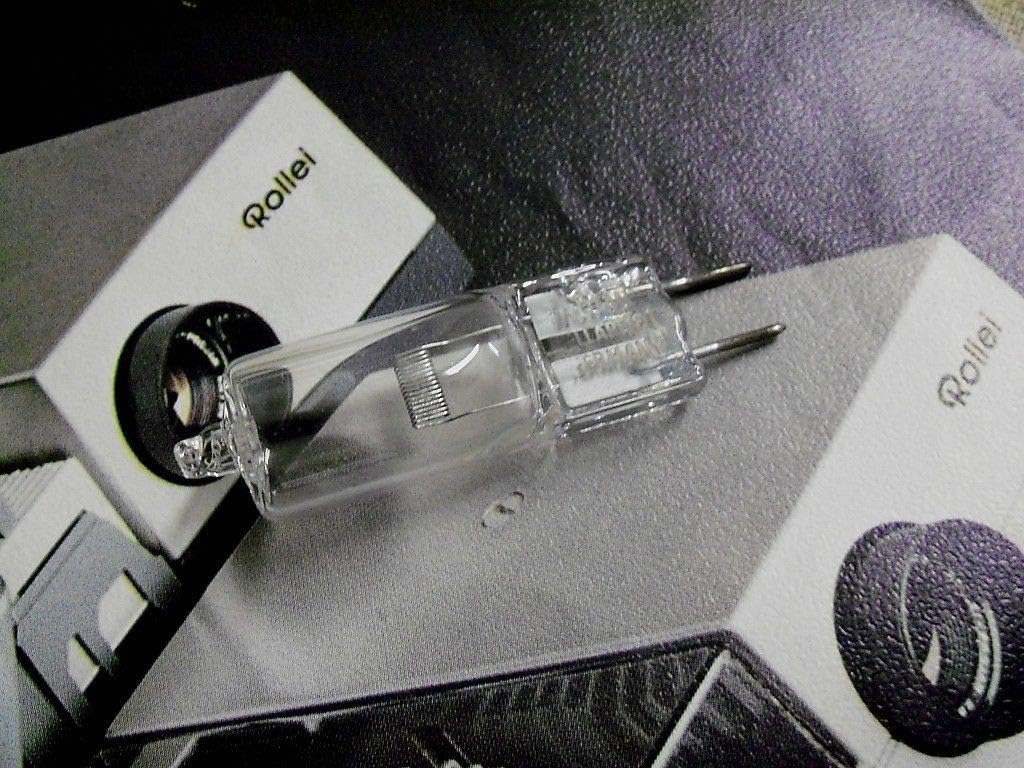
Figure 1: The Rollei ROLLEIVISION P3800 slide projector lamp, shown resting on its product packaging. This image provides a general view of the lamp and its typical presentation.
2. Setup and Installation
Proper installation is crucial for the lamp's longevity and safe operation. Always ensure the projector is unplugged and cooled down before attempting to replace the lamp.
- Safety First: Disconnect the projector from the main power supply and allow it to cool completely for at least 30 minutes. Lamps can become extremely hot during operation.
- Locate Lamp Compartment: Refer to your Rollei ROLLEIVISION P3800 projector's user manual to locate and open the lamp access compartment. This is typically secured by screws or a latch.
- Remove Old Lamp: Carefully grasp the old lamp by its base (avoid touching the glass) and gently pull it straight out from its socket. If the lamp is broken, use gloves and exercise extreme caution.
- Handle New Lamp: When handling the new lamp, do not touch the glass bulb with bare hands. Oils from your skin can create hot spots on the lamp, leading to premature failure. Use a clean cloth, gloves, or hold the lamp by its ceramic base.
- Insert New Lamp: Align the pins of the new lamp with the corresponding holes in the projector's lamp socket. Gently push the lamp straight into the socket until it is firmly seated. The lamp features a G6.35 base with two pins, as shown in Figure 2.

Figure 2: A close-up view of the lamp's base, clearly showing the two metal pins (G6.35 base) used for electrical connection and secure fitting into the projector's socket. This detail is crucial for correct installation.
- Close Compartment: Securely close the lamp access compartment, ensuring all screws or latches are fastened.
- Power On: Reconnect the projector to the power supply and turn it on to test the new lamp.
3. Operating Guidelines
Once installed, the lamp operates in conjunction with your Rollei ROLLEIVISION P3800 projector. Follow these general guidelines for optimal performance and lamp life:
- Cool Down: Always allow the projector to complete its cool-down cycle after use before unplugging it or moving it. This helps to extend the life of the lamp.
- Avoid Frequent On/Off Cycles: Turning the lamp on and off frequently can reduce its lifespan. If you need to pause a projection for a short period, it is often better to leave the projector on.
- Ventilation: Ensure the projector's ventilation openings are not blocked during operation to prevent overheating, which can damage the lamp and other components.
4. Maintenance
Minimal maintenance is required for the lamp itself, but proper care of the projector can indirectly extend lamp life.
- Cleaning: If the lamp's glass surface becomes dirty (e.g., fingerprints), gently clean it with a soft, lint-free cloth and a small amount of isopropyl alcohol. Ensure the lamp is cool and disconnected from power.
- Dust Removal: Regularly clean the projector's air filters and ventilation grilles to ensure proper airflow and prevent dust buildup, which can lead to overheating and reduced lamp life.
- Storage: Store spare lamps in their original packaging in a cool, dry place away from direct sunlight and extreme temperatures.
5. Troubleshooting
If you encounter issues with your projector lamp, consider the following common problems and solutions:
| Problem | Possible Cause | Solution |
|---|---|---|
| Lamp does not light up. | Lamp not properly seated; faulty lamp; projector issue. | Ensure lamp is fully inserted. Test with a known good lamp if available. Check projector's power connection and internal fuses (refer to projector manual). |
| Lamp is dim or flickers. | Lamp nearing end of life; dirty optics; insufficient power. | Replace the lamp. Clean projector lenses and mirrors (refer to projector manual). Ensure stable power supply. |
| Lamp explodes or breaks. | Overheating; physical damage; faulty lamp. | Ensure proper projector ventilation. Handle lamp carefully during installation. If repeated, consult projector service. |
For more complex issues, refer to your Rollei ROLLEIVISION P3800 projector's comprehensive user manual or contact Rollei customer support.
6. Specifications
Key technical specifications for the Rollei ROLLEIVISION P3800 Slide Projector Lamp:
- Brand: Rollei
- Model Compatibility: Rollei ROLLEIVISION P3800
- Voltage: 24 Volts
- Wattage: 250 Watts
- Lamp Base: G6.35 (2-pin)
- Equivalent Incandescent Power: 150 Watt
- Brightness: >1000 lumens
- Special Features: Energy efficient
- ASIN: B00AFP7C7O
7. Warranty and Support
For information regarding the warranty period and terms for this projector lamp, please refer to the documentation provided at the time of purchase or contact the seller directly. Warranty coverage typically addresses manufacturing defects.
For technical support related to the Rollei ROLLEIVISION P3800 projector or general inquiries about Rollei products, please visit the official Rollei website or contact their customer service department. Contact details can usually be found on the manufacturer's website or within your projector's original manual.
Related Documents - P3800
 |
Rollei Smart Beamer 4K SB-502 User Manual User manual for the Rollei Smart Beamer 4K SB-502, detailing setup, operation, technical specifications, and safety instructions for this compact, portable projector. |
 |
Rollei DF-S 1600 SE Slide Film Scanner User Manual This user manual provides comprehensive instructions for the Rollei DF-S 1600 SE Slide Film Scanner, guiding users through setup, operation, features, and troubleshooting for digitizing slides and negatives. |
 |
Rollei AC530 Action Camera User Manual and Technical Specifications Comprehensive user manual and technical specifications for the Rollei AC530 Action Camera, covering features, operation, setup, warnings, and conformity information. Optimized for accessibility and SEO. |
 |
Rollei Pissarro DPF-880 Digital Photo Frame User Manual Comprehensive user manual for the Rollei Pissarro DPF-880 digital photo frame, covering setup, operation, technical specifications, safety guidelines, and disposal information. |
 |
Rollei Actioncam 40s Pro User Guide: Setup, Operation, and Features Explore the features and functionalities of the Rollei Actioncam 40s Pro with this official user guide. This comprehensive manual covers everything from initial setup and operation to advanced settings, waterproof use, and WiFi connectivity, ensuring you can capture high-quality footage in any adventure. Learn about technical specifications, safety guidelines, and maintenance from Rollei. |
 |
Rollei 35AF Schnellstartanleitung | Kompaktkamera Bedienung Schnellstartanleitung für die Rollei 35AF Kleinbildkamera. Lernen Sie, wie Sie Film laden, Fotos aufnehmen und Ihre Kamera schnell und einfach bedienen. |