
1. Introduction
This manual provides essential information for the LG Electronics 6615JB2005N Freezer Controller Assembly. It covers product overview, installation guidelines, operational function, maintenance tips, troubleshooting, and technical specifications. This component is designed to regulate the temperature and defrost cycles within compatible LG and Kenmore freezer models, ensuring optimal performance and food preservation.
2. Safety Information
WARNING: Before attempting any installation or repair, ensure the appliance is completely disconnected from its power source to prevent electric shock or injury.
- Always wear appropriate personal protective equipment (PPE), such as gloves and safety glasses.
- If you are not comfortable performing the installation, consult a qualified appliance technician.
- Handle all components with care to avoid damage.
- Keep children and pets away from the work area.
3. Product Overview
The LG 6615JB2005N is a genuine LG Electronics replacement part, specifically a Freezer Controller Assembly. This assembly plays a critical role in the freezer's defrost system, often including a bimetal thermostat and a fuse. It monitors the freezer temperature and initiates the defrost cycle to prevent excessive ice buildup on the evaporator coils. A malfunctioning controller assembly can lead to issues such as improper cooling or failure to defrost.
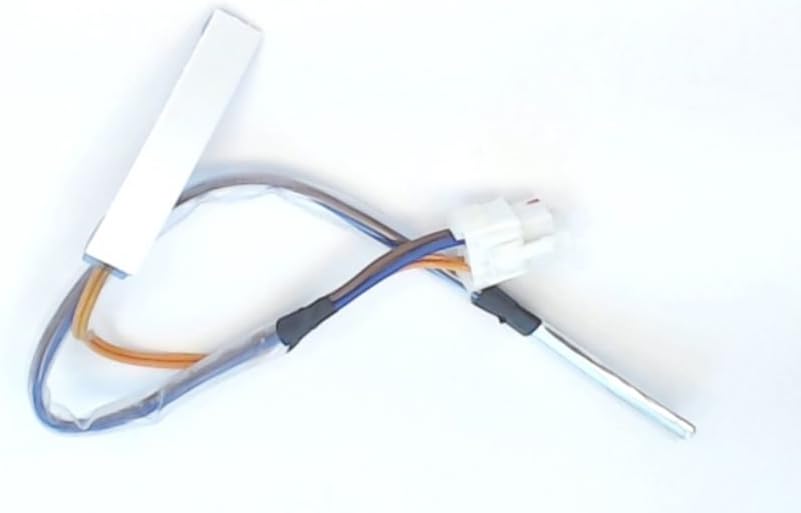
Figure 1: LG 6615JB2005N Freezer Controller Assembly. This image displays the LG 6615JB2005N Freezer Controller Assembly. It features a white rectangular component, connected by multiple colored wires (blue, orange, brown) to a white plastic connector, and a metallic cylindrical sensor tip. The wires are partially encased in clear and black insulation.
4. Installation Guidelines
Installation of the 6615JB2005N Freezer Controller Assembly typically involves replacing the existing faulty component. Due to variations in appliance models, it is crucial to refer to your specific appliance's service manual for detailed, model-specific instructions.
- Disconnect Power: Unplug the freezer from the electrical outlet.
- Access Component: Locate and access the existing freezer controller assembly. This may require removing interior panels or components within the freezer compartment.
- Document Connections: Before disconnecting, carefully note or photograph the wiring connections of the old assembly. Pay attention to wire colors and their corresponding terminals.
- Remove Old Assembly: Disconnect the wires and carefully remove the old controller assembly.
- Install New Assembly: Connect the new 6615JB2005N assembly, ensuring all wires are correctly attached according to your documentation. Secure the assembly in its designated location.
- Reassemble: Reinstall any panels or components that were removed.
- Restore Power: Plug the freezer back into the electrical outlet.
- Test Functionality: Monitor the freezer's operation to ensure proper cooling and defrost cycles.
Note: Some users have reported issues with wire configurations on replacement parts. Always verify wire connections against the original part or your appliance's wiring diagram before finalizing installation. It is also recommended to clean any dust around the compressor/coil/fan during this process.
5. Operation
The LG 6615JB2005N Freezer Controller Assembly operates automatically as part of your freezer's internal system. It does not require direct user interaction. Its primary function is to:
- Monitor Temperature: Continuously senses the temperature within the freezer compartment.
- Initiate Defrost Cycles: Based on temperature readings and programmed intervals, it activates the defrost heater to melt frost buildup on the evaporator coils.
- Terminate Defrost Cycles: Shuts off the defrost heater once the frost is melted or a specific temperature is reached, preventing overheating.
Proper operation of this assembly is crucial for maintaining consistent freezer temperatures and preventing ice accumulation, which can impede cooling efficiency.
6. Maintenance
The 6615JB2005N Freezer Controller Assembly itself is a sealed unit and does not require routine maintenance. However, general freezer maintenance can help prolong the life of all components, including the controller:
- Keep Coils Clean: Regularly clean the condenser coils located at the back or bottom of your freezer. Dust and debris can hinder heat dissipation, making the freezer work harder.
- Check Door Seals: Ensure door seals are intact and sealing properly to prevent warm air from entering the freezer, which can lead to excessive frost buildup.
- Monitor Frost: If you notice unusual or rapid frost accumulation, it may indicate an issue with the defrost system, potentially including the controller assembly.
7. Troubleshooting
If your freezer is experiencing issues related to temperature control or defrosting, the 6615JB2005N Freezer Controller Assembly might be a contributing factor. Here are common symptoms and potential solutions:
| Symptom | Possible Cause | Action |
|---|---|---|
| Freezer not defrosting (excessive ice buildup) | Faulty defrost thermostat/fuse within the assembly, or the entire controller assembly. | Inspect the defrost heater and the controller assembly. A multimeter can be used to check the resistance of the defrost heater (should be low, e.g., 10-30 ohms). If the assembly is faulty, replacement is necessary. |
| Freezer too warm or not cooling | Controller assembly not initiating cooling cycles correctly, or a related component failure. | Verify power supply. Check for error codes on the appliance display (e.g., "ER-dH" code often indicates a defrost heater or sensor issue). If other components are functional, consider replacing the controller assembly. |
| Appliance displaying error codes (e.g., ER-dH) | Specific error codes often point to defrost system issues, which involve the controller assembly. | Consult your appliance's service manual for the meaning of specific error codes. "ER-dH" typically indicates a problem with the defrost heater or its associated sensor/thermostat. |
If troubleshooting steps do not resolve the issue, professional assistance from a certified technician is recommended.
8. Specifications
- Part Number: 6615JB2005N
- Manufacturer: Geneva - LG parts - APA
- Item Weight: 0.32 ounces
- Product Dimensions: 12 x 1.5 x 1 inches
- Power Source: Corded Electric (operates within appliance's electrical system)
- Special Features: Ergonomic (referring to design for ease of installation/fit)
- Batteries Required: No
9. Compatible Models
The LG 6615JB2005N Freezer Controller Assembly is compatible with various LG Electronics and Kenmore models. Always verify compatibility with your specific appliance model before purchasing and installing. Refer to your appliance's manual or the part compatibility list.
Known compatible models include:
- 71092
- 71093
- 71099
- 72032
- 72033
- 72034
- 72036
- 72039
- LFC25765ST
- LFC25765SW
- LFX25973SB
- LFX25973ST
- LFX25973SW
- LFX25974SB
- LFX25974ST
- LFX25974SW
- LFX28968SB
- LFX28968ST
- LFX28979SB
- LFX28979ST
- LFX28979SW
- LFX28991ST
- LFX28995ST
- LMX25986SB
- LMX25986SW
- LSMX211ST
10. Warranty and Support
For specific warranty information regarding the LG 6615JB2005N Freezer Controller Assembly, please refer to the documentation provided with your purchase or contact the retailer. For technical support or further assistance, it is recommended to contact LG Electronics customer service or a certified appliance repair professional.
You can often find additional support resources, including service manuals and FAQs, on the official LG Electronics website: www.lg.com