
1. Introduction
This manual provides detailed instructions for the safe installation, operation, and maintenance of your MINKA-AIRE Aluma F521-ABD Ceiling Fan with Light Kit. Please read all instructions carefully before beginning installation and retain this manual for future reference.
2. Safety Information
WARNING: To reduce the risk of fire, electric shock, or personal injury, always follow these instructions.
- Always disconnect power at the main circuit breaker before installation or servicing.
- All electrical connections must be in accordance with local codes, ordinances, or national electrical codes. If you are unfamiliar with electrical wiring, consult a qualified electrician.
- The fan must be mounted with a minimum of 7 feet (2.1 meters) clearance from the trailing edge of the blades to the floor.
- Ensure the outlet box is securely attached to the building structure and is marked "Acceptable for Fan Support of 35 lbs (15.9 kg) or less."
- Do not operate the fan with damaged blades or housing.
- This product contains chemicals known to the State of California to cause cancer and birth defects or other reproductive harm. Wash hands after handling.
3. Package Contents
Verify that all components listed below are included in your package:
- Ceiling Fan Motor Assembly
- Fan Blades (4)
- Light Kit Assembly
- Halogen Bulb (1)
- Downrod and Canopy
- Mounting Bracket
- Wall Control Unit
- Hardware Pack (screws, washers, wire nuts)
- Instruction Manual
4. Specifications
| Feature | Specification |
|---|---|
| Brand | MINKA-AIRE |
| Model Number | F521-ABD |
| Color | Brushed Aluminum |
| Product Dimensions | 52"D x 52"W x 15.75"H |
| Item Weight | 16.53 Pounds |
| Power Source | Corded Electric |
| Voltage | 120 Volts |
| Wattage | 100 Watts (Max Compatible) |
| Number of Blades | 4 |
| Blade Length | 52 Inches |
| Air Flow Capacity | 5471.2 Cubic Feet Per Minute |
| Control Method | Wall Control / Remote |
| Bulb Type | Halogen |
| Shade Material | Glass (Etched Opal) |
| Certification | UL Listed |
Energy Guide Information:

Image: Energy Guide label indicating an estimated yearly energy cost of $10 and airflow of 2,910 Cubic Feet Per Minute.
5. Setup and Installation
Before installation, ensure the power is OFF at the circuit breaker. Follow these general steps. Refer to the detailed diagrams in your included printed manual for specific wiring and mounting instructions.
5.1 Mounting the Fan
- Secure the mounting bracket to the ceiling outlet box. Ensure the outlet box is rated for fan support.
- Attach the downrod to the fan motor assembly.
- Carefully lift the fan assembly and hang it from the mounting bracket.
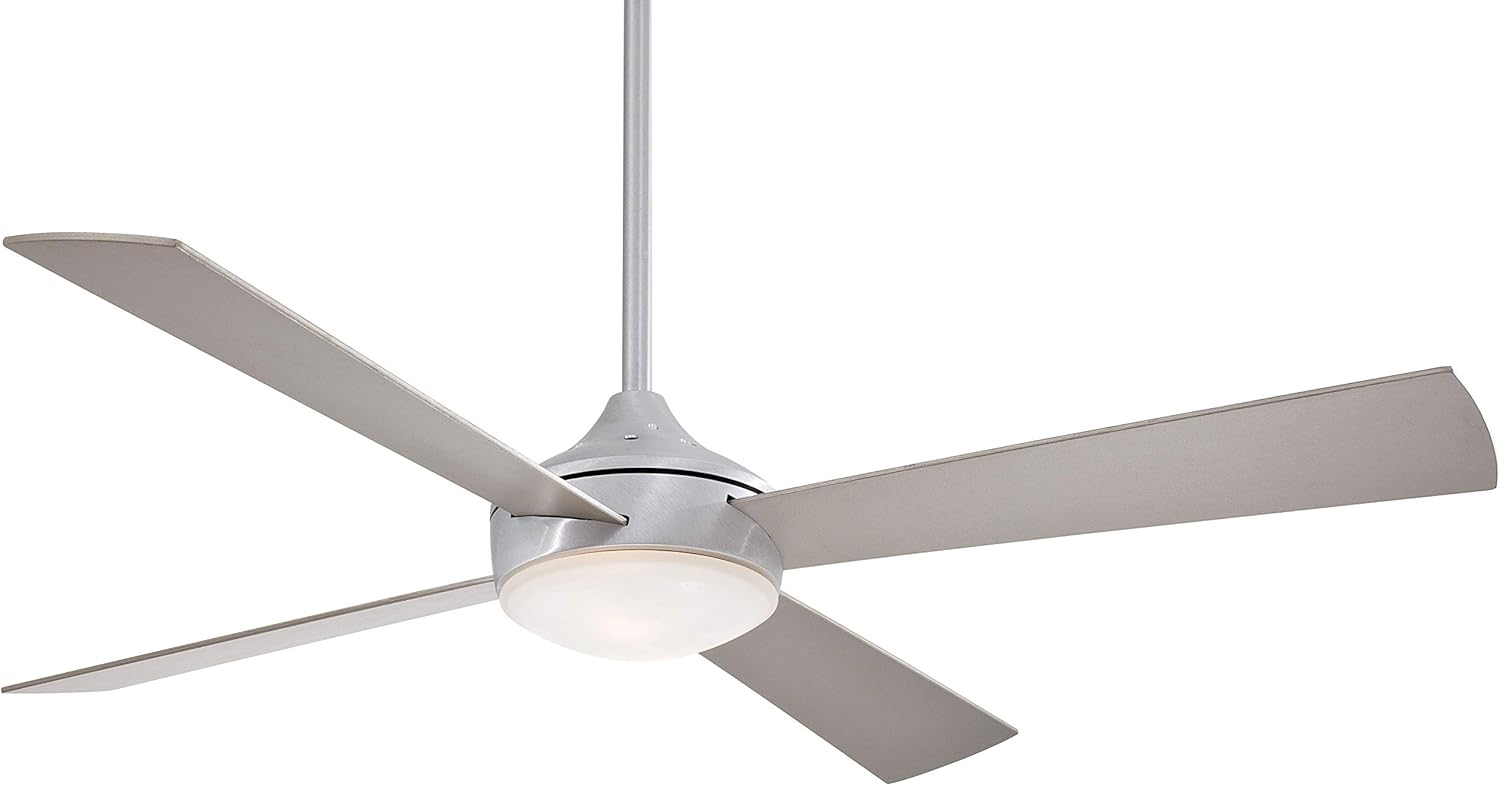
Image: The MINKA-AIRE Aluma F521-ABD ceiling fan, featuring four brushed aluminum blades and an integrated etched opal light kit, suspended from a downrod.
5.2 Electrical Connections
- Connect the fan's electrical wires to the household wiring according to the wiring diagram in your manual. Use the provided wire nuts.
- Ensure all connections are secure and properly insulated.
5.3 Attaching Fan Blades
- Attach each fan blade to the motor housing using the provided screws. Ensure they are tightened securely.

Image: A close-up view of one of the brushed aluminum fan blades, showing its sleek design and attachment point to the motor housing.
5.4 Installing the Light Kit
- Connect the light kit wires to the fan motor wires.
- Secure the light kit assembly to the bottom of the fan motor housing.
- Install the provided halogen bulb into the light kit socket.
- Attach the etched opal glass shade to the light kit.

Image: A detailed view of the integrated light kit with its etched opal glass shade, located at the center of the fan motor housing.
5.5 Installing the Wall Control
- Replace your existing wall switch with the provided MINKA-AIRE wall control unit. Follow the wiring instructions included with the wall control.
- Ensure all wires are properly connected and secured within the wall box.

Image: A white wall control unit with two vertical sliders. One slider controls the light intensity (indicated by a light bulb icon), and the other controls fan speed (indicated by a fan icon with settings 1-4).
6. Operating Instructions
Your MINKA-AIRE Aluma F521-ABD ceiling fan can be operated using the included wall control or a compatible remote control (if purchased separately).
6.1 Fan Operation (Wall Control)
- The right slider on the wall control adjusts the fan speed. Move the slider up for higher speeds (4) and down for lower speeds (1).
- To turn the fan OFF, move the slider to the lowest position (0).
6.2 Light Operation (Wall Control)
- The left slider on the wall control adjusts the light intensity. Move the slider up to brighten the light and down to dim it.
- To turn the light OFF, move the slider to the lowest position.
7. Maintenance
Regular maintenance ensures optimal performance and extends the life of your ceiling fan.
- Cleaning: Periodically clean the fan with a soft, damp cloth. Do not use abrasive cleaners or solvents, as these can damage the finish.
- Blade Inspection: Check fan blade screws periodically to ensure they are tight. Loose blades can cause wobbling and noise.
- Light Bulb Replacement: Ensure power is off before replacing the halogen bulb. Allow the bulb to cool completely before handling. Replace with a bulb of the same type and wattage (max 100W halogen).
- No Lubrication Required: The fan motor is permanently lubricated and does not require oiling.
8. Troubleshooting
If you experience issues with your fan, consult the following table for common problems and solutions.
| Problem | Possible Cause | Solution |
|---|---|---|
| Fan does not start | No power to the fan Loose wire connections Wall control not functioning | Check circuit breaker and wall switch Verify all wire connections are secure (power off) Ensure wall control is properly installed and functioning |
| Fan wobbles | Loose blade screws Unbalanced blades Loose mounting bracket | Tighten all blade screws Ensure blades are installed correctly and evenly; use a balancing kit if necessary Verify mounting bracket is securely fastened to the ceiling outlet box |
| Light does not work | Bulb is faulty or loose Loose wire connections Light kit switch (if applicable) is off | Replace bulb or tighten it Check light kit wiring connections (power off) Ensure light function on wall control is active |
| Noisy operation | Loose screws Motor housing rubbing Improper installation | Check and tighten all screws on fan blades and housing Ensure no parts are touching other components Re-check installation steps for proper assembly |
9. Warranty and Support
MINKA-AIRE products are manufactured to the highest quality standards. For specific warranty information, please refer to the warranty card included with your product or visit the official MINKA-AIRE website. For technical support or replacement parts, please contact MINKA-AIRE customer service directly.
Manufacturer: Minka Aire Fans
UPC: 706411040023
Part Number: F521-ABD