
Introduction
Thank you for choosing the Timberland Unisex Watch model 13673JSU_02. This manual provides essential information for the proper setup, operation, and maintenance of your watch. Please read it carefully to ensure optimal performance and longevity of your timepiece.
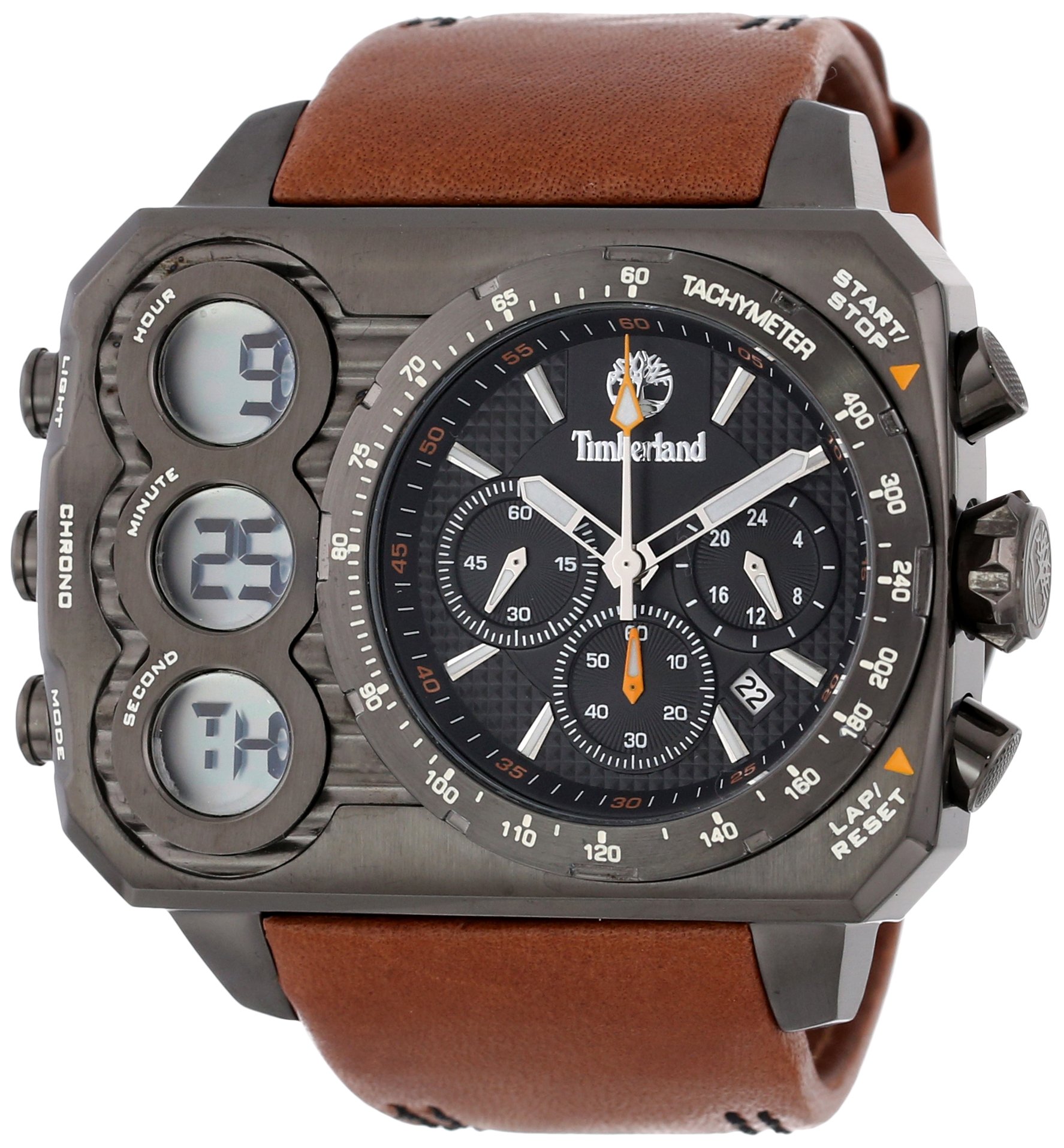
Image: Front view of the Timberland Unisex Watch 13673JSU_02, showcasing its black dial, chronograph sub-dials, digital displays, and brown leather strap.
Setup
1. Setting the Analog Time
- Pull the crown (located on the right side of the watch case) out to position 2.
- Rotate the crown to set the hour and minute hands to the desired time.
- Push the crown back into position 1 to start the watch.
2. Setting the Digital Time and Date
Refer to the specific buttons on the left side of the watch case for digital display adjustments. Typically, these involve:
- Pressing a mode button to cycle through time, date, and chronograph functions.
- Using adjustment buttons to change flashing digits (hours, minutes, day, month, year).
- Confirming settings by pressing the mode button again or waiting for the display to exit setting mode.
3. Battery Information
Your watch is powered by 1 product-specific battery (included). When the watch stops or the digital display fades, it indicates that the battery needs replacement. It is recommended to have the battery replaced by a qualified watch technician to ensure proper sealing and water resistance.
Operating the Watch
1. Analog Display
The analog display shows the current time using hour, minute, and second hands. The second hand provides continuous timekeeping.
2. Digital Displays and Chronograph
The watch features three LCD displays on the left side of the dial. These typically provide:
- Digital Time: An alternative time display, often with 12/24-hour format options.
- Date Display: Shows the current day and month.
- Chronograph (Stopwatch): Used for measuring elapsed time.
To operate the chronograph, use the pushers on the left side of the watch case. Typically:
- One pusher starts and stops the chronograph.
- Another pusher resets the chronograph to zero.

Image: The Timberland Unisex Watch 13673JSU_02 worn on a wrist, illustrating its size and appearance during use.
Maintenance
1. Cleaning
Wipe the watch case and crystal with a soft, dry cloth. For the leather strap, avoid excessive moisture and harsh chemicals. If the watch is water-resistant, a slightly damp cloth can be used for the case, but ensure the crown is pushed in completely.
2. Water Resistance
This watch has a water resistance rating of 30 meters (3 ATM). This means it is suitable for everyday use and can withstand splashes or brief immersion in water. It is not suitable for swimming, showering, or diving. Always ensure the crown is fully pushed in before any contact with water.
3. Battery Replacement
When the battery requires replacement, it is strongly recommended to take your watch to an authorized service center or a professional watchmaker. This ensures the correct battery type is used and the watch's water resistance seal is maintained.
4. Strap Care
The brown leather strap should be kept dry and away from direct sunlight or extreme temperatures to prevent cracking or discoloration. Clean with a soft, dry cloth. Avoid contact with perfumes, cosmetics, and oily substances.
Troubleshooting
- Watch Not Running: Check if the crown is fully pushed in. If it is, the battery may need replacement.
- Incorrect Analog Time: Pull the crown out and reset the time as described in the Setup section.
- Digital Display Issues: If the digital display is blank or showing incorrect information, the battery may be low, or a reset might be needed. Consult a professional.
- Water Inside Watch: If moisture appears inside the watch, immediately take it to a service center. This indicates a breach in the water resistance.
Specifications
| Feature | Detail |
|---|---|
| Model Number | 13673JSU_02 |
| Brand | Timberland |
| Case Diameter | 56 Millimetres |
| Case Thickness | 16 Millimetres |
| Case Material | Stainless Steel |
| Band Material | Synthetic (Leather) |
| Band Colour | Brown |
| Dial Colour | Black |
| Display Type | Analog and Digital |
| Movement Type | Quartz |
| Water Resistance Depth | 30 Metres (3 ATM) |
| Special Features | Second Hand, Chronograph, Date Display |
| Battery | 1 Product Specific battery (included) |
| Item Weight | 400 g (0.4 Kilograms) |

Image: A visual guide illustrating various watch case diameters for size comparison, including the 50-54mm range relevant to this watch's 56mm case.
Warranty
This Timberland watch comes with a Manufacturer's Warranty. For specific terms, conditions, and duration of the warranty, please refer to the warranty card included with your purchase or visit the official Timberland website. Keep your proof of purchase for warranty claims.
Support
Should you require further assistance, service, or have questions not covered in this manual, please contact Timberland customer support. You can find contact information on the official Timberland website or through your authorized retailer.

Image: The Timberland watch presented in its original branded packaging, as it would be received upon purchase.