1. Introduction
This manual provides essential instructions for the proper use and handling of Nihon KOHDEN-TEC 7100 ECG Chart Paper. This product is designed for use with compatible electrocardiograph machines, ensuring accurate and clear recording of cardiac activity. Please read this manual thoroughly before use.
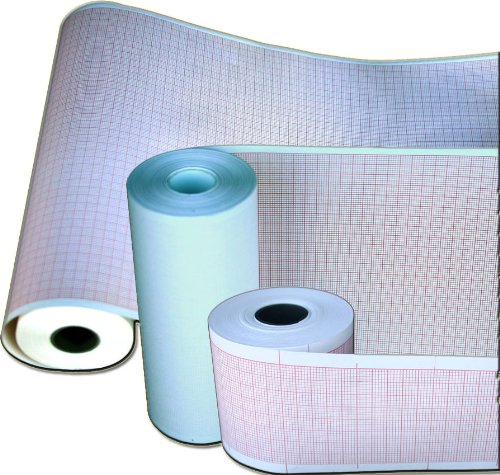
Image 1.1: Illustration of Nihon KOHDEN-TEC 7100 ECG Chart Paper. The image displays multiple rolls of Z-fold chart paper with a red grid pattern, indicating its use for medical recording devices.
2. Setup
Proper setup of the chart paper in your electrocardiograph (ECG) machine is crucial for accurate readings. Follow these general steps:
- Verify Compatibility: Ensure that the Nihon KOHDEN-TEC 7100 chart paper (50mm x 100mm x 300 sheets, Z-fold) is compatible with your specific ECG machine model. Refer to your ECG machine's user manual for paper specifications.
- Power Off ECG Machine: Before loading or unloading paper, always turn off the ECG machine to prevent accidental operation or damage.
- Open Paper Compartment: Locate and open the paper compartment cover on your ECG machine. This mechanism varies by machine model.
- Load Paper:
- Carefully place the Z-fold chart paper into the compartment, ensuring the red grid side is facing the print head.
- Feed the leading edge of the paper into the paper feed slot until it catches.
- Ensure the paper is aligned correctly to prevent jamming and skewed printouts.
- Close Compartment: Securely close the paper compartment cover.
- Power On ECG Machine: Turn on the ECG machine and perform a test print to confirm correct paper loading and functionality.
3. Operating Instructions
Once the chart paper is correctly loaded, the ECG machine is ready for operation. The paper itself does not require specific operational steps beyond proper loading.
- Printing: The ECG machine will automatically feed and print on the chart paper during an electrocardiogram recording.
- Monitoring Paper Supply: Regularly check the paper compartment to ensure sufficient paper supply for upcoming procedures. Replace paper when the low-paper indicator appears or when the supply is visibly low.
- Removing Printed Records: After a recording is complete, carefully tear off the printed chart paper along the perforated line, if present, or use the machine's cutter.
4. Maintenance
Maintaining the chart paper primarily involves proper storage and handling to ensure its quality and functionality.
- Storage: Store unused chart paper in its original packaging in a cool, dry place, away from direct sunlight, excessive heat, humidity, and chemical fumes. These conditions can degrade paper quality and printability.
- Handling: Handle paper rolls by the edges to avoid transferring oils or dirt from hands onto the printing surface. Avoid bending or creasing the paper.
- Expiration: While chart paper typically does not have a strict expiration date, prolonged storage under unfavorable conditions can affect its thermal sensitivity and print quality.
5. Troubleshooting
Most issues related to chart paper are due to incorrect loading or environmental factors. Refer to your ECG machine's manual for machine-specific troubleshooting.
| Problem | Possible Cause | Solution |
|---|---|---|
| Paper Jam | Incorrect loading, misaligned paper, damaged paper. | Power off the machine, carefully remove jammed paper, reload correctly. Ensure paper is not creased or damaged. |
| Faint or Incomplete Print | Paper loaded upside down, low print head temperature, dirty print head, aged paper. | Ensure red grid side faces print head. Consult ECG machine manual for print head cleaning or temperature adjustment. Replace old paper. |
| Paper Not Feeding | Paper not properly inserted into feed mechanism, empty paper compartment. | Verify paper is correctly seated and engaged with the feed rollers. Replace with a new roll if empty. |
6. Specifications
- Product Name: Nihon KOHDEN-TEC 7100 ECG Chart Paper
- Model Number: TEC 7100 (also known as PA7100, CARDIOLIFE 7621)
- Dimensions: 50mm (width) x 100mm (length per sheet) x 300 sheets
- Fold Type: Z-Fold
- Grid Color: Red
- Manufacturer: Modul Diagram (as per Amazon listing)
- Brand: Quality Chart Paper
- ASIN: B009ZZHSBU
7. Warranty and Support
Information regarding specific warranty terms for this chart paper is not provided in the product details. For support related to product defects or compatibility, please contact the seller, Quality Chart Paper, or the manufacturer, Modul Diagram, directly. Refer to your purchase documentation for contact details.


