OTC RM1020CPCL Diesel Emission Smoke Check Tester User Manual
Comprehensive Guide for Operation and Maintenance
Product Overview
The OTC RM1020CPCL is a highly portable and efficient diesel emission tester designed for accurate smoke emission checks. This device is crucial for fleets to determine immediate compliance with state and interstate emission programs, helping to avoid costly fines and downtime. Its all-in-one design eliminates the need for an external PC, allowing a single operator to perform comprehensive tests.
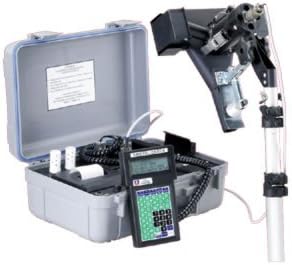
Figure 1: The OTC RM1020CPCL Diesel Emission Smoke Check Tester, showing the main unit, handheld display, and the partial flow meter.
The system includes a partial flow meter that clips inside any smokestack, enabling testing in various weather conditions. It features a digital LCD screen that guides the user through each step of the testing process, culminating in a printout of results for verification. This model is widely recognized and utilized for enforcement in several states, including California, New York, and Illinois.
Key Features
- Allows fleets to immediately determine compliance with state and interstate emission programs.
- Completely portable, with all components housed in a single case, eliminating the need for a separate PC.
- Enables single-person operation for the entire testing procedure.
- Features a Windows-based, PC downloadable program for transferring up to 100 stored tests.
- Requires no warm-up time, making it ideal for random roadside testing or integration into PM Service Programs.
- Partial flow meter clips inside any smokestack, facilitating testing in diverse weather conditions.
- Digital LCD screen provides step-by-step guidance throughout the testing process.
- Produces a printout of results upon test completion for official verification.
- Utilized for enforcement in major states like California, New York, and Illinois.
Setup and Initial Preparation
Component Identification
Before beginning, ensure all components are present and in good condition. The OTC RM1020CPCL package includes:
- Partial Flow Meter
- Base Unit with Hand-Held Display
- Built-in Printer
- Ambient Sensors
- Two Battery Chargers (one for vehicle, one for shop)
- 20 ft. Cable
- Telescoping Rod
- Spring Clamp
- Neutral Density Filter
- Sensor Head Case
Powering On
Connect the appropriate battery charger to the unit and a power source (vehicle or shop) to ensure the device is fully charged before use. The unit is designed for immediate operation without warm-up time once powered.
Operating Instructions
Performing a Smoke Emission Test
Follow these steps to conduct a diesel emission smoke check:
- Prepare the Vehicle: Ensure the vehicle is in a safe and appropriate location for testing.
- Attach the Partial Flow Meter: Securely clip the partial flow meter inside the vehicle's smokestack. The design allows for testing in various weather conditions.
- Connect Components: Connect the partial flow meter and ambient sensors to the base unit using the provided 20 ft. cable.
- Power On: Turn on the base unit. The digital LCD screen will illuminate.
- Follow On-Screen Prompts: The digital LCD screen will guide you through each step of the testing process. This includes prompts for engine RPM, temperature, and other relevant parameters.
- Conduct the Test: Perform the emission test as instructed by the device. The unit requires no warm-up time, allowing for immediate testing.
- Review and Print Results: Once the testing is complete, the results will be displayed on the LCD screen. Use the built-in printer to produce a physical printout for verification and record-keeping.
- Disconnect and Store: Carefully disconnect all components and store them in the sensor head case and main carrying case.
Maintenance and Care
Cleaning
Regular cleaning of the unit, especially the partial flow meter and sensor head, is essential for accurate readings and longevity. Use a soft, dry cloth to wipe down the exterior. For the sensor head, follow specific cleaning instructions in the detailed product manual (not provided here) to avoid damage to sensitive components. Ensure the neutral density filter is clean and free of debris.
Storage
Store the OTC RM1020CPCL in its original carrying case in a cool, dry environment when not in use. Protect it from extreme temperatures, dust, and moisture to prevent damage to electronic components and sensors.
Battery Care
To maximize battery life, fully charge the unit after each use and before long-term storage. Use only the provided battery chargers. Avoid completely draining the batteries frequently, as this can reduce their overall lifespan.
Troubleshooting
This section addresses common issues you might encounter with the OTC RM1020CPCL.
| Problem | Possible Cause | Solution |
|---|---|---|
| Unit does not power on. | Battery is depleted or not charged. | Connect the unit to a power source using one of the provided battery chargers and allow it to charge. |
| Inaccurate or inconsistent readings. | Partial flow meter or ambient sensors are dirty or obstructed. | Clean the partial flow meter and ambient sensors thoroughly. Ensure no obstructions are present in the smokestack. |
| Printer not producing output. | Printer paper is out, jammed, or the printer connection is loose. | Check and replace printer paper. Clear any paper jams. Ensure the internal printer connection is secure. |
| Error message on LCD screen. | Specific operational error or sensor malfunction. | Refer to the on-screen error code and consult the full product manual for detailed explanations and solutions. |
Technical Specifications
| Specification | Detail |
|---|---|
| Manufacturer | OTC |
| Brand | OTC |
| Model Number | RM1020CPCL |
| Item Weight | 34 pounds |
| Package Dimensions | 33.25 x 20.5 x 14.5 inches |
| ASIN | B009TC8YX0 |
| Date First Available | June 11, 2007 |
Warranty and Support
OTC is committed to providing high-quality tools and equipment. The OTC RM1020CPCL Diesel Emission Smoke Check Tester is backed by OTC's dedication to quality, ensuring reliable performance for professionals.
For detailed warranty information, technical assistance, or to inquire about replacement parts, please visit the official OTC website or contact their customer support directly. You can also visit the OTC Store on Amazon for more products and information.


