
Keurig B70
Keurig B70 Platinum Single-Cup Home Brewing System Instruction Manual
Model: B70
Brand: Keurig
Product Overview
The Keurig B70 Platinum Brewing System is designed to provide a perfect single cup of coffee, tea, hot cocoa, or iced beverage with ease. This premium model offers a wide range of features for a customized brewing experience.
- Single-cup home brewing system for use with patented K-Cups
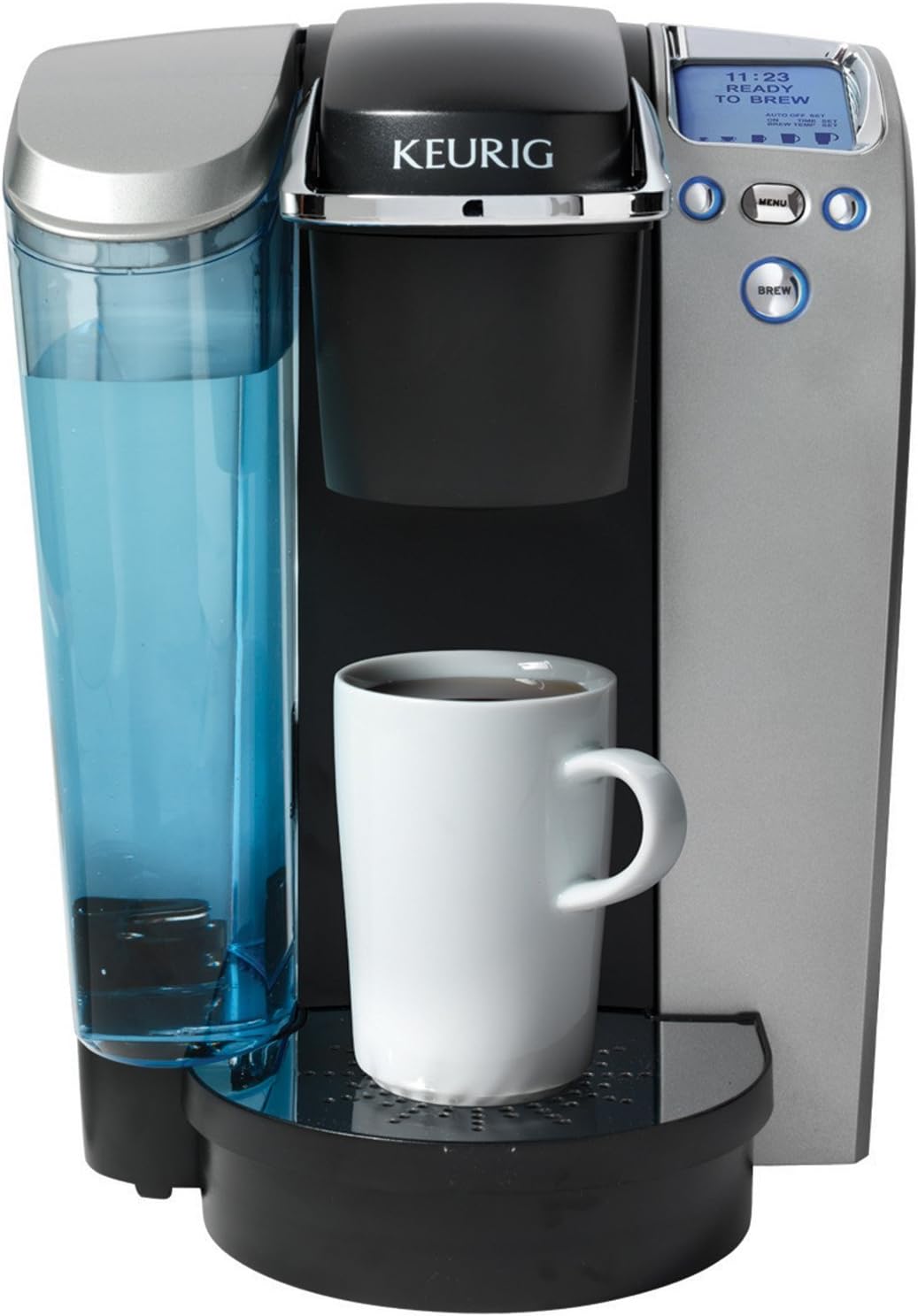
- One-touch control panel; blue backlit LCD display; digital clock; programmable on/off
- 5 brew-size options; adjustable brew temperature; removable drip tray

The Keurig B70 Platinum brewer, showcasing its sleek design and user-friendly interface.
Initial Setup
Before first use, it is essential to properly set up your Keurig B70 Platinum brewer to ensure optimal performance and taste.
First Use Instructions:
- Fill Water Reservoir: Remove the 60 oz. removable water reservoir from the left side of the brewer. Fill it with fresh, filtered water up to the MAX fill line. Place the reservoir back securely on the brewer.
- Power On: Plug the brewer into a grounded outlet. Press the power button to turn the unit on. The blue lit LCD display will illuminate.
- Initial Heating: The brewer will begin heating the water. This process may take approximately 4 minutes. The red light next to "HEATING" on the LED Control Center may be illuminated during this time. Once heated, the light will turn off and the "Small Mug Button" will flash.
- Cleansing Brew: Place a large mug or bowl on the drip tray. Press the "Small Mug Button" to start a cleansing brew. This will dispense hot water to clean the internal components. Pour the hot water into the sink.
- Ready to Brew: The brewer may take about 15 seconds to reheat water between brews. Once the water is heated, the red light will turn off, and the brewer is ready for use.
Side view of the Keurig B70 Platinum, highlighting the removable water reservoir.
Operating Instructions
Brewing your favorite beverage with the Keurig B70 Platinum is a simple, one-touch process.
Brewing a Beverage:
- Lift Handle: Lift the handle to open the K-Cup holder.
- Insert K-Cup: Place a K-Cup pod into the K-Cup holder. Ensure it is seated properly.
- Lower Handle: Firmly lower the handle until it clicks into place. This punctures the K-Cup.
- Place Mug: Position your mug or cup on the drip tray.
- Select Brew Size: Use the control panel to select your desired brew size (4 oz., 6 oz., 8 oz., 10 oz., or 12 oz.). The blue backlit LCD display will show your selection.
- Press Brew: Press the "BREW" button. The brewer will begin dispensing your beverage.
Control Panel Features:
- Digital Clock: Set the current time for convenience.
- Auto On/Off: Program the brewer to turn on or off at specific times, saving energy and ensuring hot coffee when you need it.
- Adjustable Temperature Control: Customize your brew temperature for optimal taste.
- Set Your Favorite Cup Size: Easily select from five different brew sizes (4 oz., 6 oz., 8 oz., 10 oz., and 12 oz.) to match your preference.

The Keurig B70 Platinum brewer with various K-Cup pods, illustrating its compatibility.
Care and Maintenance
Regular cleaning and maintenance will prolong the life of your Keurig B70 Platinum brewer and ensure consistent beverage quality.
Water Reservoir:
The 60 oz. water reservoir is fully removable for easy refilling and cleaning. It is recommended to clean the reservoir periodically with warm, soapy water and rinse thoroughly.
Drip Tray:
The drip tray is removable for easy cleaning of spills and to accommodate taller travel mugs. Simply slide it out, empty any liquid, and wash with warm, soapy water.
Descaling:
Over time, calcium deposits (scale) can build up in your brewer, affecting performance. It is recommended to descale your brewer every 3 to 6 months, or more frequently if you have hard water. Refer to the full user manual for detailed descaling instructions using a descaling solution or white vinegar.
Product Specifications
| Feature | Detail |
|---|---|
| Brand | Keurig |
| Special Feature | Programmable |
| Coffee Maker Type | Drip Coffee Machine |
| Filter Type | Reusable |
| Included Components | Filter |
| Operation Mode | Fully Automatic |
| Model Name | FBA_102554 |
| Coffee Input Type | pods |
| Manufacturer | Keurig |
| UPC | 649645007021 |
| Package Dimensions | 16.7 x 14.8 x 12.6 inches |
| Item Weight | 14.1 pounds |
| ASIN | B009RVLMCI |
| Item model number | B70 |
| Date First Available | September 19, 2012 |
Troubleshooting Guide
If you encounter any issues with your Keurig B70 Platinum brewer, please refer to the common troubleshooting steps below. For more complex problems, consult the full user manual or contact customer support.
- Brewer Not Turning On: Ensure the power cord is securely plugged into a grounded electrical outlet. Check if the outlet is functional by plugging in another appliance.
- No Water Dispensing/Weak Brew: Verify that the water reservoir is filled to the appropriate level and is seated correctly. Check if the K-Cup holder needle is clogged and clean it if necessary. Descaling may be required if mineral buildup is present.
- Coffee Grounds in Cup: Ensure the K-Cup pod is properly inserted and the handle is fully lowered. Check the K-Cup holder for any debris or damage.
- Leaking: Confirm the water reservoir is properly seated and not overfilled. Check the drip tray for any cracks or improper placement.
- Error Messages: Refer to the specific error code displayed on the LCD screen in your comprehensive user manual for detailed solutions.
Warranty and Customer Support
Your Keurig B70 Platinum Single-Cup Home Brewing System comes with a manufacturer's warranty. Please refer to the warranty card included with your product for specific terms, conditions, and duration.
For technical assistance, troubleshooting beyond this guide, or warranty claims, please contact Keurig Customer Support. Contact information can typically be found on the official Keurig website or in your product's packaging.
Always use genuine Keurig accessories and follow recommended maintenance procedures to ensure the longevity and optimal performance of your brewer.