
Bussmann AGU-2
Cooper Bussmann AGU-2 Fast-Acting Midget Fuse User Manual
Model: AGU-2 | Brand: Bussmann
1. Introduction
This manual provides essential information for the safe and effective use of the Cooper Bussmann AGU-2 Fast-Acting Midget Fuse. Please read these instructions carefully before installation and operation. This fuse is designed for specific electrical protection applications.

Image: Bussmann company logo, featuring "COOPER Bussmann" text on a yellow background, signifying the brand's identity.
2. Product Overview
The Bussmann AGU-2 is a fast-acting midget fuse designed to protect electrical circuits from overcurrent conditions. It is a small-dimension fuse that quickly interrupts the circuit when current exceeds its rated value, preventing damage to equipment. This fuse complies with major industrial standards including IEC, ISO, NEMA, and SAE.
- Model: AGU-2
- Type: Fast-Acting Midget Fuse
- Material: Copper
- Compliance: BS, IEC, DIN, UL, NEMA, SAE, CSA, CE, C-UL
- Fit Type: Universal Fit
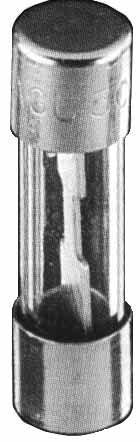
Image: A clear photograph of the Bussmann AGU-2 fast-acting midget fuse. It shows a cylindrical glass body with metallic end caps, revealing the internal fuse element.
3. Safety Information
WARNING: Electrical work should only be performed by qualified personnel. Failure to follow these safety instructions can result in electric shock, fire, or serious injury.
- Always disconnect power to the circuit before installing or replacing fuses.
- Never replace a fuse with one of a different voltage or amperage rating than specified for the circuit.
- Ensure the fuse holder is clean and free from corrosion before insertion.
- Do not bypass or tamper with fuses.
- Wear appropriate personal protective equipment (PPE), such as insulated gloves and safety glasses, when working with electrical circuits.
4. Setup and Installation
The AGU-2 fuse is designed for through-hole mounting in compatible fuse holders. Follow these steps for proper installation:
- Power Disconnection: Ensure all power to the circuit where the fuse will be installed is completely disconnected and verified with a voltage tester.
- Identify Fuse Holder: Locate the appropriate fuse holder for the AGU-2 midget fuse.
- Insert Fuse: Carefully insert the AGU-2 fuse into the fuse holder. Ensure it is seated firmly and correctly.
- Verify Connection: Double-check that the fuse is securely in place and that there are no loose connections.
- Restore Power: Once installation is complete and verified, restore power to the circuit.
Note: Always use the correct fuse rating for your application. Refer to your equipment's specifications for the required fuse type and rating.
5. Operating Instructions
The Bussmann AGU-2 fuse operates passively as a safety device. When the electrical current flowing through the circuit exceeds the fuse's rated amperage for a specified duration, the internal element of the fast-acting fuse melts, creating an open circuit and interrupting the flow of electricity. This action protects connected components from damage due to overcurrents or short circuits.
No user interaction is required for the fuse's operation once installed correctly. Its function is to fail safely when an overcurrent event occurs.
6. Maintenance
Fuses are generally maintenance-free components. However, periodic inspection of the fuse and its holder is recommended, especially in critical applications or environments prone to vibration or corrosion.
- Visual Inspection: Periodically check the fuse for any signs of damage, discoloration, or a broken internal element (which indicates it has blown).
- Holder Condition: Ensure the fuse holder is clean, free from dust, dirt, or corrosion, and that the contacts are making good connection with the fuse caps.
- Replacement: If a fuse is found to be blown or damaged, replace it immediately with an identical Bussmann AGU-2 fuse or one with the exact same specifications (voltage and amperage rating).
7. Troubleshooting
The primary troubleshooting step for a fuse is to determine if it has blown. A blown fuse indicates an overcurrent condition in the circuit it protects.
- No Power to Device: If a device or circuit protected by the AGU-2 fuse is not receiving power, the fuse may have blown.
- Visual Check: Disconnect power and visually inspect the fuse. A clear glass fuse will often show a broken or charred internal wire if it has blown.
- Multimeter Test: With power disconnected, use a multimeter to test for continuity across the fuse. A blown fuse will show an open circuit (no continuity).
- Replacement: If the fuse is confirmed to be blown, replace it with a new Bussmann AGU-2 fuse of the correct rating.
- Identify Cause: A blown fuse is a symptom, not the root cause. Investigate why the fuse blew (e.g., short circuit, overloaded device, faulty component) before replacing it to prevent immediate re-occurrence.
8. Specifications
| Attribute | Detail |
|---|---|
| Model Number | AGU-2 |
| Brand | Bussmann (Cooper Bussmann) |
| Fuse Type | Fast-Acting Midget Fuse |
| Voltage Rating | 250 Volts |
| Material | Copper |
| Mounting Type | Through-Hole Mount |
| Compliance | IEC, ISO, NEMA, SAE (also BS, DIN, UL, CSA, CE, C-UL) |
| Package Dimensions | Approximately 3 x 2 x 2 inches |
| Weight | Approximately 1 Pound (for package) |
| Date First Available | October 16, 2012 |
9. Warranty and Support
Specific warranty information for the Bussmann AGU-2 fuse is typically provided at the point of purchase or through the official Bussmann website. As a consumable safety device, fuses generally do not carry extensive warranties beyond manufacturing defects.
For technical support or further inquiries, please refer to the official Bussmann (Eaton) customer service channels or their authorized distributors. Contact information can usually be found on the manufacturer's official website.
Manufacturer: Cooper Bussmann
Website: Eaton Bussmann Fuses
Related documentsAGU-2


Ask a question about this manual
Ask about setup, troubleshooting, compatibility, parts, safety, or missing instructions. Manuals+ will review the question and use this page’s manual context to help answer it.