
1. Introduction
The Seiko DM51S Clip-On Metronome is a compact digital metronome designed for musicians. It features a high-contrast LCD display, easy volume control, and a clock function, making it a versatile tool for practice and performance. This manual provides detailed instructions for the proper setup, operation, and maintenance of your DM51S metronome.
2. Product Features
- Digital Metronome Functionality
- Integrated Clock Function
- Easy Volume Control
- High Contrast LCD Display for clear visibility
- Convenient Clip-On Design
3. Package Contents
- Seiko DM51S Clip-On Metronome Unit
- Lithium Metal Batteries (2 included)
- Instruction Manual (this document)
4. Setup
4.1 Battery Installation
The Seiko DM51S metronome requires two Lithium Metal batteries for operation. These batteries are included with your purchase.
- Locate the battery compartment cover on the back of the metronome.
- Open the battery compartment cover.
- Insert the two Lithium Metal batteries, ensuring correct polarity (+ and -) as indicated inside the compartment.
- Close the battery compartment cover securely.
4.2 Attaching the Metronome
The DM51S features a clip-on design for convenient attachment to music stands, instrument headstocks, or other suitable surfaces.
- Gently open the clip mechanism on the back of the metronome.
- Attach the metronome to your desired surface, ensuring a secure grip.
- Adjust the angle of the metronome for optimal viewing of the display.
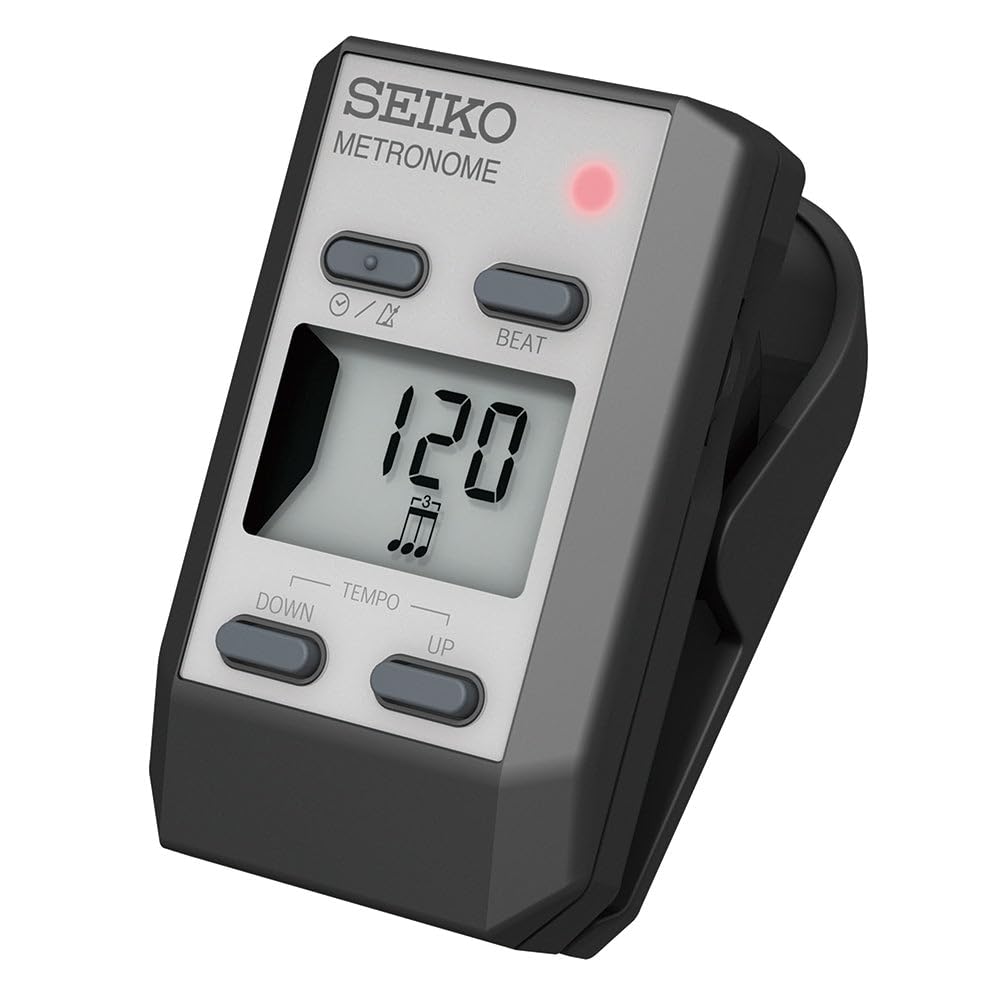
Figure 1: Front view of the Seiko DM51S Clip-On Metronome, highlighting the display, power/mode button, beat button, and tempo adjustment buttons.
5. Operating Instructions
5.1 Power On/Off and Mode Selection
Locate the power/mode button, typically marked with a circle and a slash symbol (⌛/⌛), on the front panel.
- To Power On: Press and hold the power/mode button for approximately 1-2 seconds. The display will illuminate.
- To Power Off: Press and hold the power/mode button again for approximately 1-2 seconds. The display will turn off.
- To Change Mode (Metronome/Clock): Briefly press the power/mode button to switch between metronome and clock display modes.
5.2 Tempo Adjustment
The tempo (beats per minute - BPM) can be adjusted using the "UP" and "DOWN" buttons located below the display.
- Increase Tempo: Press the "UP" button to increase the BPM.
- Decrease Tempo: Press the "DOWN" button to decrease the BPM.
- Holding either button will accelerate the tempo change.
5.3 Beat Adjustment
The "BEAT" button allows you to select the beat pattern (e.g., 0, 1, 2, 3, 4, 5, 6 beats per measure).
- Press the "BEAT" button repeatedly to cycle through the available beat patterns. The current beat pattern will be displayed on the LCD.
5.4 Volume Control
The DM51S features easy volume control for the metronome click sound.
- Specific volume buttons or a combination of existing buttons may be used. Refer to the on-screen indicators or experiment with the power/mode button during metronome operation for volume adjustment.
5.5 Clock Function
When in clock mode, the DM51S displays the current time.
- Setting the Time: While in clock mode, press and hold the power/mode button until the time display begins to flash. Use the "UP" and "DOWN" buttons to adjust the hours and minutes. Briefly press the power/mode button to switch between setting hours and minutes. Press and hold the power/mode button again to save the settings.
6. Maintenance
- Cleaning: Use a soft, dry cloth to clean the metronome's exterior. Do not use abrasive cleaners or solvents.
- Storage: Store the metronome in a cool, dry place away from direct sunlight and extreme temperatures. If storing for an extended period, remove the batteries to prevent leakage.
- Battery Replacement: Replace batteries when the display becomes dim or the metronome functions erratically.
7. Troubleshooting
| Problem | Possible Cause | Solution |
|---|---|---|
| Metronome does not power on. | Dead or incorrectly installed batteries. | Check battery polarity. Replace batteries if necessary. |
| Display is dim or flickering. | Low battery power. | Replace batteries. |
| No sound from metronome. | Volume is set to minimum or mute. | Adjust the volume level. |
| Tempo or beat settings cannot be changed. | Metronome might be in clock mode or a setting lock is active. | Ensure the unit is in metronome mode. Refer to section 5.1. |
8. Specifications
| Feature | Detail |
|---|---|
| Model Number | DM51SE |
| Product Dimensions | 10.41 x 6.35 x 1.91 cm |
| Item Weight | 50 g |
| Colour | Silver |
| Batteries | 2 Lithium Metal batteries (included) |
| Manufacturer | KMC Music Inc |
| Date First Available | 15 October 2012 |
9. Warranty Information
This Seiko DM51S Clip-On Metronome is covered by a 1 Year Warranty from the date of purchase. This warranty covers manufacturing defects and malfunctions under normal use. Please retain your proof of purchase for warranty claims. The warranty does not cover damage caused by misuse, accidents, unauthorized modifications, or normal wear and tear.
10. Support
For further assistance, technical support, or warranty inquiries, please contact the manufacturer or your authorized dealer. Refer to the product packaging or the manufacturer's official website for contact details.
Manufacturer: KMC Music Inc