Introduction
This manual provides detailed instructions for the assembly, operation, maintenance, and troubleshooting of your DoubleSight Dual Monitor Flex Stand, Model DS-230STA. This stand is designed to enhance your workspace by providing flexible positioning for two monitors up to 30 inches each, supporting VESA 75mm and 100mm mounting patterns.

Image: The DoubleSight Dual Monitor Flex Stand, showcasing its robust design and dual arm configuration.
Setup and Assembly
The DoubleSight DS-230STA Flex Stand ships largely pre-assembled for your convenience. Only the VESA mounting brackets need to be attached to your monitors before securing them to the stand.
1. Attaching VESA Brackets to Monitors
Each monitor requires a VESA bracket to be attached to its rear mounting points. The stand supports VESA 75mm x 75mm and 100mm x 100mm hole patterns. Use the screws provided with your monitor or the stand to secure the brackets firmly.

Image: A VESA mounting bracket, illustrating its 90-degree pivot capability for portrait viewing and 45-degree forward/back tilt for customized viewing angles. Compatible with 75mm x 75mm and 100mm x 100mm hole patterns.
2. Mounting Monitors to the Stand
Once the VESA brackets are attached to your monitors, carefully slide the monitors onto the arms of the Flex Stand. Ensure they are securely seated. The flexible horizontal arms feature multiple hinged points, allowing for a custom fit and precise positioning of your monitors.

Image: A diagram highlighting the eight hinged points on the Flex Stand's arms, which enable extensive adjustability for monitor placement.
3. Adjusting Monitor Width
The VESA brackets can be installed at various points along the Flex Stand's arm to customize the overall width and spacing between your monitors.
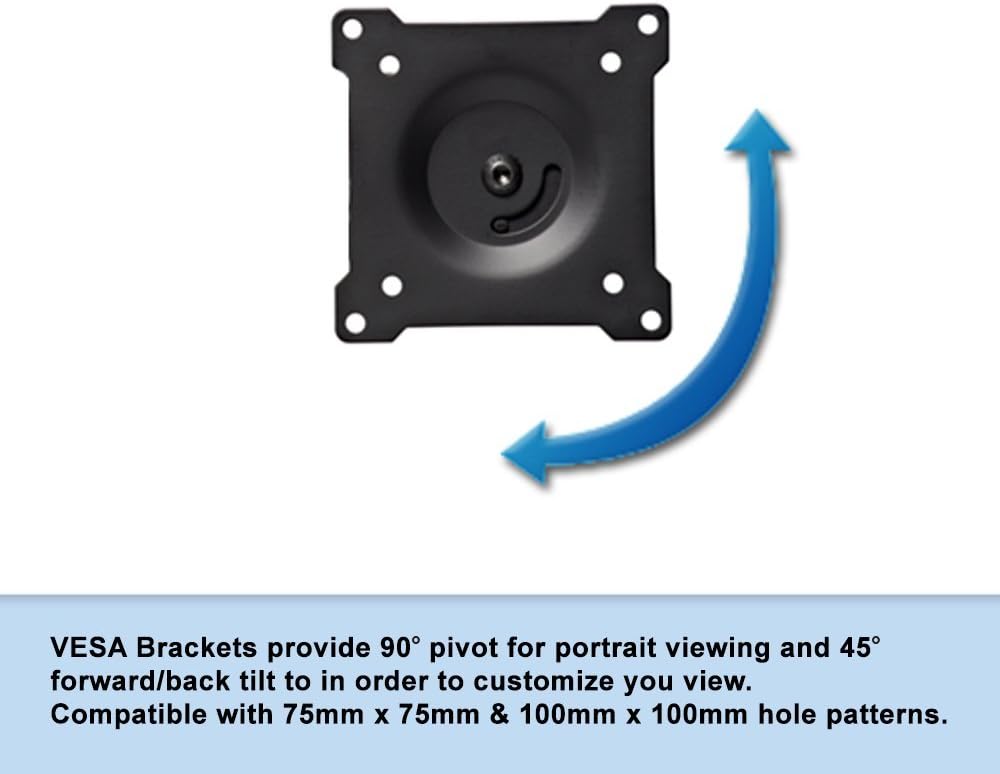
Image: A diagram illustrating how VESA brackets can be positioned along the stand's arm to adjust the horizontal spacing between monitors.
Operating the Stand
The DoubleSight Flex Stand offers extensive adjustability to optimize your viewing experience.
Height Adjustment
The stand features 3 inches of height adjustment. To adjust the height, locate the easy-to-use knob on the central post of the stand. Loosen the knob, set the desired height, and then tighten the knob to secure the position.

Image: A close-up view of the height adjustment knob located on the central post of the Flex Stand.
Tilt, Swivel, and Pivot
Each monitor can be independently adjusted for tilt, swivel, and pivot. The VESA brackets allow for 90-degree pivot for portrait viewing and 45-degree forward/back tilt. Utilize the hinged points on the arms to swivel monitors to your preferred angle.

Image: The DoubleSight Dual Monitor Flex Stand with two monitors attached, demonstrating the potential for flexible positioning.
Cable Management
To maintain a tidy workspace, route monitor cables along the arms and down the central post. Use cable ties or Velcro straps (not included) to secure them neatly.
Maintenance
Regular maintenance ensures the longevity and optimal performance of your DoubleSight Flex Stand.
- Cleaning: Use a soft, dry cloth to wipe down the stand. For stubborn marks, a slightly damp cloth with mild soap can be used, followed by drying thoroughly. Avoid abrasive cleaners or solvents.
- Connection Checks: Periodically check all screws and connections, especially those securing the VESA brackets to the monitors and the stand, to ensure they remain tight and secure.
- Joint Lubrication: If any joints become stiff over time, a small amount of silicone-based lubricant can be applied to the pivot points to restore smooth movement.
Troubleshooting
If you encounter issues with your DoubleSight Flex Stand, refer to the following common solutions:
- Monitors Drooping or Not Holding Position:
Ensure all VESA bracket screws and arm joint fasteners are tightened securely. Over time, heavy monitors may cause slight slippage if not adequately tightened. Re-tighten the pivot point screws on the VESA brackets if monitors tilt downwards.
- Stand Wobbles:
Verify that the stand is placed on a flat, stable surface. Check the connection of the central post to the base and ensure it is firmly secured. If the wobble persists, ensure the weight distribution of the monitors is balanced on the arms.
- Monitors Not Aligning Evenly:
Utilize the independent tilt, swivel, and pivot adjustments on each VESA bracket and the hinged points on the arms to fine-tune the alignment. Small adjustments to the position of the VESA brackets along the arm can also help achieve perfect alignment.
- Difficulty Adjusting Height:
Ensure the height adjustment knob on the central post is sufficiently loosened before attempting to change the height. If it feels stuck, apply gentle, even pressure while adjusting.
Specifications
| Model Number | DS-230STA |
| Brand | DoubleSight Displays |
| Monitor Compatibility | Dual monitors up to 30 inches each |
| VESA Compatibility | 75mm x 75mm, 100mm x 100mm |
| Adjustments | Height, Tilt, Swivel, Pivot |
| Height Adjustment Range | 3 inches |
| Product Dimensions (L x W x H) | 91.44 x 25.4 x 39.37 cm (approx. 36 x 10 x 15.5 inches) |
| Item Weight | 7.26 kg (approx. 16 lbs) |
| Color | Black |
Warranty and Support
The DoubleSight Dual Monitor Flex Stand comes with a Lifetime Warranty. For any support inquiries, technical assistance, or warranty claims, please contact DoubleSight Displays directly through their official website or customer service channels. Please have your model number (DS-230STA) ready when contacting support.