
1. Introduction
1.1 Product Overview
This manual provides instructions for the ELTO replacement thermostat, an essential component designed for specific ELTO tumble dryer models. This thermostat ensures the correct operating temperature within your dryer, preventing overheating and maintaining efficient drying cycles. It is a genuine ELTO product, identified by manufacturer code C00095536.
1.2 Intended Use
This ELTO thermostat is intended as a direct replacement part for the following ELTO tumble dryer models: 37701, TD41, TD410RS, TD46. Use of this thermostat with incompatible models may result in improper operation or damage.
1.3 Safety Information
- Always disconnect the dryer from the main power supply before attempting any installation, maintenance, or repair. Failure to do so can result in electric shock or serious injury.
- Installation should only be performed by a qualified technician or a person with sufficient electrical and appliance repair knowledge.
- Wear appropriate personal protective equipment, such as gloves, during installation.
- Ensure all connections are secure and correctly wired according to the dryer's service manual.
- Do not bypass any safety features of the appliance.
2. Installation
2.1 General Installation Steps
The following steps provide a general guide for replacing a dryer thermostat. Specific procedures may vary depending on your dryer model. Always refer to your dryer's service manual for detailed, model-specific instructions.
- Disconnect Power: Unplug the dryer from the wall outlet or turn off the circuit breaker supplying power to the dryer.
- Access Thermostat: Depending on your dryer model, you may need to remove the back panel, top panel, or front panel to access the thermostat.
- Locate Old Thermostat: Identify the existing thermostat. It is typically a small, disc-shaped component with two wires connected to it, often mounted near the heating element or blower housing.
- Disconnect Wires: Carefully disconnect the wires from the old thermostat. Note their positions for correct re-connection.
- Remove Old Thermostat: Unscrew or unclip the old thermostat from its mounting bracket.
- Install New Thermostat: Mount the new ELTO thermostat in the same location and orientation as the old one. Secure it with screws or clips.
- Reconnect Wires: Connect the wires to the new thermostat, ensuring they are securely attached.
- Reassemble Dryer: Reattach any panels removed during the process.
- Restore Power: Plug the dryer back into the wall outlet or turn on the circuit breaker.
- Test Operation: Run a short drying cycle to ensure the dryer heats correctly and the thermostat functions as expected.
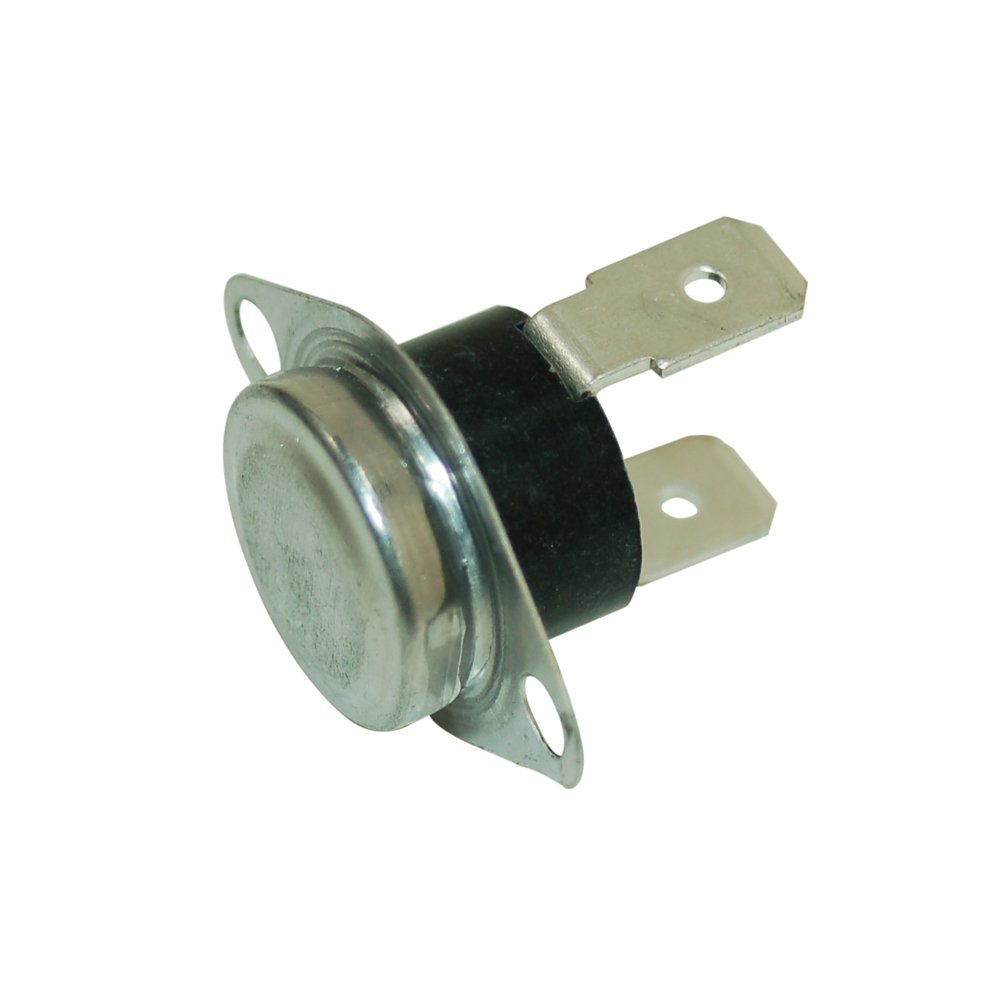
Figure 1: ELTO Dryer Thermostat. This image shows the typical appearance of the replacement thermostat, a small, disc-shaped component with electrical terminals.
3. Operation
The ELTO dryer thermostat operates automatically to regulate the temperature inside your tumble dryer. It functions as a safety device and a temperature control component. When the dryer reaches a predetermined temperature, the thermostat opens the electrical circuit to the heating element, turning it off. As the temperature drops, the thermostat closes the circuit, turning the heating element back on. This cycle maintains the desired drying temperature and prevents overheating.
No user intervention is required for the thermostat's operation once correctly installed.
4. Maintenance
The ELTO dryer thermostat is a sealed unit and does not require routine maintenance. However, regular maintenance of your tumble dryer can help ensure the longevity and proper function of all its components, including the thermostat.
- Clean Lint Filter: Always clean the lint filter before or after every load to ensure proper airflow.
- Check Venting: Periodically inspect and clean the dryer's exhaust vent to prevent lint buildup, which can restrict airflow and cause overheating. Restricted airflow can lead to premature failure of heating elements and thermostats.
- Inspect Wiring: During any other dryer maintenance, visually inspect the thermostat's wiring for any signs of wear, fraying, or loose connections.
5. Troubleshooting
If your dryer is experiencing issues related to heating, the thermostat might be a contributing factor. Always ensure the dryer is disconnected from power before inspecting components.
- Dryer Not Heating: If the dryer is running but not producing heat, the thermostat may have failed in the open position, preventing power from reaching the heating element.
- Dryer Overheating: If the dryer gets excessively hot or shuts off prematurely, the thermostat might have failed to open the circuit at the correct temperature. This can also be caused by restricted airflow due to clogged vents.
- No Power to Dryer: While less common for a thermostat, a shorted thermostat could potentially trip a circuit breaker. However, other components are more likely culprits for a complete power loss.
Recommendation: Diagnosing thermostat issues often requires a multimeter to test for continuity. If you suspect a faulty thermostat or any other electrical component, it is highly recommended to consult a qualified appliance repair technician for diagnosis and repair.
6. Specifications
| Feature | Detail |
|---|---|
| Brand | Elto |
| Product Type | Dryer Thermostat (Replacement Part) |
| Manufacturer Code | C00095536 |
| Manufacturer Reference | C00279578 |
| ASIN | B009NIAOTM |
| Compatible Models | Elto 37701, TD41, TD410RS, TD46 |
| Country of Origin | United Kingdom |
| First Available Date | January 15, 2020 |
7. Warranty and Support
7.1 Warranty Information
Specific warranty details for this ELTO replacement thermostat are not provided within this document. Please refer to the original purchase documentation or contact the retailer from whom the product was purchased for information regarding warranty coverage.
7.2 Customer Support
For technical assistance, installation queries, or troubleshooting beyond the scope of this manual, please contact the seller or the manufacturer, Elto. When contacting support, please have your product model numbers (37701, TD41, TD410RS, TD46) and the manufacturer code (C00095536) readily available.
You may also find additional support resources on the official Elto website or through authorized service centers.