
1. Introduction
This instruction manual provides essential information for the safe and effective use of your SIEMENS Oven 40watt SES Bulb. Please read this manual thoroughly before installation and retain it for future reference. This bulb is designed as a replacement part for specific SIEMENS oven models, ensuring proper illumination within the oven cavity.
2. Safety Information
- Electrical Hazard: Always disconnect power to the oven at the circuit breaker or fuse box before attempting any installation, removal, or maintenance of the bulb. Failure to do so can result in electric shock or serious injury.
- Burn Hazard: Allow the oven and the old bulb to cool completely before handling. Oven bulbs can reach very high temperatures during operation.
- Glass Hazard: Handle the bulb carefully. If the bulb breaks, use gloves and appropriate tools to clean up glass fragments to prevent cuts.
- Compatibility: Use only the specified wattage and voltage bulb (40W, 220V) for your oven. Using an incorrect bulb can damage the oven or pose a fire risk.
- Disposal: Dispose of old bulbs according to local regulations.
3. Product Overview
The SIEMENS Oven 40watt SES Bulb (Model: 057874) is a specialized light source designed for the high-temperature environment of an oven. It provides illumination inside the oven cavity, allowing you to monitor cooking progress without opening the oven door. This bulb is suitable for the following SIEMENS oven models:
- HB12420GB/02, HB12420GB/03, HB12420GB/04, HB12420GB/05, HB12420GB/06
- HB12440GB/01, HB12440GB/02, HB12440GB/03, HB12440GB/04, HB12440GB/05, HB12440GB/06
- HB12450GB/01, HB12450GB/02, HB12450GB/03, HB12450GB/04

Image 1: SIEMENS 40watt SES Oven Bulb. This image shows the bulb itself, highlighting its compact size and screw-in base.
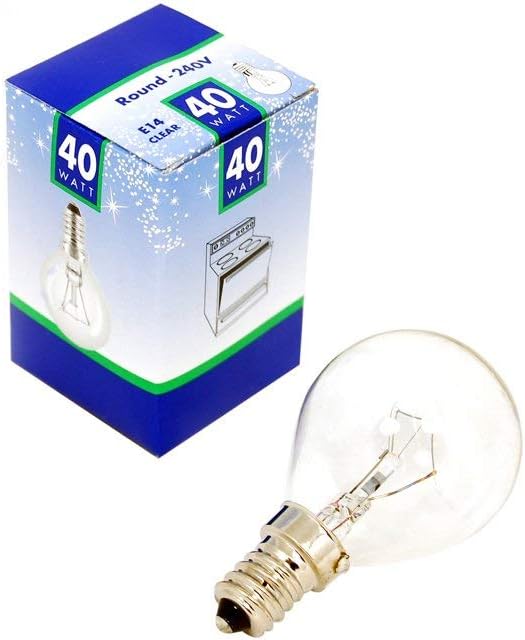
Image 2: SIEMENS 40watt SES Oven Bulb. This image provides another view of the bulb, emphasizing its design and form factor.
4. Setup and Installation
Follow these steps to safely replace your oven bulb:
- Disconnect Power: Locate the circuit breaker or fuse box that controls power to your oven. Turn off the corresponding breaker or remove the fuse to completely cut off power to the appliance. Verify power is off by attempting to turn on the oven light.
- Cool Down: Ensure the oven and the existing bulb are completely cool to the touch before proceeding.
- Access Bulb: Open the oven door. The bulb is typically located at the top or side of the oven cavity, often behind a protective glass cover.
- Remove Glass Cover (if applicable): If there is a glass cover, carefully unscrew or unclip it. Some covers may twist off counter-clockwise, while others may have clips or screws. Set the cover aside in a safe place.
- Remove Old Bulb: Gently unscrew the old bulb counter-clockwise. If the bulb is stuck, apply firm but gentle pressure. Be careful not to break the bulb.
- Install New Bulb: Carefully screw the new SIEMENS 40watt SES Bulb into the socket clockwise until it is finger-tight. Do not overtighten.
- Replace Glass Cover: Reattach the protective glass cover, ensuring it is securely fastened to prevent grease and food splatter from reaching the bulb.
- Restore Power: Return to your circuit breaker or fuse box and restore power to the oven.
- Test: Turn on the oven light to confirm the new bulb is working correctly.
5. Operating Instructions
Once installed, the SIEMENS Oven 40watt SES Bulb operates in conjunction with your oven's internal lighting system. To illuminate the oven cavity, simply activate the oven light switch on your appliance's control panel. The bulb is designed to withstand the high temperatures typically found within an oven during cooking cycles.
6. Maintenance
The SIEMENS Oven 40watt SES Bulb requires minimal maintenance. Follow these guidelines to ensure its longevity:
- Cleaning: If the glass cover or the bulb itself becomes dirty with grease or food residue, ensure the oven is cool and power is disconnected. Remove the glass cover and, if necessary, the bulb. Clean with a soft cloth and mild detergent. Ensure all parts are completely dry before reinstallation.
- Inspection: Periodically inspect the bulb and its socket for any signs of damage or corrosion. If any damage is observed, replace the bulb immediately.
- Replacement: The lifespan of an oven bulb can vary. Replace the bulb when it burns out or if its light output significantly diminishes.
7. Troubleshooting
If your oven light is not working after installing the new bulb, consider the following:
| Problem | Possible Cause | Solution |
|---|---|---|
| Bulb does not light up | No power to the oven Bulb not screwed in properly Defective bulb Oven light switch malfunction | Check circuit breaker/fuse. Ensure bulb is securely tightened. Test with a known working bulb (if available). Consult an appliance technician for switch issues. |
| Bulb flickers | Loose connection Voltage fluctuations | Ensure bulb is tightly screwed in. If flickering persists, consult an electrician. |
| Bulb burns out quickly | Excessive vibration Over-voltage Defective bulb | Ensure oven is stable. Verify oven's voltage matches bulb's rating. Replace with a new bulb. |
8. Specifications
| Attribute | Value |
|---|---|
| Brand | SIEMENS |
| Model Number | 057874 |
| Wattage | 40 watts |
| Voltage | 220 Volts |
| Light Source Wattage | 40 Watts |
| Number of Items | 1 |
| Item Weight | 4 ounces |
| Package Dimensions | 4 x 4 x 4 inches |
| ASIN | B009NH25KY |
| Date First Available | December 20, 2012 |
9. Warranty and Support
This SIEMENS Oven 40watt SES Bulb is a replacement part. For specific warranty information regarding replacement parts for your SIEMENS oven, please refer to the original appliance's warranty documentation or contact SIEMENS customer support directly. Keep your purchase receipt as proof of purchase.
For further assistance or technical inquiries, please visit the official SIEMENS website or contact their customer service department.