
Jabra BT2046
Jabra BT2046 Bluetooth Headset User Manual
Model: BT2046
Introduction
This manual provides comprehensive instructions for the Jabra BT2046 Over the Ear Bluetooth Headset. It covers setup, operation, maintenance, and troubleshooting to ensure optimal performance and longevity of your device. The Jabra BT2046 is designed for hands-free communication, offering convenience and clarity.
Package Contents
- Jabra BT2046 Bluetooth Headset
- Charger
- Earhook (pre-attached or separate)
- EarGels/Eartips (various sizes, if included)
- Quick Start Guide (this manual serves as a detailed guide)
Headset Overview

Figure 1: Top view of the Jabra BT2046 Bluetooth Headset, showing the main body and the integrated earhook.
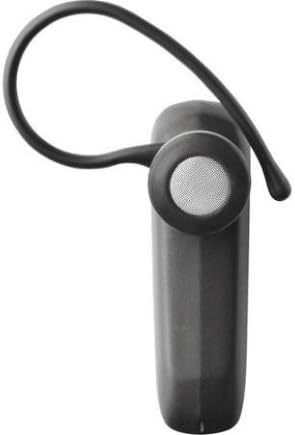
Figure 2: Side view of the Jabra BT2046 Bluetooth Headset, highlighting the earhook designed for over-the-ear wear and the speaker component.
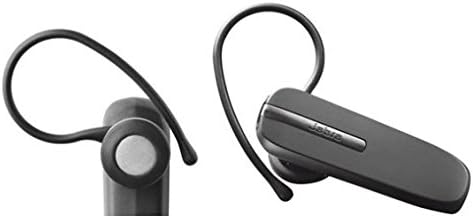
Figure 3: Two distinct views of the Jabra BT2046 Bluetooth Headset, illustrating its compact design and the earhook from different perspectives.
Key Components:
- Multi-function Button: Used for power on/off, pairing, answering/ending calls.
- Volume Buttons: Adjust call volume.
- Microphone: For voice input during calls.
- Speaker: For audio output.
- Charging Port: For connecting the charger.
- LED Indicator: Displays status (e.g., charging, connected, low battery).
Setup
1. Charging the Headset
Before first use, fully charge your Jabra BT2046 headset.
- Connect the charger to the charging port on the headset.
- Plug the charger into a power outlet.
- The LED indicator will illuminate to show charging status. It typically turns solid when fully charged.
- A full charge usually takes approximately 2 hours.
2. Powering On/Off
- To Power On: Press and hold the Multi-function Button for approximately 3 seconds until the LED indicator flashes.
- To Power Off: Press and hold the Multi-function Button for approximately 3 seconds until the LED indicator turns off.
3. Pairing with a Bluetooth Device
The Jabra BT2046 can be paired with Bluetooth-enabled devices such as cellphones, computers, and tablets.
- Ensure the headset is powered off.
- Press and hold the Multi-function Button for approximately 5-6 seconds until the LED indicator flashes blue rapidly. This indicates the headset is in pairing mode.
- On your Bluetooth device, enable Bluetooth and search for new devices.
- Select "Jabra BT2046" from the list of found devices.
- If prompted for a passcode, enter "0000" (four zeros).
- Once paired, the LED indicator on the headset will change to a slow blue flash or solid blue, and your device will confirm the connection.
Note: The headset can typically remember multiple paired devices, but can only be actively connected to one at a time for calls.
Operating the Headset
Call Handling
- Answer Call: Press the Multi-function Button once.
- End Call: Press the Multi-function Button once during an active call.
- Reject Call: Press and hold the Multi-function Button for approximately 2 seconds when a call is incoming.
- Redial Last Number: Double-press the Multi-function Button when the headset is idle.
- Voice Dialing (if supported by phone): Press the Multi-function Button once when the headset is idle.
Volume Control
- Use the Volume Up (+) or Volume Down (-) buttons on the headset to adjust the call volume.
Wearing the Headset
The Jabra BT2046 is designed for over-the-ear wear. Gently place the earhook over your ear and position the speaker comfortably in your ear canal. Adjust the earhook for a secure and comfortable fit.
Maintenance
Cleaning
- Wipe the headset with a soft, dry, lint-free cloth.
- Do not use harsh chemicals, cleaning solvents, or strong detergents.
- Avoid getting moisture into any openings.
Storage
- Store the headset in a cool, dry place, away from extreme temperatures and direct sunlight.
- If storing for an extended period, charge the battery periodically to maintain its lifespan.
Troubleshooting
| Problem | Possible Cause | Solution |
|---|---|---|
| Headset does not power on. | Battery is drained. | Charge the headset fully. |
| Cannot pair the headset with my device. | Headset not in pairing mode; Bluetooth off on device; device too far. | Ensure headset is in pairing mode (rapid blue flash). Turn on Bluetooth on your device. Move headset closer to device (within 10 meters/33 feet). Try restarting both devices. |
| No sound or poor sound quality during calls. | Volume too low; headset not selected as audio output; interference. | Increase headset volume. Ensure your phone's audio is routed to the headset. Move away from other electronic devices. |
| Headset disconnects frequently. | Out of range; low battery; interference. | Stay within Bluetooth range. Charge the headset. Reduce interference sources. |
Specifications
| Feature | Detail |
|---|---|
| Model Name | BT2046 |
| Connectivity Technology | Wireless (Bluetooth) |
| Wireless Communication Technology | Bluetooth |
| Ear Placement | Over Ear |
| Form Factor | Over Ear |
| Material | Plastic |
| Item Weight | 10 Grams (0.353 ounces) |
| Product Dimensions | 2.09 x 0.63 x 0.98 inches |
| Phone Talk Time | Up to 420 minutes (7 hours) |
| Phone Standby Time | Up to 240 hours (10 days) |
| Compatible Devices | Cellphones, Computers, Tablets, Other Bluetooth-enabled Devices |
| Control Type | Media Control |
| Special Features | Lightweight |
| UPC | 519808822467, 519808912304 |
Warranty and Support
Specific warranty information for the Jabra BT2046 headset is typically provided with the product packaging or can be found on the official Jabra website. Please refer to the manufacturer's website for the most up-to-date warranty terms and conditions.
For technical support, frequently asked questions, or to download additional resources, please visit the official Jabra support page or contact their customer service.
Ask a question about this manual
Ask about setup, troubleshooting, compatibility, parts, safety, or missing instructions. Manuals+ will review the question and use this page’s manual context to help answer it.