
1. Introduction
This manual provides detailed instructions for the installation and use of the Brodit ProClip 854788 Angled Mount. This custom-made, vehicle-specific mount is designed to provide a secure and stable platform for your device holder in Freightliner Class M2 – 12 vehicles. The ProClip is engineered for easy, non-invasive installation, clipping tightly into dashboard seams without requiring drilling or dismantling of vehicle components.
2. Package Contents
Please verify that all components are present before beginning installation:
- 1x Brodit ProClip 854788 Angled Mount
- Installation Instructions
Note: A device holder is NOT included and must be purchased separately. The ProClip features a pre-drilled hole pattern for easy attachment of a compatible device holder.

Figure 1: The Brodit ProClip 854788 Angled Mount. This image shows the black plastic mount with a yellow stripe on one side and a label indicating "Item no. 854788 Brodit". This is the main component included in the package.
3. Setup and Installation
The Brodit ProClip is designed for quick and secure installation without damaging your vehicle's interior. Follow these steps carefully:
- Prepare the Surface: Clean the area of the dashboard where the ProClip will be installed to ensure a secure grip.
- Identify Installation Point: The ProClip 854788 is designed for the angled section of the dashboard to the right of the steering wheel in Freightliner Class M2 – 12 vehicles. Refer to Figure 2 for the exact placement.
- Position the ProClip: Locate the upper edge of the ProClip (marked '1' in Figure 2). Insert this edge into the seam between the dashboard and the pillar on the right side.
- Secure the Lower Edge: Gently press the lower part of the ProClip (marked '2' in Figure 2) into the gap between the dashboard and the center console/panel. Apply firm, even pressure until the ProClip snaps securely into place.
- Verify Stability: Once installed, gently tug on the ProClip to ensure it is firmly seated and does not wobble.
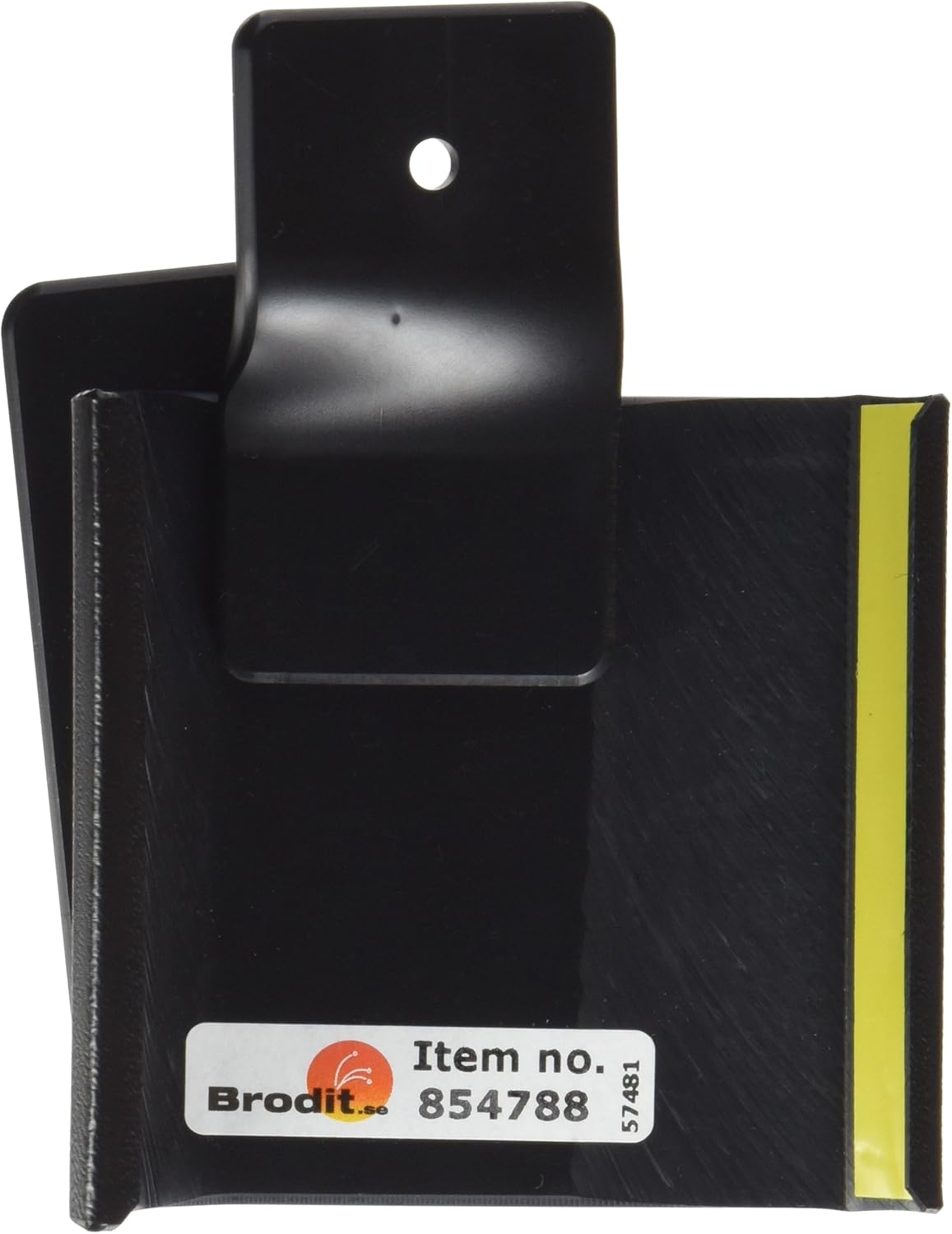
Figure 2: Installation diagram showing the placement of the Brodit ProClip 854788 in a Freightliner Class M2 – 12 dashboard. Point '1' indicates where the upper edge of the ProClip should be inserted into the dashboard seam. Point '2' indicates where the lower edge should be pressed into the dashboard gap, securing the mount to the right of the steering wheel and instrument panel.
Important: No drilling or special tools are required for installation. Ensure the ProClip is correctly aligned with the dashboard seams for optimal stability.
4. Operating and Usage
Once the ProClip is securely installed, you can attach your compatible device holder. The ProClip features a pre-drilled hole pattern, allowing for easy and secure attachment of most Brodit device holders. Position your device holder to ensure it does not obstruct your view, interfere with airbags, or impede access to vehicle controls.
- Attaching Device Holder: Align the screw holes of your device holder with the pre-drilled holes on the ProClip face plate and secure it using the provided screws from your device holder kit.
- Device Placement: Consider the size and orientation of your device. Ensure it is placed in a position that is easily accessible but does not compromise driving safety.
5. Maintenance
The Brodit ProClip requires minimal maintenance. To keep it clean, simply wipe it with a soft, damp cloth. Avoid using harsh chemicals or abrasive cleaners, as these may damage the material.
6. Troubleshooting
- Mount is not stable: Ensure the ProClip is fully inserted into both dashboard seams. Verify that the correct ProClip model (854788) is being used for your specific Freightliner Class M2 – 12 vehicle.
- Difficulty inserting: Do not force the ProClip. Re-check the alignment with the dashboard seams. A small, non-marring plastic tool can be used to gently widen the seam if necessary, but typically firm hand pressure is sufficient.
- Device holder does not fit: Ensure your device holder is compatible with Brodit ProClips and uses a standard mounting pattern.
7. Specifications
| Feature | Detail |
|---|---|
| Model Number | 854788 |
| Product Dimensions | 5.91 x 3.94 x 1.97 inches |
| Item Weight | 0.352 ounces |
| Compatibility | Freightliner Class M2 – 12 |
| Material | High-quality plastic |
| Installation Type | Clip-on, no drilling required |
8. Warranty and Support
For information regarding warranty coverage or technical support, please refer to the official Brodit website or contact your authorized Brodit dealer. Keep your purchase receipt as proof of purchase.