
Introduction
This manual provides detailed instructions for the proper setup, operation, and maintenance of your Panasonic KX-TS820MX Corded Telephone. Please read this manual thoroughly before using your telephone to ensure optimal performance and to understand all available features.
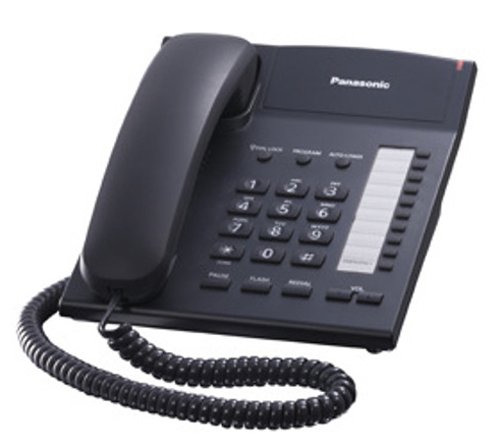
Image: The Panasonic KX-TS820MX corded telephone, featuring a black handset, coiled cord, and a keypad with various function buttons.
Setup and Installation
Follow these steps to set up your Panasonic KX-TS820MX telephone:
- Connect the Handset: Plug one end of the coiled handset cord into the handset and the other end into the jack labeled HANDSET on the side of the telephone base unit.
- Connect the Telephone Line: Plug one end of the telephone line cord into the jack labeled LINE on the back of the telephone base unit. Plug the other end into your wall telephone jack.
- Placement: Place the telephone on a stable, flat surface. The 2-step tilt angle allows for adjustment of the viewing angle for comfort.
Operating Instructions
This section details the functions and operations of your telephone.
Making and Receiving Calls
- To Make a Call: Lift the handset and dial the desired number.
- To Receive a Call: When the telephone rings, lift the handset. The ringer indicator will flash during an incoming call.
- To End a Call: Place the handset back on the cradle.
Volume Control
The handset features a 2-step electronic volume control. During a call, use the VOL button to adjust the listening volume to your preference.
One-Touch Dialing (20 Stations)
Store frequently called numbers for quick dialing.
- To Store: Lift the handset. Press PROGRAM. Dial the telephone number. Press one of the 20 one-touch dial buttons. Press PROGRAM again.
- To Dial: Lift the handset. Press the desired one-touch dial button.
Speed Dialing (10 Stations)
Store up to 10 numbers for speed dialing.
- To Store: Lift the handset. Press PROGRAM. Dial the telephone number. Press AUTO STORE. Press a number from 0-9. Press PROGRAM again.
- To Dial: Lift the handset. Press AUTO DIAL. Press the desired speed dial number (0-9).
Redial Memory (Last Number)
To redial the last number dialed, lift the handset and press the REDIAL button.
Ringer Settings
- Ringer Indicator: A light-up indicator flashes to alert you of an incoming call.
- Ringer Volume: Adjust the ringer volume to Off, Low, or High using the switch located on the side or bottom of the unit.
Special Features
- Timed Flash: Used for transferring calls or accessing special services on a PABX or central office line. Press the FLASH button.
- Pause: Used when dialing numbers that require a pause, such as accessing an outside line from a PABX. Press the PAUSE button.
- Call Lock and Call Restriction: These features allow you to restrict outgoing calls to certain numbers or types of calls. Refer to the detailed instructions in the full manual for programming these functions.
- Navigator Key: For easy operation and menu navigation (if applicable to specific features).
Maintenance
Proper care ensures the longevity of your telephone.
- Cleaning: Wipe the telephone with a soft, dry cloth. Do not use abrasive cleaners, waxes, or solvents.
- Avoid Liquids: Keep the telephone away from water and other liquids.
- Temperature: Avoid exposing the telephone to extreme temperatures or direct sunlight.
Troubleshooting
If you experience issues with your telephone, refer to the following common problems and solutions:
| Problem | Solution |
|---|---|
| No dial tone |
|
| Cannot hear caller / Caller cannot hear me |
|
| Telephone does not ring |
|
If the problem persists after trying these solutions, please contact Panasonic customer support.
Specifications
- Model: KX-TS820MX
- Brand: Panasonic
- Telephone Type: Corded
- Power Source: Corded Electric
- Dialer Type: Single Keypad
- Color: Black
- Product Dimensions: 19 x 10.5 x 23 cm
- Item Weight: 850 g
- Special Features: 20-station one-touch dial, 10-station speed dial, Redial memory (last number), Ringer indicator, 2-step tilt angle, Timed flash/pause, 2-step electronic volume control, Call Lock and Call Restriction, 3-Step Ringer Volume (Off, Low, High), Light-Up Indicator with Ringer Alert, Navigator key.
- Handset Cord Length: 39 cm (coiled)
Warranty and Support
Your Panasonic KX-TS820MX Corded Telephone comes with a 1-Year Warranty from the date of purchase. Please retain your purchase receipt as proof of purchase for warranty claims.
For technical assistance, warranty service, or further inquiries, please contact Panasonic customer support through their official website or designated service centers.