Introduction
This manual provides comprehensive instructions for the Redi-Remote replacement remote control, designed for use with the Philips DVDR3545V unit. It covers setup, operation, maintenance, and troubleshooting to ensure optimal performance.
Product Overview
The Redi-Remote is a custom-built replacement remote control specifically compatible with the Philips DVDR3545V and the original remote control number 996510002027. It replicates all essential functions of the original remote without requiring any programming.
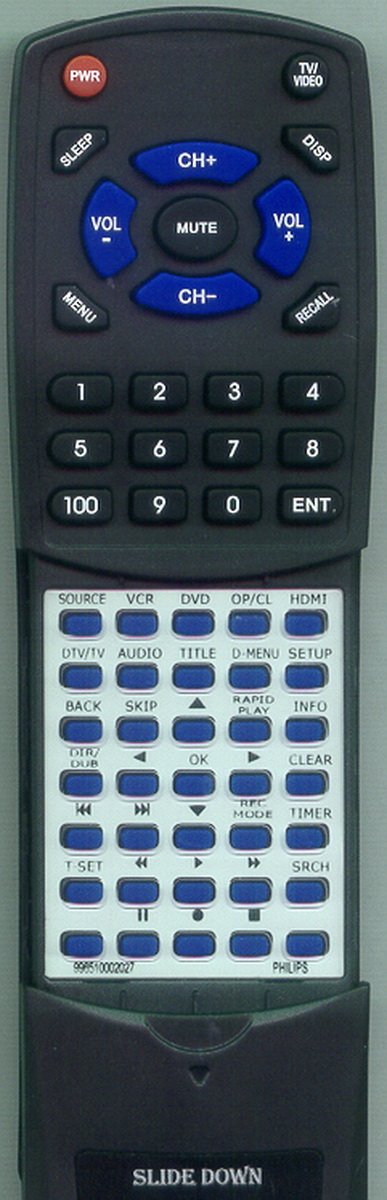
Image 1: Redi-Remote Replacement Remote Control. This image displays the front view of the remote control, highlighting its button layout and compact design. The remote is black with clearly labeled buttons.
The remote features a sliding cover that conceals the lower half of the buttons. Slide this cover down to access additional functions.
Setup
Battery Installation
- Locate the battery compartment on the back of the remote control.
- Slide open the battery compartment cover.
- Insert four (4) AAA batteries, ensuring correct polarity (+ and -) as indicated inside the compartment.
- Close the battery compartment cover securely.
The remote control comes pre-programmed and does not require any additional setup or coding for the Philips DVDR3545V unit.
Operating Instructions
This remote control is designed to operate your Philips DVDR3545V unit directly. All functions of the original remote are replicated. Refer to your Philips DVDR3545V's original operating instructions for specific function details if needed.
Basic Functions:
- Power: Press the Power button to turn the unit on or off.
- Play/Pause/Stop: Use the dedicated buttons for media playback control.
- Channel/Track Navigation: Use the arrow buttons to navigate menus or change channels/tracks.
- Volume Control: Adjust audio output using the Volume Up/Down buttons.
Accessing Additional Functions:
Slide down the cover located on the lower half of the remote to reveal additional buttons for advanced functions. These may include menu navigation, input selection, and other specific controls for your DVDR3545V.
Maintenance
Battery Replacement
Replace batteries when the remote's response becomes sluggish or stops functioning. Always replace all four AAA batteries simultaneously with new ones. Do not mix old and new batteries or different types of batteries.
Cleaning
To clean the remote, wipe it with a soft, dry cloth. Do not use liquid cleaners, abrasive pads, or chemical solvents, as these can damage the remote's surface or internal components.
Storage
Store the remote in a dry place, away from direct sunlight and extreme temperatures. If the remote will not be used for an extended period, remove the batteries to prevent leakage.
Troubleshooting
- Remote not responding:
- Ensure the remote is pointed directly at the Philips DVDR3545V unit.
- Check if the batteries are inserted correctly with the correct polarity.
- Replace old batteries with new AAA batteries.
- Remove any obstructions between the remote and the unit.
- Certain buttons not working:
- Ensure the sliding cover is positioned correctly to access the desired buttons.
- Clean the remote's surface, especially around the unresponsive buttons, to remove any debris.
- Remote controls other devices:
This Redi-Remote is designed specifically for the Philips DVDR3545V and cannot be programmed to control auxiliary devices. If it appears to be affecting other devices, ensure no other universal remotes are in use or interfering.
- Remote feels sluggish:
This usually indicates low battery power. Replace all four AAA batteries.
Specifications
| Model Number | RT996510002027 |
| Compatible Unit | Philips DVDR3545V |
| Original Remote P/N | 996510002027 |
| Dimensions | 7 x 2.5 x 1 inches (17.78 x 6.35 x 2.54 cm) |
| Item Weight | 4.5 ounces (127.57 grams) |
| Batteries Required | 4 x AAA (included) |
| Connectivity Technology | Infrared |
| Special Feature | No Programming Required |
Customer Support
For any concerns or issues with your Redi-Remote replacement remote control after purchase, please contact the seller directly for assistance. Refer to your purchase documentation for seller contact information.