
Cat Mate 355W
Cat Mate Elite Microchip Cat Flap
Model 355W - Instruction Manual
Introduction
Thank you for choosing the Cat Mate Elite Microchip Cat Flap. This advanced pet door provides secure and convenient access for your feline companions while helping to keep unwanted animals out of your home. Featuring microchip or I.D. disc recognition, a digital timer, and an LCD display, this cat flap offers unparalleled control over your pet's movements. Please read this manual carefully before installation and operation to ensure proper use and longevity of your product.
This product is designed for small to average-sized cats and is suitable for installation in various door types including UPVC, glass, and wood, as well as walls.
Safety Information
- Always ensure the installation area is clear of electrical wiring, plumbing, and other obstructions before cutting.
- Keep small children away from the cat flap during operation and installation.
- Do not attempt to modify the product. Use only genuine Cat Mate replacement parts if necessary.
- Ensure batteries are inserted with correct polarity. Do not mix old and new batteries, or different types of batteries.
- This product is intended for pet use only.
Package Contents
Please check that all components are present before beginning installation:
- Cat Mate Elite Microchip Cat Flap Unit (Front and Rear sections)
- Fixing Screws
- Installation Template
- Instruction Manual
Note: Cat Mate I.D. Discs and the Cat Mate Elite Wall Liner (308W) are sold separately.
Setup and Installation
1. Battery Installation
The Cat Flap requires 4 AA batteries (not included). Locate the battery compartment on the top of the main unit. Open the cover and insert the batteries, ensuring correct polarity as indicated inside the compartment. Close the cover securely.
2. Choosing an Installation Location
Select a suitable location on your door or wall. The cat flap is designed for easy installation in single/multiple glazing, UPVC, metal, and wooden doors. For wall installations, the unit self-lines up to 100mm (4 inches) and is compatible with the Cat Mate Elite Wall Liner (308W) for thicker walls.
3. Cutting the Opening
Use the provided installation template to mark the precise cutting lines on your door or wall. Carefully cut the opening according to the template. Ensure the opening is clean and free of debris.

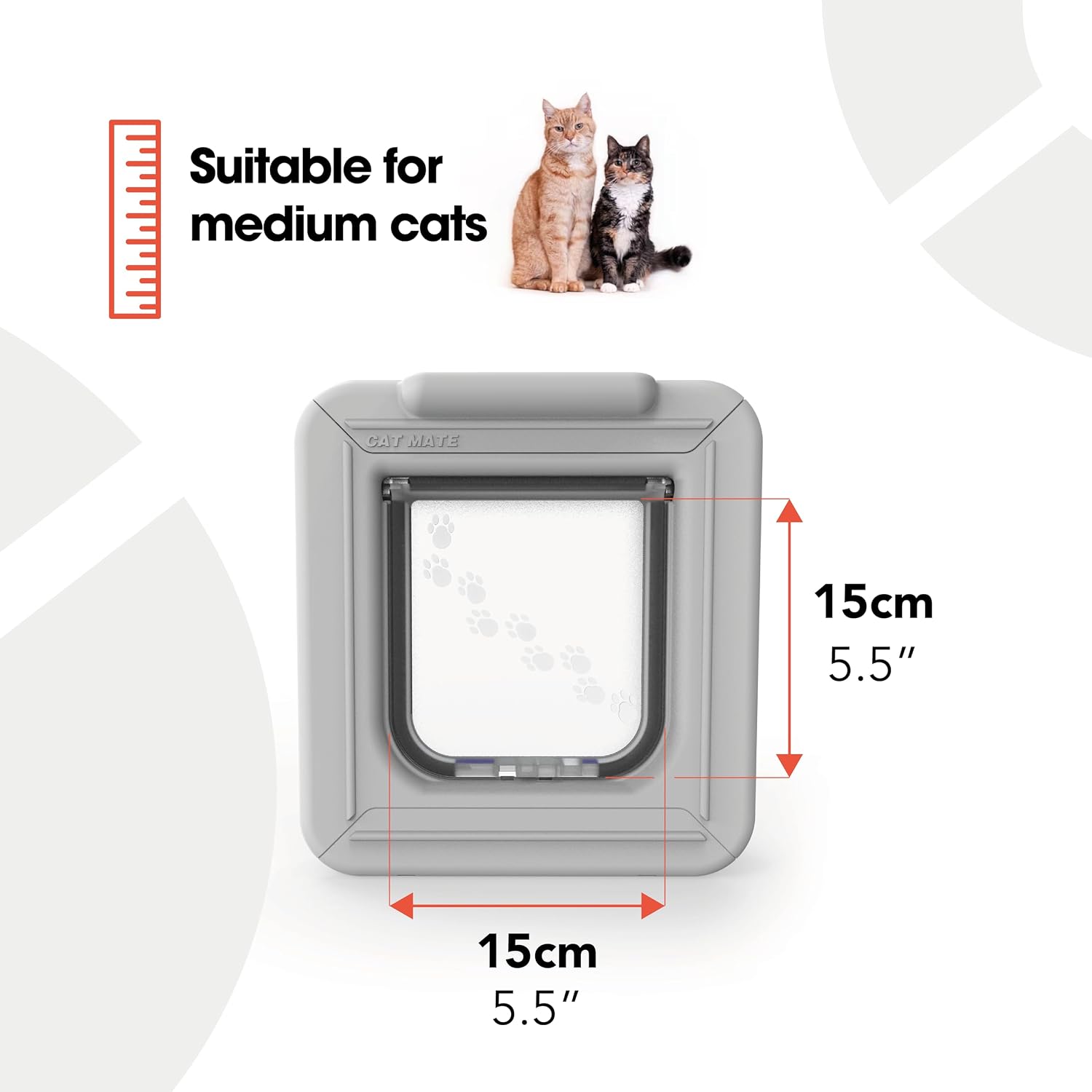
Dimensions of the Cat Mate Elite Microchip Cat Flap, indicating a flap opening of 15cm x 15cm (5.5 inches x 5.5 inches).
4. Assembling the Cat Flap
Insert the front section of the cat flap into the prepared opening from one side, and the rear section from the other side. Align the two sections and secure them using the provided fixing screws. Ensure the unit is flush and stable.

The Cat Mate Elite Microchip Cat Flap, ready for installation.

Side profile of the cat flap, illustrating its depth for various installations.
Rear view of the cat flap, showing the internal structure.
Operating Instructions
1. Programming Microchips/I.D. Discs
The cat flap recognizes your cat's unique microchip or a Cat Mate I.D. Disc (sold separately). To program, press the 'PROG' button on the unit. When the indicator light flashes, guide your cat to pass through the flap. The unit will register their microchip. Repeat for up to 9 cats. The LCD display will show the registered cats.

The digital display provides maximum control, allowing you to check if your cats are in or out and set routines.

Detailed view of the LCD display, showing current time and status indicators.
2. 4-Way Locking System
The cat flap features a 4-way manual lock, allowing you to control access:
- In/Out: Allows free entry and exit for programmed cats.
- In-Only: Allows programmed cats to enter but not exit.
- Out-Only: Allows programmed cats to exit but not enter.
- Locked: Prevents all entry and exit.
Adjust the locking mechanism located on the top of the unit to select the desired setting.
3. Digital Timer Control
Use the digital timer to set specific curfews for your cats, such as keeping them indoors at night. Refer to the detailed instructions in the manual for setting the clock and programming timed entry/exit restrictions.
4. LCD Tracking Display
The LCD display provides useful information, including:
- Lock status
- Location of up to 3 selected cats (in/out)
- Time of last use for each tracked cat
This feature is ideal for multi-cat homes, allowing you to monitor your pets' activity.

The Cat Mate Elite Microchip Cat Flap ensures only paired pets have access, keeping out unwanted visitors and providing weather protection.

A cat demonstrating the use of the Cat Mate Elite Microchip Cat Flap.
Maintenance
- Cleaning: Regularly wipe the cat flap and surrounding area with a damp cloth. Avoid abrasive cleaners or solvents. Ensure the brush seals are kept clean for optimal weatherproofing.
- Battery Replacement: When the battery indicator on the LCD display shows low power, replace all 4 AA batteries promptly.
- Flap Operation: Periodically check the flap for smooth operation. Clear any debris that might obstruct its movement.
Troubleshooting
| Problem | Possible Cause | Solution |
|---|---|---|
| Cat flap not opening for programmed cat. | Microchip not registered or recognized; low batteries; flap obstructed. | Re-program microchip; replace batteries; check for obstructions. |
| Unwanted animals entering. | Flap not set to 'In-Only' or 'Locked'; microchip not working correctly. | Adjust 4-way lock setting; ensure only programmed cats are registered. |
| LCD display is blank or flickering. | Low or dead batteries; incorrect battery installation. | Replace batteries; ensure correct polarity. |
| Timer function not working. | Incorrect time setting; programming error. | Refer to manual for detailed timer programming steps; reset time. |
Specifications
- Model: 355W
- Product Dimensions: 4 x 4 x 4 inches (approximate overall unit size)
- Flap Opening Size: 15cm (5.5 inches) width, 15cm (5.5 inches) height
- Minimum Compatible Thickness: 10 Centimeters (for self-lining)
- Item Weight: 2.81 pounds
- Power: 4 x AA batteries (not included)
- Material: Plastic or resin
- Color: White
- Closure Type: Magnetic
- Compatibility: Cat microchips, Cat Mate I.D. Discs (sold separately)
Warranty and Support
This Cat Mate product is manufactured by Ani Mate - Pet Products. For specific warranty details, please refer to the documentation included with your purchase or visit the official Cat Mate website. Most products come with a limited warranty covering manufacturing defects.
For technical support, troubleshooting assistance, or to inquire about replacement parts, please contact Closer Pets - U.S. customer service. You may find contact information on the product packaging or the official brand website.
Return Policy: Products purchased from authorized sellers typically have a 30-day return policy for refunds or replacements, subject to seller terms and conditions.
Related documents355W


Ask a question about this manual
Ask about setup, troubleshooting, compatibility, parts, safety, or missing instructions. Manuals+ will review the question and use this page’s manual context to help answer it.