
Armani Exchange AX2094 Quartz Chronograph Watch User Manual
Model: AX2094
Brand: A|X Armani Exchange
1. Introduction
This user manual provides detailed instructions for the proper setup, operation, and maintenance of your Armani Exchange AX2094 Quartz Chronograph Watch. Please read this manual thoroughly to ensure optimal performance and longevity of your timepiece.
2. Setup and Initial Use
2.1 Unboxing and Initial Inspection
Upon receiving your watch, carefully remove it from its packaging. Inspect the watch for any visible damage or missing components. The package should include the watch and this instruction manual.

Image: The Armani Exchange AX2094 watch presented in its black box, accompanied by the user manual.
2.2 Setting the Time
To set the time:
- Pull the crown (the knob on the side of the watch) out to the second click position.
- Turn the crown clockwise or counter-clockwise to move the hour and minute hands to the desired time.
- Push the crown back in to the normal operating position to start the watch.

Image: Front view of the AX2094 watch, highlighting the crown (center right) and chronograph pushers (top and bottom right).
2.3 Setting the Date
To set the date (if applicable):
- Pull the crown out to the first click position.
- Turn the crown clockwise or counter-clockwise to adjust the date. Avoid setting the date between 9 PM and 3 AM, as this may interfere with the automatic date change mechanism.
- Push the crown back in to the normal operating position.
2.4 Strap Adjustment
The stainless steel strap can be adjusted for a comfortable fit. It is recommended to have the strap adjusted by a professional jeweler or watchmaker to prevent damage to the links or clasp.

Image: The AX2094 watch worn on a wrist, illustrating how the watch fits and the typical wrist size range.

Image: Rear view of the AX2094 watch, focusing on the stainless steel strap and the branded clasp mechanism.
2.5 Water Resistance
This watch is water resistant up to 50 meters (5 ATM). This means it is suitable for short periods of recreational swimming in shallow water. It is not suitable for diving, snorkeling, or high-impact water sports. Ensure the crown is fully pushed in before any contact with water.
3. Operating the Watch
3.1 Time Display
The watch displays time using traditional hour, minute, and second hands. The sub-dials provide chronograph functions.
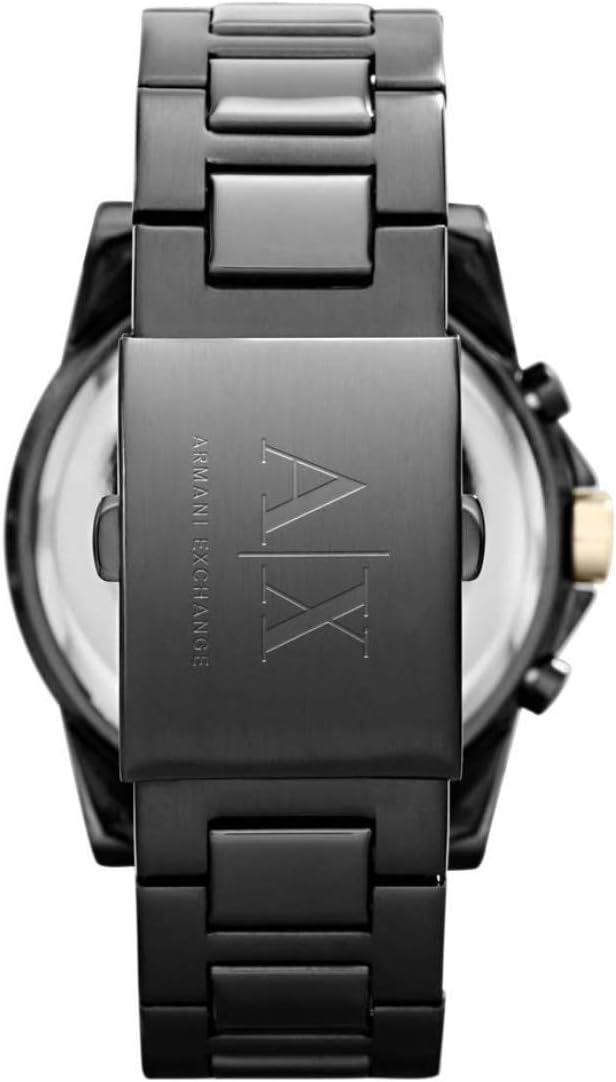
Image: Detailed view of the AX2094 watch dial, showcasing the chronograph sub-dials, hour markers, and hands.
3.2 Chronograph Function
The chronograph function allows you to measure elapsed time. It operates independently of the main time display.
- Start/Stop: Press the top pusher (A) to start the chronograph. Press it again to stop the measurement.
- Reset: While the chronograph is stopped, press the bottom pusher (B) to reset all chronograph hands to their zero positions.
4. Maintenance
4.1 Cleaning
Wipe the watch case and strap regularly with a soft, dry cloth to remove dust and dirt. For stainless steel, a slightly damp cloth can be used, followed by immediate drying. Avoid using chemical cleaners, as they may damage the watch's finish or seals.
4.2 Water Resistance Care
To maintain water resistance, ensure the crown is always fully pushed in. Avoid operating the crown or pushers while the watch is wet or submerged. Do not expose the watch to hot water, steam, or extreme temperature changes, as this can compromise the water-resistant seals.
4.3 Battery Replacement
The watch is powered by one LR44 battery. When the battery runs low, the watch may stop or the second hand may skip. Battery replacement should be performed by a qualified watch technician to ensure proper sealing and function, especially to maintain water resistance.
4.4 Storage
When not in use, store your watch in a cool, dry place, away from direct sunlight and strong magnetic fields. The original watch box is ideal for storage.
5. Troubleshooting
- Watch Not Running: Check if the crown is fully pushed in. If the watch still does not run, the battery may need replacement.
- Incorrect Time/Date: Refer to sections 2.2 and 2.3 for setting instructions. Ensure the crown is fully pushed in after setting.
- Chronograph Hands Not Resetting to Zero: This may indicate a need for calibration or service. Consult a professional watch technician.
6. Specifications
| Feature | Detail |
|---|---|
| Model Number | AX2094 |
| Movement | Quartz Chronograph |
| Case Diameter | 45 mm |
| Band Width | 22 mm |
| Case Material | Black Stainless Steel |
| Strap Material | Stainless Steel |
| Crystal Type | Mineral Crystal |
| Water Resistance | 50 meters (5 ATM) |
| Battery Type | 1 x LR44 (included) |
| Product Dimensions | 4.5 x 2.2 x 1 cm; 100 g |

Image: A visual guide illustrating different watch dial sizes, including the 45mm diameter of the AX2094.
7. Warranty and Support
7.1 Warranty Information
Your Armani Exchange AX2094 watch typically comes with a manufacturer's warranty. This generally includes a 2-year warranty for the watch movement and a 1-year warranty for the battery from the date of purchase. Please retain your proof of purchase for warranty claims. The warranty usually covers manufacturing defects but does not cover normal wear and tear, accidental damage, or damage resulting from improper use or unauthorized repairs.
7.2 Customer Support
For further assistance, technical support, or warranty service, please contact the authorized Armani Exchange service center or the retailer from whom you purchased the watch. Refer to the warranty card or official brand website for specific contact details.