
1. Introduction
This manual provides comprehensive instructions for the installation, operation, and maintenance of your OFFTEK 2GB DDR2-4200 RAM module. This memory module is specifically designed to enhance the performance of your NEC SI1310 Workstation by providing a reliable and compatible memory upgrade.
Upgrading your system's RAM is an effective way to improve overall machine performance, achieve faster boot times, increase productivity, and enhance multitasking capabilities, potentially extending the lifespan of your workstation.
2. Safety Precautions
Before beginning any installation, please observe the following safety guidelines:
- Always power off your computer and disconnect it from the power outlet before opening the case.
- Discharge any static electricity from your body by touching a grounded metal object (e.g., the computer's metal chassis) before handling components. Consider using an anti-static wrist strap.
- Handle the RAM module by its edges to avoid touching the gold connectors or the chips.
- Work in a clean, well-lit environment.
3. Installation Guide
Installing the OFFTEK RAM module is a straightforward process. No operating system or software updates are required, as the module is designed for plug-and-play functionality.
Step-by-Step Installation:
- Prepare Your Workstation: Power down your NEC SI1310 Workstation completely and unplug all cables.
- Open the Computer Case: Refer to your workstation's manual for instructions on how to safely open its case.
- Locate RAM Slots: Identify the DIMM slots on your motherboard. These are typically long, narrow slots with clips on either end.
- Prepare the Slot: If you are replacing an existing module, gently push the clips on both ends of the slot outwards to release the old RAM module. If installing in an empty slot, ensure the clips are open.
- Insert the New RAM Module: Align the notch on the OFFTEK RAM module with the key in the DIMM slot. Gently but firmly push the module straight down into the slot until the clips on both sides snap into place, securing the module.

Image 3.1: The OFFTEK 2GB DDR2-4200 RAM module.
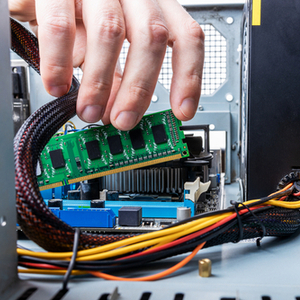
Image 3.2: Proper insertion of a RAM module into a DIMM slot.
- Verify Installation: Double-check that the module is seated correctly and the clips are fully engaged.
- Close the Case: Reassemble your computer case and reconnect all cables.
- Power On: Turn on your workstation. The system should automatically detect the new memory.

Image 3.3: Multiple OFFTEK RAM modules correctly installed in a motherboard.
4. Operating Considerations
Once installed, the OFFTEK RAM module operates automatically. Your operating system will utilize the increased memory to improve system responsiveness and allow for more applications to run simultaneously without performance degradation.
To verify the new memory is recognized, you can check your system's properties (e.g., in Windows, right-click 'This PC' and select 'Properties'; in Linux, use commands like `free -h` or `cat /proc/meminfo`).
5. Maintenance
RAM modules generally require minimal maintenance. However, to ensure optimal performance and longevity:
- Keep your computer's interior clean from dust buildup, which can impede airflow and cause overheating.
- Ensure proper ventilation around your workstation to prevent excessive heat, which can degrade electronic components over time.
- Avoid unnecessary physical shocks or impacts to your computer.
6. Troubleshooting
If you encounter issues after installing the RAM module, consider the following troubleshooting steps:
- System Does Not Boot:
- Ensure the RAM module is fully seated in its slot. Re-seat the module firmly.
- Check if the clips on both ends of the slot are securely closed.
- If you installed multiple modules, try booting with only one module at a time to identify a potentially faulty module or slot.
- Incorrect Memory Amount Detected:
- Verify that the module is correctly seated.
- Check your system's BIOS/UEFI settings to ensure the memory is recognized.
- Ensure your operating system is 64-bit to fully utilize more than 4GB of RAM (though this module is 2GB, it's a general consideration for memory upgrades).
- Frequent Crashes or Blue Screens:
- Run a memory diagnostic tool (e.g., Windows Memory Diagnostic) to check for errors.
- Ensure your motherboard's BIOS/UEFI is up to date.
If problems persist, consult your workstation's manufacturer support or OFFTEK customer service.
7. Specifications
The following table details the technical specifications of the OFFTEK 2GB DDR2-4200 RAM Module:
| Feature | Specification |
|---|---|
| Brand | OFFTEK |
| Manufacturer | Offtek |
| Model Number | 891769-NE-2048 |
| Product Dimensions | 13.34 x 1.09 x 2.99 cm |
| Form Factor | DIMM |
| RAM Size | 2 GB |
| Memory Technology | DDR2 |
| Computer Memory Type | DDR2 SDRAM |
| Memory Clock Speed | 533 MHz |
| Voltage | 1.8 Volts |
8. Warranty and Support
Limited Lifetime Warranty:
OFFTEK memory products are backed by a limited lifetime warranty. This warranty ensures that if your memory module becomes defective, OFFTEK will replace or repair it free of charge, provided the product is still in production. This commitment reflects OFFTEK's confidence in the high-quality components and rigorous module-level testing that ensure long-term reliability.
Customer Support:
For technical assistance, warranty claims, or further inquiries, please contact OFFTEK customer support through their official website or the retailer where the product was purchased. Please have your product model number and purchase details ready when contacting support.