
Introduction
Welcome to the user manual for your OFFTEK 4GB Replacement Memory RAM Upgrade. This guide provides essential information for the proper installation, operation, and maintenance of your new memory module, ensuring optimal performance for your LG R490 laptop. Please read this manual carefully before proceeding with installation.
Product Overview
The OFFTEK 4GB DDR3-8500 memory module is designed to enhance the performance of your compatible laptop. Upgrading your RAM can lead to faster boot times, increased productivity, and improved multitasking capabilities, extending the overall life and efficiency of your machine.
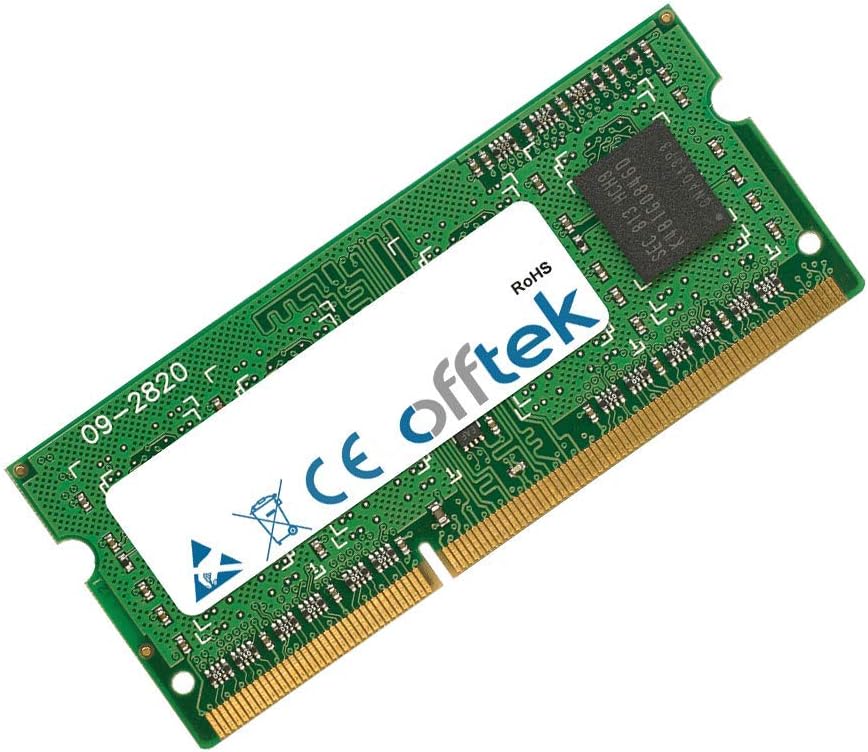
Figure 1: OFFTEK 4GB DDR3-8500 Laptop Memory Module. This image shows the OFFTEK 4GB DDR3-8500 laptop memory module, a green circuit board with a white label displaying the OFFTEK logo and product information.

Figure 2: Side view of OFFTEK 4GB DDR3-8500 Laptop Memory Module. This image provides a different angle of the OFFTEK memory module, highlighting its compact form factor and gold-plated contacts.
Setup and Installation
Installing your OFFTEK RAM module is a straightforward process and one of the simplest ways to upgrade your laptop. No operating system or software updates are needed; it's a plug-and-play upgrade. However, it is crucial to follow these steps carefully to prevent damage to your laptop or the memory module.
Safety Precautions:
- Power Off: Ensure your laptop is completely powered off and disconnected from the power adapter.
- Remove Battery: For laptops with removable batteries, remove the battery before proceeding.
- Static Discharge: Discharge any static electricity from your body by touching a grounded metal object (e.g., an unpainted metal part of your laptop's chassis) before handling the memory module.
- Handle Carefully: Hold the memory module by its edges, avoiding contact with the gold connectors or the chips.
Installation Steps:
- Access RAM Compartment: Locate and open the RAM compartment on the underside of your LG R490 laptop. This usually involves unscrewing a panel.
- Remove Old Module (if applicable): If replacing an existing module, gently push the small clips on either side of the module outwards. The module will pop up at an angle. You can then slide it out of the slot.
- Insert New Module: Align the notch on the OFFTEK memory module with the key in the RAM slot. Insert the module at a 45-degree angle into the slot.
- Secure Module: Gently push the module down until the clips on both sides snap into place, securing the module horizontally.
- Close Compartment: Replace the RAM compartment cover and secure it with screws.
- Reconnect Power: Reinsert the battery (if removed) and reconnect the power adapter.
- Power On: Turn on your laptop. The system should automatically detect the new memory.

Figure 3: Installation of OFFTEK Memory Module. A close-up image of hands carefully inserting the OFFTEK memory module into an open laptop's RAM slot, demonstrating the installation process.
Operating
Once the OFFTEK memory module is correctly installed, your LG R490 laptop will automatically recognize the increased memory capacity upon startup. You can verify the installed RAM by checking your system's properties:
- Windows: Right-click on "This PC" or "My Computer" and select "Properties." The installed RAM will be displayed under "Installed memory (RAM)."
- macOS: Click the Apple menu in the top-left corner, select "About This Mac," and then navigate to the "Memory" tab or section.
The system will utilize the new memory to improve overall performance without requiring any additional software or driver installations.
Maintenance
Memory modules generally require no ongoing maintenance once installed. To ensure the longevity and proper functioning of your OFFTEK RAM, consider the following:
- Environmental Conditions: Keep your laptop in a clean, dry environment, away from extreme temperatures and humidity.
- Physical Handling: If you ever need to remove or re-install the module, always follow the safety precautions outlined in the "Setup and Installation" section, particularly regarding static electricity and handling by the edges.
- Dust: Periodically clean the interior of your laptop (if comfortable doing so) to prevent dust buildup, which can affect cooling and component lifespan.
Troubleshooting
If you encounter issues after installing your OFFTEK memory module, refer to the following common troubleshooting steps:
Common Issues and Solutions:
- Laptop Does Not Boot / Black Screen:
- Ensure the memory module is fully seated in its slot. Remove and re-insert it, making sure the clips snap into place.
- Verify that the module is compatible with your specific LG R490 model. While this module is designed for it, double-check your laptop's specifications.
- If you installed multiple modules, try booting with only the new OFFTEK module installed.
- System Recognizes Incorrect Amount of RAM:
- Re-seat the module to ensure proper contact.
- Check if your operating system is 32-bit, which may limit usable RAM to around 3.5GB regardless of physical installation. A 64-bit OS is required to utilize more than 4GB.
- Frequent Crashes or Blue Screens (BSOD):
- This could indicate a faulty module or improper installation. Try re-seating the module.
- Run a memory diagnostic tool (e.g., Windows Memory Diagnostic) to check for errors.
If these steps do not resolve your issue, please refer to the "Warranty and Support" section for further assistance.
Specifications
| Feature | Specification |
|---|---|
| Brand | OFFTEK |
| Computer Memory Size | 4 GB |
| RAM Memory Technology | DDR3 |
| Memory Speed | 1066 MHz |
| Compatible Devices | Laptop (LG R490) |
| Product Dimensions | 2.6 x 0.43 x 1.75 inches |
| Item Weight | 0.32 ounces |
| Manufacturer | Offtek |
Warranty and Support
OFFTEK stands behind the quality of its products. Your 4GB Replacement Memory RAM Upgrade is backed by a Limited Lifetime Warranty. This warranty guarantees that if your memory module should ever fail, OFFTEK will replace or repair the product free of charge, provided it is still manufactured.
With over 25 years of memory expertise, OFFTEK ensures that every memory product is manufactured using premier quality components and undergoes module-level testing for long-term reliability and 100% compatibility.
For warranty claims, technical support, or further assistance, please visit the official OFFTEK website or contact their customer service department. Please have your product model and purchase information ready when contacting support.