
1. Introduction
This manual provides instructions for installing and utilizing your OFFTEK 1GB DDR PC3200 (PC400) Non-ECC Motherboard Memory module, model 1025642-IP-1024. This memory module is specifically designed as a replacement and upgrade for the IPOX IP-4MTI2H motherboard, enhancing your system's performance and multitasking capabilities.
OFFTEK memory is manufactured using premier quality components and undergoes rigorous module-level testing to ensure long-term reliability and 100% compatibility with your computer and operating system.
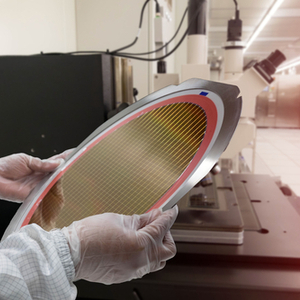
Image: Silicon wafer undergoing quality inspection, demonstrating OFFTEK's commitment to component quality.
2. Safety Precautions
Before beginning the installation process, please observe the following safety guidelines:
- Always disconnect your computer from the power outlet and remove the battery (if applicable for laptops) before opening the case.
- Discharge any static electricity from your body by touching a grounded metal object (e.g., the computer's metal chassis) before handling memory modules or other internal components. Consider using an anti-static wrist strap.
- Handle the memory module by its edges to avoid touching the gold connectors or the chips.
- Work in a clean, well-lit environment.
3. Installation Guide
Installing the OFFTEK RAM module is a straightforward process. No operating system or software updates are needed; it is a plug-and-play upgrade. For detailed visual guides, please refer to the OFFTEK website.
Step-by-Step Installation:
- Prepare Your System: Ensure your computer is powered off and unplugged. Open the computer case according to your system's manufacturer instructions.
- Locate RAM Slots: Identify the existing RAM modules and available memory slots on your IPOX IP-4MTI2H motherboard. Consult your motherboard manual if unsure.
- Remove Existing Modules (if upgrading): If you are replacing existing modules, gently push the small clips on both ends of the RAM slot outwards. The module should pop up slightly, allowing you to carefully pull it out.
- Insert New Module: Align the notches on the OFFTEK 1GB DDR PC3200 module with the corresponding keys in the memory slot. Apply even pressure to both ends of the module until it clicks into place and the clips automatically secure it. Do not force the module.
- Verify Installation: Double-check that the module is seated firmly and the clips are locked.
- Close Case and Power On: Close your computer case, reconnect the power, and power on your system. The system should automatically detect the new memory.

Image: Proper insertion of a RAM module into a motherboard slot.

Image: Installing a RAM module inside a desktop computer case.
4. Operating Benefits
Once installed, your OFFTEK 1GB DDR PC3200 RAM module will immediately contribute to improved system performance. You can expect:
- Faster Boot Times: Your computer will start up more quickly.
- Increased Productivity: Applications will load faster and run more smoothly.
- Enhanced Multitasking: Switch between multiple programs and browser tabs without slowdowns.
- Extended Machine Life: By reducing strain on other components, the upgrade can help prolong the overall lifespan of your system.
Image: Enhanced system performance supports demanding tasks and collaboration.
5. Maintenance
Memory modules generally require minimal maintenance. To ensure optimal performance and longevity of your RAM and overall system, consider the following:
- Keep Your System Clean: Regularly clean the interior of your computer case to prevent dust buildup, which can impede airflow and lead to overheating.
- Ensure Proper Ventilation: Make sure your computer has adequate airflow and is not placed in an enclosed space that could trap heat.
- Software Updates: Keep your operating system and drivers updated to ensure compatibility and optimal performance with your hardware.
6. Troubleshooting
If you encounter issues after installing your new RAM module, consider these troubleshooting steps:
- System Not Booting / No Display:
- Ensure the RAM module is fully seated in its slot. Re-seat the module by pressing down firmly until the clips lock.
- Try installing only the new OFFTEK module (if you have multiple) to isolate the issue.
- If you have multiple RAM slots, try the module in a different slot.
- Verify that the module is compatible with your motherboard's specifications (DDR, PC3200, Non-ECC).
- Memory Errors / Blue Screens:
- Run a memory diagnostic tool (e.g., Windows Memory Diagnostic) to check for errors.
- Ensure your motherboard's BIOS/UEFI is updated to the latest version.
- System Slowdown / Performance Issues:
- Confirm that the system recognizes the full amount of installed RAM in your operating system's system information.
- Check for conflicting software or background processes consuming resources.
If problems persist, contact OFFTEK customer support for further assistance.
7. Specifications
| Feature | Specification |
|---|---|
| Brand | OFFTEK |
| Model Number | 1025642-IP-1024 |
| Computer Memory Size | 1 GB |
| RAM Memory Technology | DDR |
| Memory Speed | 400 MHz (PC3200) |
| Compatible Devices | Desktop (IPOX IP-4MTI2H Motherboard) |
| Voltage | 2.6 Volts |
| Form Factor | DIMM 184-pin |
| Number of Pins | 184 |
| Additional Features | Lightweight, Non-ECC |
8. Warranty & Support
OFFTEK provides a Limited Lifetime Warranty for this memory module. This warranty guarantees that if your memory should ever fail, OFFTEK will replace or repair the product free of charge, provided it is still manufactured. This warranty reflects OFFTEK's confidence in the quality and reliability of its products, backed by over 25 years of memory expertise.
For technical support, warranty claims, or further assistance, please visit the official OFFTEK website or contact their customer service department. Ensure you have your product model number (1025642-IP-1024) and purchase details available when seeking support.


