
Introduction
This manual provides essential information for the proper use and care of your Fossil Women's Riley Stainless Steel Multifunction Watch, Model ES3204. This timepiece combines classic design with practical features, ensuring both style and functionality. Please read these instructions carefully to ensure optimal performance and longevity of your watch.
Key Features
- Multifunction Movement: Features sub-dials for day, date, and 24-hour time.
- Crystal-Accented Bezel: The watch face is adorned with 45 stones for enhanced aesthetic appeal.
- Durable Construction: Crafted with a stainless steel case and a two-tone stainless steel bracelet.
- Scratch-Resistant Lens: Equipped with a hardened mineral crystal lens to resist scratches.
- Water Resistance: Rated for 10 ATM (100 meters), suitable for bathing, swimming, or snorkeling, but not scuba diving.
- Secure Clasp: Features a fold-over clasp for a secure fit.
Setup
Setting the Time and Date
- Pull out the crown: Gently pull the crown (the small knob on the side of the watch) to position 2.
- Set the time: Rotate the crown to adjust the hour and minute hands to the correct time. Ensure AM/PM is correctly set if your watch has a 24-hour indicator.
- Set the date/day: For watches with date/day functions, pull the crown out to position 1 (if applicable, or rotate in position 2 in the opposite direction) and turn it to set the correct date and day. Avoid setting the date between 9 PM and 3 AM, as this can interfere with the automatic date change mechanism.
- Push in the crown: Once set, push the crown back into its original position to start the watch.

Image: Side view of the watch, highlighting the crown used for time and date adjustments.
Adjusting the Bracelet
The stainless steel bracelet features removable links for a customized fit. If the watch is too loose or too tight, it is recommended to visit a professional jeweler to have links added or removed. Improper adjustment can damage the bracelet or the watch.

Image: Close-up of the watch's fold-over clasp mechanism.
Understanding Watch Case Sizes
The Fossil Riley watch features a 38mm case. Refer to the general case size guide below to understand how different watch sizes appear on the wrist.
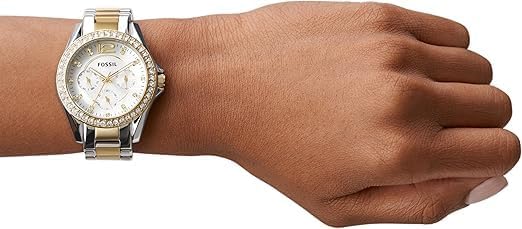
Image: A visual guide illustrating different round watch case diameters and their relative appearance.
Operating Your Watch
Your Fossil Riley watch is equipped with a multifunction quartz movement, featuring three sub-dials on the main face. These sub-dials typically display the day of the week, the date, and a 24-hour indicator.
- Day Sub-dial: Indicates the current day of the week (e.g., SU, MO, TU).
- Date Sub-dial: Displays the current date (1-31).
- 24-Hour Sub-dial: Shows the time in a 24-hour format, useful for distinguishing AM/PM.
To adjust these sub-dials, use the crown as described in the 'Setting the Time and Date' section. Specific adjustments for each sub-dial may vary slightly; refer to the detailed instructions provided with your watch packaging for precise steps.

Image: Detailed view of the watch face, illustrating the main hands and the three functional sub-dials.
Product Overview Video
Video: An official product video showcasing the Fossil Women's Riley Stainless Steel Crystal-Accented Multifunction Quartz Watch.
Additional Product Overview
Video: Another official product video providing a general overview of the Fossil Women's Riley Stainless Steel Multifunction Glitz Quartz Watch.
Maintenance
Cleaning Your Watch
To maintain the appearance of your watch, regularly wipe the case and bracelet with a soft, damp cloth. For stainless steel, a mild soap solution can be used, followed by thorough rinsing and drying. Avoid harsh chemicals or abrasive materials, as these can damage the finish or crystal.
Water Resistance
Your watch is water-resistant up to 10 ATM (100 meters). This means it is suitable for bathing, swimming, and snorkeling. However, it is not designed for scuba diving. Always ensure the crown is fully pushed in before exposing the watch to water. Avoid operating the crown or pushers while the watch is wet.
Battery Replacement
The watch is powered by 1 Lithium Metal battery (included). When the battery needs replacement, it is recommended to take your watch to an authorized Fossil service center or a reputable jeweler. Attempting to replace the battery yourself may void the warranty or damage the watch.
Troubleshooting
- Watch not running: Check if the crown is fully pushed in. If the watch still does not run, the battery may need replacement.
- Incorrect time/date: Follow the instructions in the 'Setting the Time and Date' section to reset.
- Condensation under crystal: This may indicate a breach in the water resistance. Avoid further water exposure and seek professional service immediately.
- Bracelet discomfort: Ensure the bracelet is properly sized. If not, consult a jeweler for adjustment.
For issues not covered here, please contact Fossil customer support or an authorized service center.
Specifications
| Model Number | ES3204 |
| Case Size | 38mm |
| Band Width | 18mm |
| Case Material | Stainless Steel |
| Band Material | Stainless Steel |
| Movement | Quartz Multifunction |
| Water Resistance | 10 ATM (100 meters) |
| Lens Material | Hardened Mineral Crystal |
| Battery Type | 1 Lithium Metal (included) |
| Product Dimensions | 2.83 x 3.86 x 3.54 inches; 4.16 ounces |
Warranty and Support
Your Fossil watch is covered by a manufacturer's warranty. For detailed information regarding warranty coverage, terms, and conditions, please refer to the warranty card included with your purchase or visit the official Fossil website. For technical support, repairs, or any other inquiries, please contact Fossil customer service through their official channels.
