
Introduction
This manual provides detailed instructions for the setup, operation, maintenance, and troubleshooting of your Replay XD XD1080 Action Camera System. This system includes the XD1080 camera, a suction cup mount, and an external microphone. Please read this manual thoroughly before using your device to ensure optimal performance and longevity.
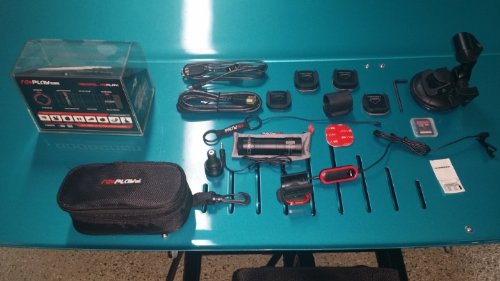
Image: The Replay XD XD1080 Action Camera System, showcasing the compact camera, the robust suction cup mount, and the external microphone for enhanced audio capture.
1. Setup
1.1 Charging the Camera
Before first use, fully charge the XD1080 camera. Connect the camera to a USB power source using the provided USB cable. The charging indicator light will illuminate during charging and turn off when fully charged.
1.2 Inserting the Micro SD Card
- Locate the Micro SD card slot on the camera.
- Gently insert a compatible Micro SD card (Class 10 or higher recommended) into the slot until it clicks into place. Ensure the card is inserted with the correct orientation.
- To remove, push the card in slightly until it springs out.
1.3 Attaching the Suction Cup Mount
- Ensure the mounting surface is clean, dry, and smooth (e.g., glass, polished metal, non-porous plastic).
- Attach the XD1080 camera to the mount's universal adapter.
- Press the suction cup firmly against the desired surface.
- Flip the lever on the suction cup base down to create a vacuum seal, securing the mount.
- Adjust the camera angle using the articulated arm and locking knobs. Ensure all knobs are tightened before use.
1.4 Connecting the External Microphone
- Locate the external microphone input port on the XD1080 camera.
- Plug the external microphone's 3.5mm jack firmly into the camera's microphone input.
- Position the microphone for optimal audio capture, away from wind noise if possible.
2. Operating Instructions
2.1 Powering On/Off
- To Power On: Press and hold the Power button until the indicator light illuminates.
- To Power Off: Press and hold the Power button until the indicator light turns off.
2.2 Recording Video
- Ensure a Micro SD card is inserted and the camera is powered on.
- Press the Record button once to start recording. The indicator light will flash to indicate recording is in progress.
- Press the Record button again to stop recording. The indicator light will stop flashing and remain solid.
2.3 Using the External Microphone
When the external microphone is connected, the camera will automatically prioritize audio input from the external microphone over the internal microphone. No additional settings are typically required.
2.4 Transferring Files
- Connect the camera to a computer using the USB cable. The camera will appear as a removable storage device.
- Alternatively, remove the Micro SD card and insert it into a compatible card reader connected to your computer.
- Drag and drop video files from the camera/SD card to your computer.
3. Maintenance
3.1 Cleaning the Camera and Mount
- Use a soft, dry, lint-free cloth to clean the camera body and lens.
- For the suction cup, wipe with a damp cloth and mild soap if necessary, then rinse thoroughly and air dry. Ensure the suction cup is free of dust and debris for optimal adhesion.
- Do not use harsh chemicals, solvents, or abrasive cleaners.
3.2 Storage
Store the camera and accessories in a cool, dry place away from direct sunlight and extreme temperatures. Remove the Micro SD card if storing for extended periods.
3.3 Battery Care
To prolong battery life, avoid fully discharging the battery frequently. If storing for a long time, charge the battery to approximately 50% every few months.
4. Troubleshooting
| Problem | Possible Cause | Solution |
|---|---|---|
| Camera does not power on. | Low or depleted battery. | Charge the camera fully using the USB cable. |
| Camera not recording. | No Micro SD card, full card, or incompatible card. | Insert a compatible Micro SD card, delete old files, or format the card. |
| Poor audio quality. | External microphone not connected properly, or internal microphone obstructed. | Ensure external microphone is fully plugged in. Check for obstructions around microphone ports. |
| Suction cup mount detaches. | Surface is dirty, wet, porous, or suction lever not engaged. | Clean and dry the mounting surface. Ensure the lever is fully engaged. Use on smooth, non-porous surfaces only. |
5. Specifications
- Brand: Replay XD
- Model: XD1080
- Item Weight: 1.59 pounds
- Package Dimensions: 6.85 x 5.12 x 3.94 inches
- Color: Black
- Special Features: Removable
- Photo Sensor Technology: CMOS
- Video Capture Resolution: 1080p
- Flash Memory Type: Micro SD
- Camcorder Type: Action Camera
- Lens Type: Zoom
- Image Stabilization: No
- Focus Type: Fixed Focus
6. Warranty and Support
For warranty information and technical support, please refer to the official Replay XD website or contact their customer service directly. Keep your proof of purchase for warranty claims.
Replay XD Official Website: www.replayxd.com (Note: This is a placeholder URL, please verify the actual manufacturer's website.)