
1. Introduction
Thank you for choosing the Black & Decker PW1300C Pressure Washer. This manual provides essential information for the safe and efficient operation, maintenance, and troubleshooting of your new pressure washer. Please read these instructions carefully before use and retain them for future reference.
2. Safety Information
WARNING: Read all safety warnings and instructions. Failure to follow the warnings and instructions may result in electric shock, fire, and/or serious injury.
- Always wear appropriate personal protective equipment, including safety glasses, when operating the pressure washer.
- Never direct the water jet at people, animals, electrical equipment, or the appliance itself.
- Ensure the power cord and plug are in good condition. Do not use if damaged.
- Connect the pressure washer only to a properly grounded outlet.
- Do not operate the pressure washer in explosive atmospheres, such as in the presence of flammable liquids, gases, or dust.
- Keep children and bystanders away while operating the pressure washer.
- Always disconnect the power supply before performing any maintenance or cleaning.
- Ensure the water supply is clean and free of debris to prevent damage to the pump.
3. Package Contents
Verify that all items listed below are present in your package:
- Pressure washer unit
- Nozzle cleaning tool
- Wall mounting kit
- Foam sprayer
- High-performance water inlet filter (pre-installed or separate)
- Spray gun and high-pressure hose

Figure 3.1: Accessories included with the pressure washer, such as the spray gun, high-pressure hose, and various nozzles.
4. Setup
4.1 Assembling the Unit
- Attach the High-Pressure Hose: Connect one end of the high-pressure hose to the outlet on the pressure washer unit and the other end to the spray gun. Ensure connections are secure.
- Install Nozzle/Foam Sprayer: Select the desired nozzle or attach the foam sprayer to the end of the spray gun. Twist or click into place firmly.

Figure 4.1: The spray gun assembly with the foam sprayer attachment.
4.2 Connecting to Water Supply
- Connect Garden Hose: Attach a standard garden hose (not supplied) to the water inlet connector on the pressure washer. Ensure the water inlet filter is clean and properly seated.
- Secure Connection: Tighten the garden hose connection to prevent leaks.
- Turn on Water: Fully open the water tap to allow water to flow to the pressure washer.

Figure 4.2: Close-up view of the water inlet connection point on the pressure washer.
4.3 Connecting to Power
- Plug In: Insert the power plug into a suitable, grounded electrical outlet (230 volts).
- Check Cord: Ensure the power cord is not damaged or pinched.
4.4 Wall Mounting (Optional)
The unit includes a wall mounting kit for convenient storage and use. Follow the instructions provided with the wall mounting kit for secure installation. Ensure the mounting surface can support the weight of the unit.
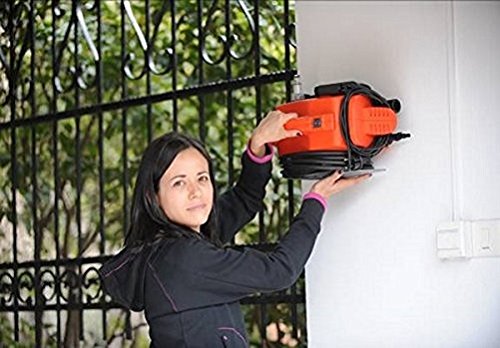
Figure 4.3: A person demonstrating the wall-mounting capability of the Black & Decker PW1300C Pressure Washer.
5. Operating Instructions
5.1 Initial Start-up and Priming
- With the water supply on, squeeze the trigger on the spray gun to release any air from the system. Allow water to flow steadily for about 30 seconds.
- Turn the pressure washer ON using the power switch.
- The unit will start, and pressure will build up.
5.2 Using the Pressure Washer
- Total Stop System: The PW1300C features a Total Stop System (TSS). This system automatically shuts off the pump when the trigger is released, saving energy and prolonging pump life. The pump restarts when the trigger is squeezed again.
- Applying Detergent: If using the foam sprayer, fill it with appropriate pressure washer detergent. Attach it to the spray gun. The pressure washer will draw detergent and mix it with water.
- Cleaning Technique: Always start spraying from a distance of approximately 30 cm (12 inches) from the surface and move closer if higher pressure is needed. Use a sweeping motion.

Figure 5.1: Main unit of the Black & Decker PW1300C Pressure Washer in operation.
5.3 Shutting Down
- Turn OFF the pressure washer power switch.
- Turn OFF the water supply.
- Squeeze the spray gun trigger to release any remaining pressure in the system.
- Disconnect the garden hose and power cord.
6. Maintenance
6.1 Cleaning the Water Inlet Filter
Regularly inspect and clean the water inlet filter to prevent debris from entering and damaging the pump. To clean:
- Disconnect the water supply.
- Remove the filter from the water inlet.
- Rinse the filter under running water to remove any accumulated debris.
- Reinsert the clean filter into the water inlet.
6.2 Nozzle Cleaning
If the nozzle becomes clogged, use the provided nozzle cleaning tool to clear any obstructions. Insert the tool into the nozzle opening and gently remove debris.
6.3 Storage
Before storing, ensure all water is drained from the pump and hose to prevent freezing damage in cold climates. Store the pressure washer in a dry, protected area.
7. Troubleshooting
| Problem | Possible Cause | Solution |
|---|---|---|
| Motor does not start | No power supply Faulty power switch | Check power connection and outlet Contact service center |
| No water pressure | Water supply off Clogged water inlet filter Air in pump Clogged nozzle | Turn on water supply Clean water inlet filter Prime the pump (Section 5.1) Clean nozzle with cleaning tool |
| Water leaks from connections | Loose connections Damaged O-rings | Tighten all connections Replace damaged O-rings |
| Motor runs but no pressure | Insufficient water supply Air in pump | Ensure full water flow Prime the pump (Section 5.1) |
8. Specifications
- Brand: Black + Decker
- Model Number: PW1300C
- Power: 1300 watts
- Operating Voltage: 230 volts
- Power Source: Corded Electric
- Maximum Pressure: 110 Bars
- Maximum Flow Rate: 360 Liters Per Hour
- Hose Length: 5 Metres
- Item Weight: 14.46 Pounds (approx. 6.56 kg)
- Colour: Black and Orange
9. Warranty and Support
9.1 Warranty Information
This Black & Decker PW1300C Pressure Washer comes with a 6 months warranty on the product from the date of purchase. Please retain your proof of purchase for warranty claims. The warranty covers manufacturing defects under normal use conditions.
9.2 Customer Support
For technical assistance, spare parts, or warranty claims, please contact Black & Decker customer service. Refer to the contact information provided on the product packaging or the official Black & Decker website for your region.
When contacting support, please have your model number (PW1300C) and purchase details ready.


