
1. Introduction
The Joseph Joseph Tri Scale is a compact and foldable digital kitchen scale designed for convenient storage and precise measurement of ingredients. Its unique design allows it to fold neatly, saving space in your kitchen drawers.
Key features include:
- Compact and foldable design for easy storage.
- Easy-to-read LCD display.
- Add and weigh function for measuring multiple ingredients in the same bowl.
- Measures in grams (gms), pounds (lbs), ounces (ozs), fluid ounces (fl.ozs), and milliliters (mls).
- Touch controls and automatic shut-off function.

Image: The Joseph Joseph Tri Scale shown both folded for storage and unfolded for use.
2. Setup
2.1 Battery Installation
The Tri Scale requires one CR2 battery (included). To install or replace the battery:
- Locate the battery compartment on the underside of the scale's central unit.
- Open the battery compartment cover.
- Insert the CR2 battery, ensuring the correct polarity (+/-) as indicated inside the compartment.
- Close the battery compartment cover securely.
2.2 Unfolding the Scale
To prepare the scale for use, gently unfold the three arms until they lock into place, forming a stable platform for your weighing bowl or ingredients.

Image: The Tri Scale fully unfolded, showing the stable three-arm design.
3. Operating Instructions
3.1 Power On/Off
To turn on the scale, press the ON/OFF button (usually labeled with a circle or power symbol) located near the display. The scale will automatically turn off after a period of inactivity to conserve battery life.
3.2 Unit Conversion
The Tri Scale can measure in various units. To switch between units (grams, pounds, ounces, fluid ounces, milliliters), press the UNIT button. The current unit will be displayed on the LCD screen.
3.3 Tare Function (Add & Weigh)
The tare function allows you to weigh multiple ingredients consecutively without emptying the bowl. To use the tare function:
- Place your first ingredient or an empty bowl on the scale.
- Press the ZERO or TARE button (often the same as the ON/OFF button, or a dedicated button). The display will reset to zero.
- Add your next ingredient. The scale will display the weight of only the newly added ingredient.
- Repeat as needed for additional ingredients.

Image: The Tri Scale in use, accurately weighing flour in a mixing bowl.
4. Maintenance
4.1 Cleaning
To clean your Tri Scale, wipe it with a damp cloth. Do not immerse the scale in water or use abrasive cleaning agents, as this can damage the electronic components.
4.2 Storage
For compact storage, fold the scale's arms inwards until it forms a single, streamlined unit. Store in a dry place, such as a kitchen drawer.

Image: The Tri Scale folded and neatly stored within a kitchen utensil drawer.
5. Troubleshooting
| Problem | Possible Cause | Solution |
|---|---|---|
| Scale does not turn on. | Low or dead battery; incorrect battery installation. | Replace the CR2 battery. Ensure battery is inserted with correct polarity. |
| "EEEE" or "O-Ld" displayed. | Overload error; weight exceeds maximum capacity (5 kg / 11 lbs). | Remove items from the scale immediately. Ensure total weight does not exceed 5 kg. |
| Inaccurate readings. | Scale not on a flat, stable surface; external vibrations; scale needs re-calibration (tare). | Place the scale on a firm, level surface. Avoid vibrations. Press the ZERO/TARE button before weighing. |
| Display is dim or flickering. | Low battery. | Replace the CR2 battery. |
6. Specifications
| Feature | Detail |
|---|---|
| Model Number | 40071 |
| Dimensions (L x W x H) | 21.34 x 21.34 x 12.19 cm (unfolded) |
| Weight | 153.09 grams (approx. 5.4 ounces) |
| Weight Limit | 5 Kilograms (approx. 11 lbs) |
| Material | Plastic |
| Display Type | LCD |
| Power Source | 1 x CR2 Battery (included) |
| Units of Measurement | gms, lbs, ozs, fl.ozs, mls |
| Special Feature | Compact foldable design |
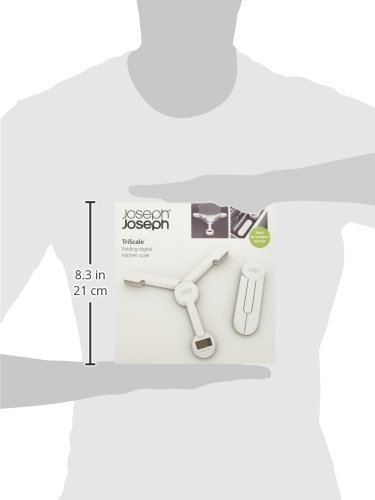
Image: Diagram illustrating the dimensions of the Joseph Joseph Tri Scale.
7. Warranty and Support
For warranty information and customer support, please refer to the official Joseph Joseph website or contact their customer service department directly. Keep your proof of purchase for any warranty claims.
You can visit the official Joseph Joseph store for more information: Joseph Joseph Store