
1. Introduction
This manual provides comprehensive instructions for the installation, operation, maintenance, and troubleshooting of your Seasonic G Series 550 SSR-550RM 550W 80+ Gold Semi-Modular Power Supply. Designed for reliable and efficient power delivery, this unit combines 80 PLUS Gold efficiency with high electrical performance and advanced fan control for optimal system stability and quiet operation.
2. Product Features
- 550W Continuous Power Output: Provides stable and consistent power for your system components.
- 80 PLUS Gold Certified: Ensures high power efficiency, reducing energy consumption and heat generation.
- Semi-Modular Cable Design: Allows for flexible cable management by connecting only the necessary cables, improving airflow and reducing clutter.
- Advanced Fan Control (S2FC): Optimizes fan speed based on temperature, ensuring efficient cooling with minimal noise.
- 120 mm Fluid Dynamic Bearing (FDB) Fan: Provides quiet operation and extended lifespan.
- High-Quality Japanese Capacitors: Utilizes premium components for enhanced reliability and durability.
- Comprehensive Protection Features: Includes Over Power Protection (OPP), Over Voltage Protection (OVP), Under Voltage Protection (UVP), Short Circuit Protection (SCP), and Over Temperature Protection (OTP).
3. Safety Information
Please read and follow these safety guidelines carefully to prevent injury and damage to your equipment:
- Do not open the power supply unit. High voltages are present inside, even when the unit is unplugged.
- Ensure the power supply is properly grounded to prevent electrical shock.
- Install the power supply in a well-ventilated area to prevent overheating.
- Use only the cables provided with your Seasonic power supply. Using incompatible cables may cause damage.
- Disconnect the AC power cord from the wall outlet before installing or removing any components.
- If you are unsure about any installation steps, consult a qualified technician.
4. Package Contents
Verify that all items are present in your package:
- Seasonic G Series 550 SSR-550RM Power Supply Unit
- AC Power Cord
- Modular Cable Set:
- 2 x PCIe 6+2 Pin Cables
- SATA Power Cables (various connectors)
- Peripheral (Molex) Power Cables
- Mounting Screws
- Cable Ties (plastic and Velcro)
- User Manual (this document)
5. Setup and Installation
Follow these steps to install your power supply:
- Prepare Your System: Ensure your computer is powered off and unplugged from the wall outlet. Open your computer case.
- Mount the Power Supply: Insert the Seasonic G Series 550 into the designated power supply bay in your computer case. Secure it with the provided mounting screws. Ensure the fan is facing the correct direction for optimal airflow (typically facing down if your case has a bottom vent, or up if it's a top-mounted PSU).

Image: The Seasonic G Series 550 Power Supply with its main 24-pin ATX cable, ready for installation.
- Connect Fixed Cables: The 24-pin ATX motherboard cable and the 8-pin (4+4) CPU power cable are permanently attached. Connect the 24-pin cable to your motherboard's main power connector and the 8-pin CPU cable to the CPU power connector.

Image: Rear view of the power supply unit, highlighting the modular cable connection ports.
- Connect Modular Cables: Identify the necessary modular cables for your components (e.g., PCIe for graphics cards, SATA for SSDs/HDDs, Peripheral for fans or other accessories). Plug these cables into the corresponding ports on the power supply and then connect them to your devices.

Image: The Seasonic G Series 550 power supply with a selection of its modular cables, ready for connection.
- Cable Management: Route cables neatly behind the motherboard tray or in other designated areas of your case to improve airflow and aesthetics. Use the provided cable ties to secure them.
- Connect AC Power: Once all internal connections are made, connect the AC power cord to the power supply's inlet and then to a wall outlet. Ensure the power switch on the PSU is in the OFF position before plugging it in.
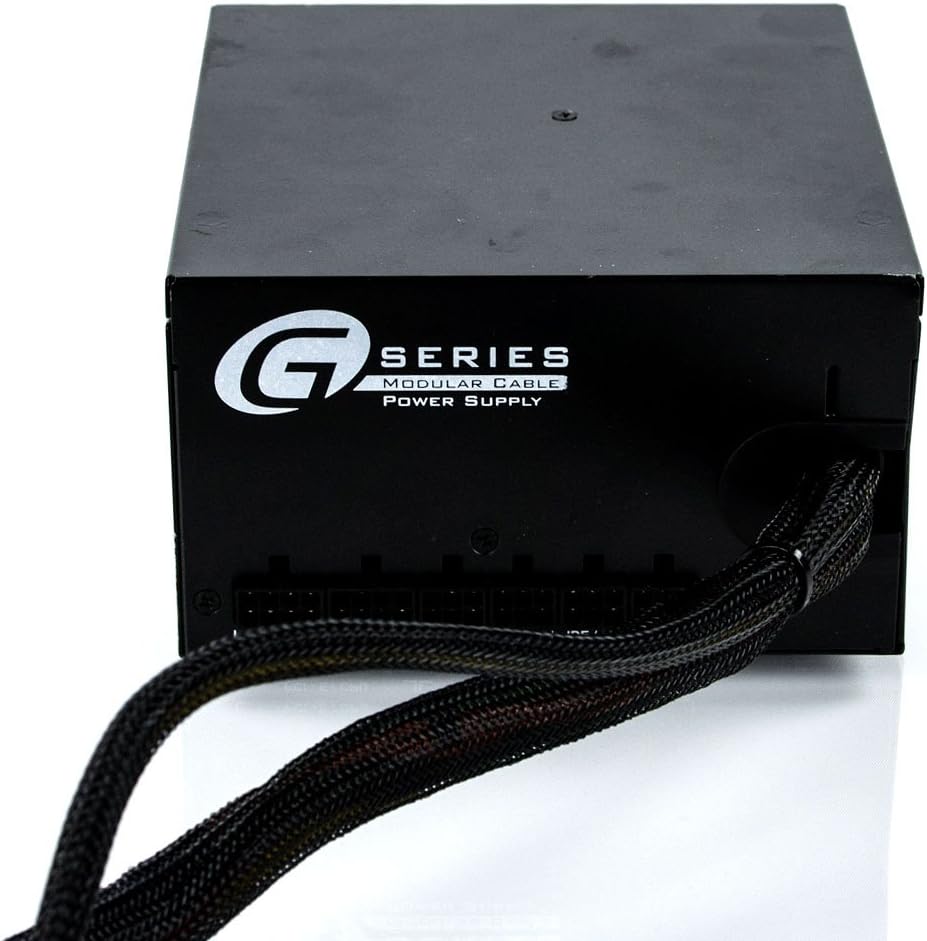
Image: The rear panel of the power supply, showing the AC power inlet and the main power switch.
- Final Check: Double-check all connections to ensure they are secure. Close your computer case.
Installation Videos
Product Summary Video:
This video provides a brief overview and summary of the power supply unit's features and design.
Product Overview Video:
A detailed overview of the power supply, showcasing its various components and design aspects.
6. Operating Instructions
- Power On: After ensuring all connections are secure and the AC power cord is plugged in, flip the power switch on the back of the power supply to the 'ON' position.
- System Boot: Press the power button on your computer case to start your system.
- Fan Operation: The 120mm Fluid Dynamic Bearing fan operates under Seasonic's S2FC (Smart and Silent Fan Control) system. The fan speed will automatically adjust based on the power supply's internal temperature and load, ensuring optimal cooling while maintaining low noise levels. The fan may not spin at very low loads, which is normal operation for silent performance.
- Power Off: To shut down your system, use the operating system's shutdown procedure. Once the system is off, you can flip the power switch on the PSU to the 'OFF' position for complete power disconnection.
7. Maintenance
Regular maintenance helps ensure the longevity and optimal performance of your power supply:
- Dust Cleaning: Periodically clean the power supply's fan and vents to prevent dust buildup, which can impede airflow and lead to overheating. Use compressed air to gently blow dust out of the unit. Ensure the power supply is unplugged before cleaning.
- Check Connections: Occasionally check all power cable connections (both at the PSU and to components) to ensure they are secure and free from damage.
- Environmental Conditions: Operate the power supply within its specified environmental conditions (temperature and humidity) to prevent premature wear.
8. Troubleshooting
If you encounter issues with your power supply, refer to the following common problems and solutions:
- No Power to System:
- Ensure the AC power cord is securely plugged into both the wall outlet and the power supply.
- Verify the power switch on the back of the PSU is in the 'ON' position.
- Check all internal power connections (24-pin ATX, 8-pin CPU, PCIe, SATA) to ensure they are firmly seated.
- Test the wall outlet with another device to confirm it has power.
- System Instability or Random Shutdowns:
- This could indicate an overloaded power supply or a faulty component. Ensure your system's power requirements do not exceed the PSU's 550W capacity.
- Check for proper ventilation within your computer case to prevent overheating.
- If the issue persists, consider testing components individually or consulting a professional.
- Excessive Fan Noise:
- Ensure the power supply fan and vents are free from dust and obstructions.
- The fan speed adjusts with load; higher system load will result in increased fan speed and noise. This is normal.
- If the noise is unusual (e.g., grinding, rattling), contact customer support.
For more complex issues, please refer to the warranty and support section.
9. Specifications
| Feature | Specification |
|---|---|
| Brand | Seasonic |
| Model Number | SSR-550RM |
| Output Wattage | 550 Watts |
| Efficiency Certification | 80 PLUS Gold |
| Form Factor | ATX |
| Power Supply Design | Semi-Modular |
| Cooling Method | Air (120mm Fluid Dynamic Bearing Fan) |
| Connector Type | ATX, EPS, PCIe, SATA, Peripheral |
| Item Weight | 5.8 pounds |
| Product Dimensions (LxWxH) | 6.3 x 3.39 x 5.9 inches |
| Manufacturer | Seasonic |
| Date First Available | September 10, 2012 |
10. Warranty and Support
The Seasonic G Series 550 SSR-550RM Power Supply comes with a 5-Year Manufacturer's Warranty. This warranty covers defects in materials and workmanship under normal use.
For warranty claims, technical support, or any questions not covered in this manual, please visit the official Seasonic website or contact their customer service department. Keep your proof of purchase for warranty validation.