
Introduction
This manual provides detailed instructions for the safe and efficient operation, maintenance, and care of your BLACK+DECKER CM2020B 12-Cup Programmable Coffeemaker. Please read all instructions thoroughly before using the appliance and retain this manual for future reference.
Product Overview
Components
- Coffeemaker Unit
- Removable Filter Basket
- Glass Carafe (12-cup capacity)
Control Panel and Features
The coffeemaker features an intuitive control panel for easy operation and programming.
- Digital Display: Shows time, programming settings, and "time since brewed" indicator.
- PROG Button: Used to set the automatic brewing time.
- AUTO Button: Activates the programmed automatic brewing cycle.
- HOUR/MIN Buttons: Adjust hour and minute settings for clock and programming.
- AUTO CLEAN Button: Initiates the self-cleaning cycle.
- ON/OFF Button: Manually turns the coffeemaker on or off.
- STRONG / 1-4 CUP Button: Selects brew strength (regular or strong) or optimizes brewing for smaller quantities (1-4 cups).
- Keep Hot Carafe Plate: Non-stick plate designed to keep coffee warm for up to two hours after brewing.

Image 1: Front view of the BLACK+DECKER CM2020B Coffeemaker, showing the digital display, control buttons, and glass carafe.

Image 2: Close-up front view of the BLACK+DECKER CM2020B Coffeemaker, highlighting the control panel with its buttons and digital clock.
Setup
- Unpack: Carefully remove all packaging materials and labels from the coffeemaker.
- Clean: Wash the removable filter basket and glass carafe in warm, soapy water. Rinse thoroughly and dry. Wipe the exterior of the coffeemaker with a damp cloth.
- First Use Cycle: Before brewing coffee, operate the coffeemaker with water only to clean the internal components.
- Fill the water reservoir to the 12-cup mark with clean water.
- Place the empty filter basket into its position.
- Place the empty carafe on the warming plate.
- Press the ON/OFF button to start the cycle.
- Once the cycle is complete, discard the water and rinse the carafe.
- Set Clock: Plug in the coffeemaker. The digital display will flash. Use the HOUR and MIN buttons to set the current time.
Operating Instructions
Brewing Coffee
- Fill Water Reservoir: Open the top lid and fill the water reservoir with fresh, cold water to the desired level, using the markings on the side of the coffeemaker. Do not exceed the 12-cup maximum.
- Add Coffee Grounds: Place a standard basket-style paper filter into the removable filter basket. Add the desired amount of ground coffee. A general guideline is one tablespoon of coffee per cup, but adjust to personal preference.
- Position Carafe: Ensure the glass carafe is empty and placed correctly on the warming plate.
- Select Brew Strength (Optional): Press the STRONG / 1-4 CUP button once for a stronger brew, or twice for 1-4 cup brewing optimization. The corresponding indicator light will illuminate.
- Start Brewing: Press the ON/OFF button. The indicator light will illuminate, and brewing will begin.
- Keep Warm: The coffeemaker will automatically keep the coffee warm for up to two hours after brewing. The "time since brewed" indicator on the display will show how long the coffee has been warming. After two hours, the coffeemaker will automatically shut off.
Programming Auto Brew
The QuickTouch™ programming allows you to set the coffeemaker to start brewing automatically at a specific time.
- Prepare the coffeemaker with water and coffee grounds as described in the "Brewing Coffee" section.
- Press the PROG button. The display will flash "PROG" and the programmed time.
- Use the HOUR and MIN buttons to set the desired automatic brewing time.
- Press the AUTO button. The AUTO indicator light will illuminate, confirming that the auto-brew function is set.
- The coffeemaker will now start brewing at the programmed time. To cancel, press the AUTO button again.
Maintenance
Daily Cleaning
- Always unplug the coffeemaker before cleaning.
- Wash the glass carafe and filter basket in warm, soapy water after each use. These parts are also top-rack dishwasher safe.
- Wipe the exterior surfaces of the coffeemaker, including the warming plate, with a damp cloth. Do not use abrasive cleaners or scouring pads.
- Do not immerse the coffeemaker unit in water or any other liquid.
Automatic Cleaning System (Descaling)
Mineral deposits from water can build up in your coffeemaker over time, affecting performance. The automatic cleaning system helps remove these deposits.
- Pour 4 cups of white vinegar into the water reservoir.
- Place an empty paper filter in the filter basket and close the lid.
- Place the empty carafe on the warming plate.
- Press the AUTO CLEAN button. The AUTO CLEAN indicator light will illuminate.
- The coffeemaker will perform a cleaning cycle. This cycle may take longer than a regular brew cycle.
- Once the cycle is complete, turn off the coffeemaker and discard the vinegar solution.
- Run 2-3 full cycles with clean water only to flush out any remaining vinegar taste.
Troubleshooting
| Problem | Possible Cause | Solution |
|---|---|---|
| Coffeemaker does not turn on. | Not plugged in; power outage. | Ensure the coffeemaker is securely plugged into a working outlet. Check circuit breaker. |
| Coffee is not brewing. | No water in reservoir; filter basket not properly seated; carafe not on warming plate. | Fill water reservoir. Ensure filter basket is correctly in place. Confirm carafe is centered on the warming plate. |
| Coffee tastes weak or too strong. | Incorrect coffee-to-water ratio; wrong brew strength setting. | Adjust the amount of coffee grounds. Use the STRONG / 1-4 CUP button for desired strength. |
| Water or coffee leaks from the unit. | Overfilling water reservoir; carafe not properly seated; filter basket overflowing. | Do not exceed the maximum fill line for water. Ensure the carafe is fully pushed back. Check if the filter basket is clogged or if too many grounds were used. |
| Excessive condensation on control panel. | Normal operation, but can be exacerbated by high humidity or steam. | Ensure the coffeemaker is in a well-ventilated area. Wipe condensation with a dry cloth after use. |
Specifications
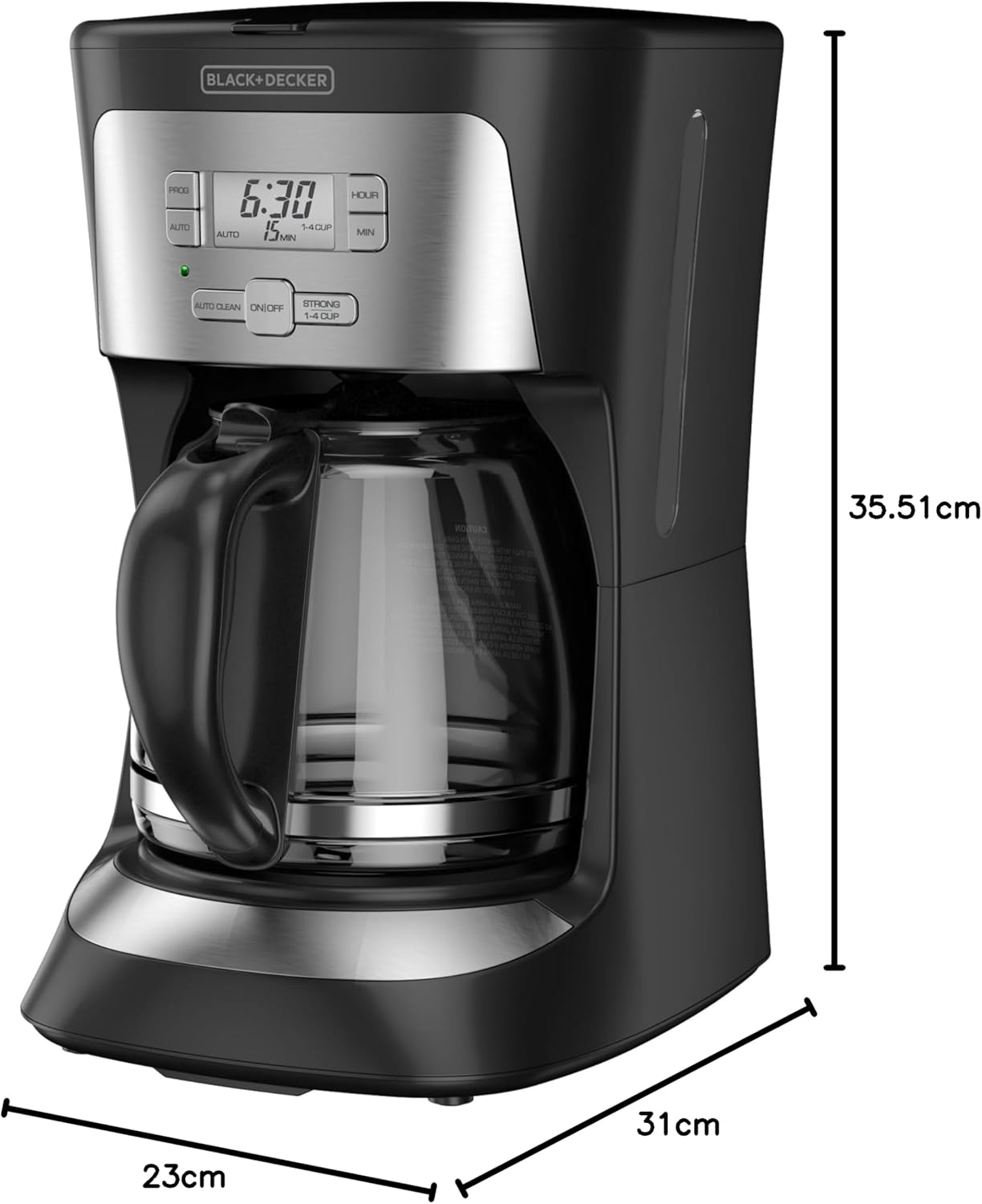
Image 3: Side view of the BLACK+DECKER CM2020B Coffeemaker illustrating its dimensions: approximately 23 cm (width), 31 cm (depth), and 35.51 cm (height).
- Model: CM2020B
- Brand: Black+Decker
- Capacity: 12 Cups
- Color: Black
- Material: Plastic
- Voltage: 120 Volts
- Wattage: 975 Watts
- Dimensions (approx.): 23 cm (Width) x 31 cm (Depth) x 35.51 cm (Height)
- Special Features: Programmable, Auto Clean System, Keep Hot Plate, Brew Strength Selector
Warranty and Support
For warranty information, please refer to the warranty card included with your product or visit the official Black+Decker website. For technical support, product registration, or to order replacement parts, please contact Black+Decker customer service.
Online Support: www.blackanddecker.com