
1. Introduction
This user manual provides comprehensive instructions for the proper installation, operation, and maintenance of your new frequency crossover. This device is designed to accurately separate audio signals into different frequency ranges, optimizing sound delivery to specific speakers (e.g., woofers, mid-range, tweeters) for enhanced audio clarity and performance. Please read this manual thoroughly before installation and use.
The frequency crossover is compatible with various audio systems, including the TX-1520, TX-1220, and TX-2520 TMX series. Its compact design and robust construction ensure reliable operation.
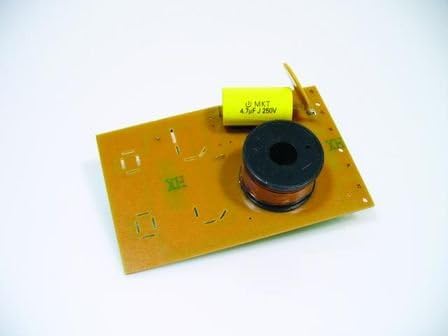
Figure 1: The frequency crossover circuit board. This image shows the compact design of the crossover, featuring a yellow MKT capacitor and a black inductor coil, mounted on a brown circuit board. This component is essential for directing specific audio frequencies to the appropriate speakers.
2. Setup and Installation
Proper installation is crucial for optimal performance and to prevent damage to your audio system. It is recommended that installation be performed by a qualified audio technician.
2.1 Safety Precautions
- Ensure all audio equipment is powered off and disconnected from the main power supply before beginning installation.
- Use appropriate tools and wear protective gear if necessary.
- Avoid touching exposed wires or components while the system is powered.
- Refer to your speaker and amplifier manuals for specific wiring diagrams and impedance requirements.
2.2 Wiring Diagram (General)
While specific wiring may vary based on your audio system configuration, the general principle involves connecting the amplifier output to the crossover input, and then connecting the crossover outputs to the respective speakers (e.g., tweeter, woofer).
- Identify the input terminals on the frequency crossover. These are typically labeled "Input" or "Amp In".
- Connect the positive (+) and negative (-) output terminals from your amplifier to the corresponding input terminals on the crossover.
- Identify the output terminals for each speaker type (e.g., "Woofer Out", "Tweeter Out", "Mid Out").
- Connect the positive (+) and negative (-) terminals of your woofer speaker to the "Woofer Out" terminals on the crossover.
- Repeat for tweeter and mid-range speakers if applicable.
- Ensure all connections are secure and free from short circuits.
Note: This specific product appears to be a single-channel crossover or a component for a larger system. Consult a professional for complex multi-speaker setups.
3. Operating Principles
The frequency crossover operates passively, meaning it does not require external power. It uses internal components (capacitors and inductors) to filter the audio signal, allowing only specific frequency ranges to pass through to designated outputs.
- High-Pass Filter: Allows high frequencies to pass through, typically for tweeters.
- Low-Pass Filter: Allows low frequencies to pass through, typically for woofers.
- Band-Pass Filter: Allows a specific range of frequencies to pass through, typically for mid-range speakers.
This particular crossover is designed for the TX-1520 series, suggesting it is optimized for a specific frequency division point to complement the characteristics of those speakers.
4. Maintenance
The frequency crossover is a passive component and requires minimal maintenance. Follow these guidelines to ensure its longevity:
- Keep the component in a dry, cool environment, away from direct sunlight and extreme temperatures.
- Avoid exposing the crossover to moisture or corrosive substances.
- Ensure proper ventilation around the component if it is enclosed, although passive crossovers generate minimal heat.
- Periodically check wiring connections for looseness or corrosion.
- Do not attempt to modify the internal components, as this can alter its frequency characteristics and potentially damage your speakers or amplifier.
5. Troubleshooting
If you experience issues with your audio system after installing the frequency crossover, consider the following common troubleshooting steps:
| Problem | Possible Cause | Solution |
|---|---|---|
| No sound from speakers | Incorrect wiring; loose connections; damaged component. | Verify all wiring connections are secure and correct. Check for continuity with a multimeter. Inspect the crossover for visible damage. |
| Distorted or poor sound quality | Incorrect crossover point for speakers; impedance mismatch; damaged component. | Ensure the crossover is compatible with your speakers' impedance. If sound quality issues persist, consult an audio professional. |
| Only certain frequencies are audible | Incorrect wiring to specific speaker outputs (e.g., only woofer or tweeter connected). | Double-check that all speaker outputs from the crossover are correctly connected to their respective speakers. |
If the problem persists after attempting these steps, it is recommended to consult a professional audio technician.
6. Specifications
| Feature | Detail |
|---|---|
| Model Number | 64951519 |
| Compatible Series | TX-1520, TX-1220, TX-2520 TMX |
| Item Weight | 0.1 g |
| Manufacturer | Unspecified (keine Angabe) |
| ASIN | B008XIHIHO |
| Display Features | Wireless (Note: This specification seems generic and may not apply directly to a passive crossover. It's listed in the product data.) |
| First Available Date | August 14, 2012 |
7. Warranty and Support
Specific warranty information for this product is not provided in the available data. Please refer to the retailer or manufacturer (if known) for details regarding warranty coverage and support services.
For technical assistance or further inquiries, it is recommended to contact a professional audio technician or the vendor from whom the product was purchased.


