
1. Introduction and Overview
This manual provides essential instructions for the safe and efficient operation of your LiteFuze LT-750 750 Watt Voltage Converter Transformer. This device is designed to convert electrical voltage between 110V/120V AC and 220V/230V/240V AC, allowing you to use appliances from different regions. Please read this manual thoroughly before use and retain it for future reference.
Key Features:
- Universal Output Socket: Equipped with an outlet that accepts plugs from most countries worldwide, providing complete grounding from input to output for safe operation.
- Convertingbox™ Technology: Utilizes a Toroidal Transformer for enhanced efficiency, reduced noise, and a more compact, lighter design compared to traditional transformers.
- Fuse Protection: Safeguards your electronics and the transformer from power or voltage overload. The fuse will interrupt power during an overload, and can be easily replaced to reset the transformer.
- Heavy Duty Step Up/Down Operation: Converts 110/117/120V AC to 220/230/240V AC, or 220/230/240V AC to 110/117/120V AC.
- Lifetime Copper Coil: Each transformer is wound with premium copper coil and wire for reliable and efficient long-term performance.
2. Setup Instructions
Follow these steps to properly set up your LiteFuze LT-750 voltage converter.

Figure 2.1: Front view of the LiteFuze LT-750 Voltage Converter Transformer.
Initial Setup:
- Unpack the Unit: Carefully remove the transformer from its packaging. Inspect for any visible damage.
- Placement: Place the transformer on a stable, flat surface with adequate ventilation. Ensure no vents are blocked.
- Input Voltage Selection: Locate the input voltage switch on the back of the unit. Set this switch to match the voltage of your wall outlet (e.g., 110V-120V for North America, 220V-240V for many other regions). Incorrect voltage selection can damage the unit and connected appliances.
- Connect to Power Source: Plug the transformer's power cord into a grounded wall outlet.

Figure 2.2: Rear view of the LiteFuze LT-750, highlighting the input voltage selection switch and power input.
Video Guide:
Video 2.1: An official overview of LiteFuze voltage converters, demonstrating their features and general setup. This video provides a visual guide to understanding the product's capabilities.
3. Operating Instructions
Once the transformer is set up, you can connect your appliances.

Figure 3.1: Front panel of the LiteFuze LT-750, showing the universal 220V-240V AC output and the 110V-120V AC output sockets.
Connecting Your Appliance:
- Determine Appliance Voltage: Check the power rating (in Watts or VA) and voltage requirement of your appliance.
- Select Output Socket:
- If your appliance requires 220V-240V AC, plug it into the universal output socket labeled "OUTPUT AC 220-240V".
- If your appliance requires 110V-120V AC, plug it into the US-style output socket labeled "OUTPUT AC 110-120V".
- Power On: Switch the power button on the transformer to the "ON" position. The power indicator light should illuminate.
- Appliance Use: You can now operate your appliance as usual.
Important: The maximum power drawn by the appliance should not exceed the maximum capacity of the transformer (750 Watts for LT-750). It is recommended to use a transformer with at least 1.25 times the wattage rating of your appliance to account for surges or spikes during operation.

Figure 3.2: The LiteFuze LT-750 connected to an appliance, demonstrating its maximum capacity.
Video Demonstration:
Video 3.1: A demonstration of a LiteFuze transformer in use, showing how to connect and operate an appliance. Note that the video features a 1500W model, but the operational principles are similar.
4. Maintenance
Proper maintenance ensures the longevity and safe operation of your LiteFuze LT-750.
Fuse Replacement:
The LT-750 is equipped with fuse protection. If the unit stops working due to an overload, the fuse may have blown.
- Disconnect Power: Turn off the transformer and unplug it from the wall outlet.
- Locate Fuse Holder: The fuse holder is typically located on the back or side of the unit, often labeled "FUSE".
- Remove Blown Fuse: Unscrew or pry open the fuse holder. Carefully remove the old fuse.
- Insert New Fuse: Replace with a new fuse of the exact same type and rating (refer to the unit's specifications or label near the fuse holder).
- Secure Fuse Holder: Close and secure the fuse holder.
- Reconnect Power: Plug the transformer back into the wall outlet and turn it on.
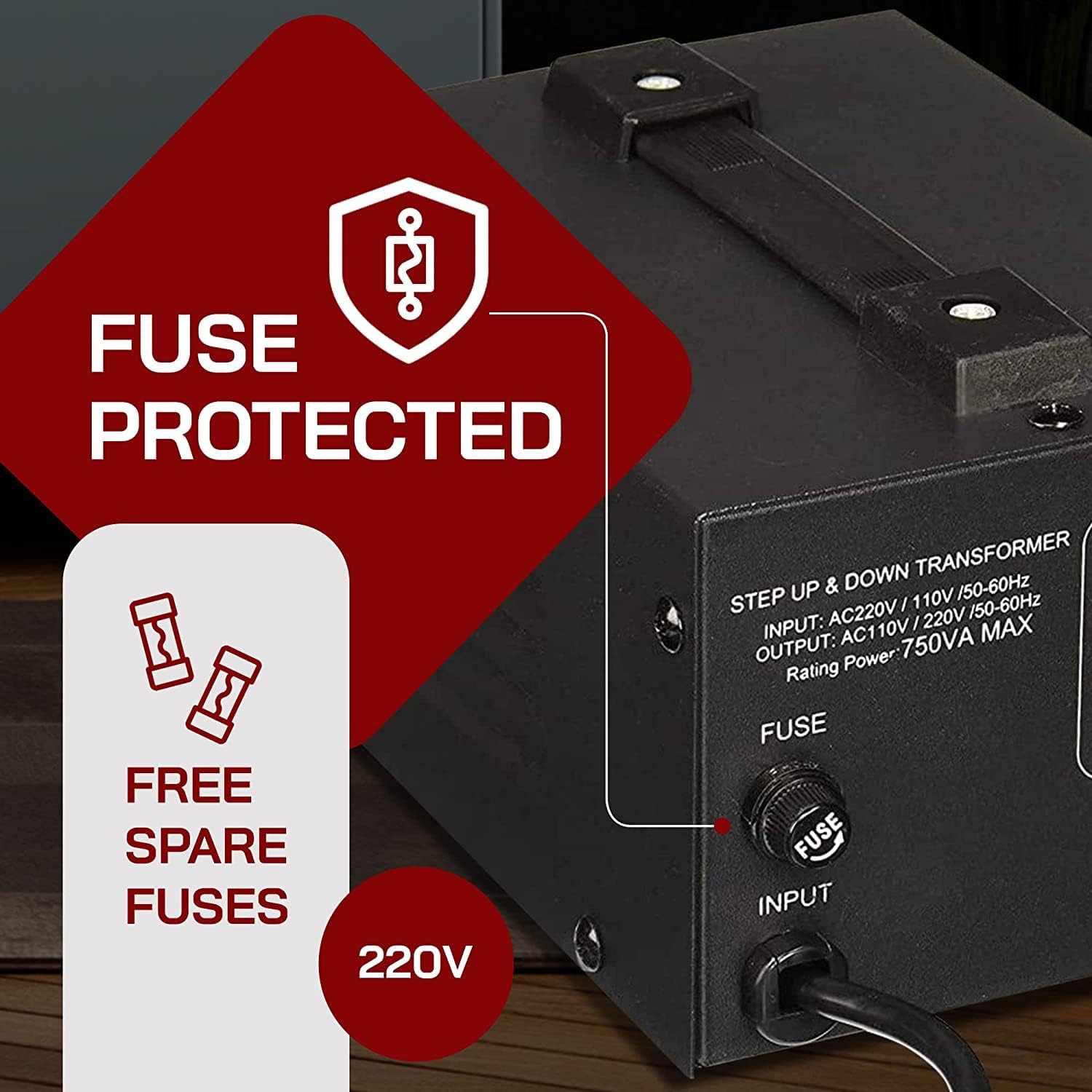
Figure 4.1: Location of the fuse holder on the LiteFuze LT-750.
General Care:
- Keep the unit clean and free from dust. Use a dry cloth for cleaning.
- Avoid exposing the transformer to moisture or extreme temperatures.
- Ensure proper ventilation around the unit during operation.
5. Troubleshooting
If you encounter issues with your LiteFuze LT-750, refer to the following common problems and solutions.
| Problem | Possible Cause | Solution |
|---|---|---|
| No power indicator light, unit not working. | Unit not plugged in, wall outlet not active, power switch off, or blown fuse. | Check power cord connection. Test wall outlet with another device. Ensure power switch is ON. Check and replace fuse if blown (refer to Maintenance section). |
| Appliance not working when connected. | Incorrect output socket used, appliance faulty, or transformer overloaded. | Ensure appliance is plugged into the correct voltage output socket. Test appliance directly if possible. Reduce total wattage of connected appliances to below 750W. |
| Unit becomes excessively hot. | Overload, poor ventilation. | Disconnect appliances immediately. Allow unit to cool. Ensure adequate ventilation and reduce load. |
| Humming noise from unit. | Normal operation (slight hum), or excessive load. | A slight hum is normal for transformers. If the hum is loud or accompanied by heat, reduce the load. |
6. Specifications
| Feature | Detail |
|---|---|
| Brand | LiteFuze |
| Model | LT-750 |
| Power Source | Corded Electric |
| Product Dimensions (D x W x H) | 7"D x 5"W x 4.13"H |
| Item Weight | 6.6 Pounds |
| Maximum Wattage | 750 Watts |
| Input Voltage | AC 110-120V or AC 220-240V (selectable) |
| Output Voltage | AC 110-120V and AC 220-240V (simultaneous output) |
| Frequency | 50 Hz / 60 Hz (output frequency matches input frequency) |
| Certification | CE Certified |
| Mounting Type | Floor Mount |
7. Warranty and Support
Warranty Information:
The LiteFuze LT-750 Voltage Converter Transformer comes with an industry-leading 5-year manufacturer's limited warranty. This warranty covers defects in materials and workmanship under normal use. Please retain your proof of purchase for warranty claims.
Customer Support:
For technical assistance, warranty inquiries, or any questions regarding your LiteFuze product, please contact LiteFuze customer support. Refer to the product packaging or the official LiteFuze website for the most current contact information.