
1. Introduction
This manual provides detailed instructions for the installation, operation, and maintenance of your Heath Zenith Motion Sensor Security Flood Light. This flood light is designed to enhance security and convenience in outdoor spaces such as pathways, sheds, garages, and patios by providing motion-activated illumination.
Key features include a 180-degree detection zone with a range of up to 70 feet (21 meters), adjustable motion sensor, and selectable light duration settings. The durable, weather-resistant construction ensures reliable performance in various outdoor environments.

Figure 1: Front view of the Heath Zenith Motion Sensor Security Flood Light in Bronze. This image shows the twin lamp heads and the motion sensor unit below.
2. Safety Information
Please read all instructions carefully before installation and operation. Failure to follow these instructions may result in electric shock, fire, or other hazards.
- Always turn off power at the circuit breaker before installing or servicing the fixture.
- Consult a qualified electrician if you are unsure about the installation process.
- Ensure all wiring connections are secure and comply with local electrical codes.
- Do not exceed the maximum wattage for bulbs (2x 120W Max PAR38 E26 base).
- This product is designed for outdoor use and is weather-resistant, but avoid direct high-pressure water spray on the unit.
3. Package Contents
Verify that all components are present before beginning installation:
- Motion Sensor Security Flood Light Fixture
- Mounting Hardware (screws, wire nuts, weather gasket, metal cross piece)
- Installation Aid (nylon strand for hands-free wiring)
- Instruction Manual
Note: 2x Standard Base E26 PAR38 Shape 120W Max Bulbs are not included and must be purchased separately. Compatible with Incandescent and LED bulbs.
4. Setup and Installation
This flood light can be installed on a wall or under an eave. Follow these steps for proper installation:
- Turn Off Power: Before starting, ensure the power to the installation area is turned off at the circuit breaker.
- Prepare Mounting Surface: Attach the metal cross piece to your outdoor electrical outlet box. Ensure it is securely fastened.
- Wiring: Use the provided nylon strand to temporarily hold the fixture while you connect the wiring. Connect the ground wire for safety. Securely connect the live and neutral wires using the provided wire nuts. It is recommended to wrap electrical tape around the wire nuts for added insulation.
- Mount Fixture: Once wiring is complete, remove the nylon strand and attach the fixture to the outlet box with the single center screw. Ensure the weather gasket is properly seated against the mounting surface to prevent water entry.
- Install Bulbs: Insert two E26 PAR38 bulbs (max 120W each) into the lamp heads.
- Adjust Lamp Heads: The lamp heads are adjustable. Loosen the wing nuts on the side of each lamp head to position them as desired, then tighten to secure.
- Adjust Motion Sensor: The motion sensor arm is adjustable for wall or eave mounting. Gently grasp the motion sensor and rotate it up or down to achieve the desired detection angle.
- Restore Power: Turn the power back on at the circuit breaker.

Figure 2: Illustration of the wired installation process for the security flood light. This image highlights the hardwired connection.

Figure 3: Visual representation of the two primary mounting options: wall mount and eave mount. The adjustable arm design allows for flexible positioning.

Figure 4: Illustration demonstrating the adjustable nature of the lamp heads, allowing users to direct light as needed.
5. Operating Instructions
Your motion sensor flood light is designed for automatic operation based on motion and ambient light levels.
5.1 Motion Detection
The sensor detects motion within a 180-degree zone, up to 70 feet (21 meters) away. For optimal performance, allow the unit to adapt to its environment for a minute or two after power is restored before aiming the sensor. Motion across the sensor lens is generally easier to detect than motion directly towards or away from it.

Figure 5: Diagram showing the 180-degree detection zone and range of the motion sensor.
5.2 Adjustable Detection Range
Adjust the motion detection range between 8 feet (2.4 meters) and 70 feet (21 meters) using the sensitivity dial on the sensor unit. This allows you to customize the detection area to suit your specific needs and avoid false triggers.
5.3 Light Duration Settings
The light can be set to remain on for 1, 5, or 10 minutes after motion is no longer detected. Select your preferred duration using the timer switch on the sensor unit.
5.4 Photocell Operation
The integrated photocell ensures the light only activates when it is dark enough, conserving energy during daylight hours. The light will remain off during the day, even if motion is detected.
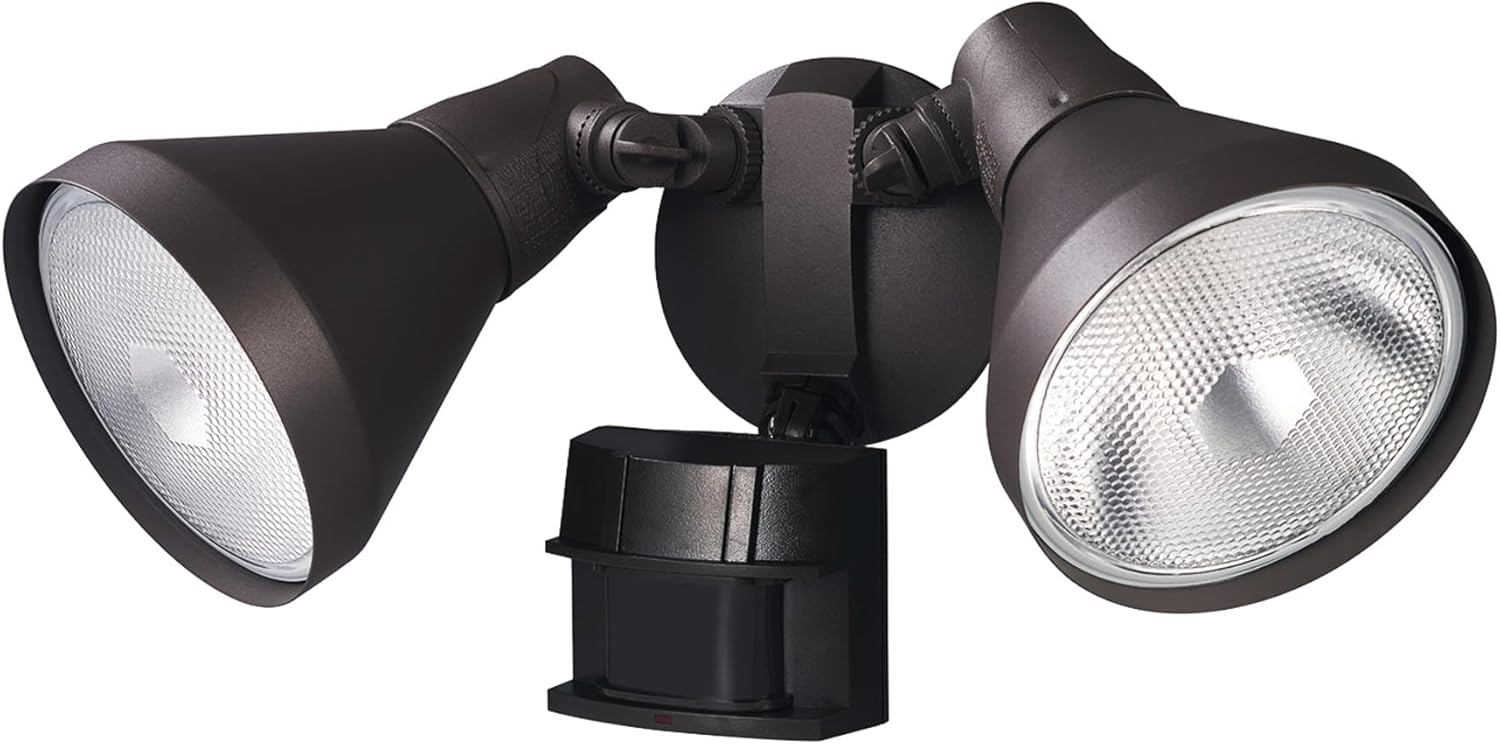
Figure 6: Overview of the flood light's features, including the adjustable motion sensor, lamp shields, and control dials for range and duration.
6. Maintenance
Regular maintenance will ensure the longevity and optimal performance of your flood light.
- Cleaning: Periodically wipe the fixture and sensor lens with a soft, damp cloth to remove dirt and debris. Do not use abrasive cleaners or solvents.
- Bulb Replacement: Ensure power is off at the circuit breaker before replacing bulbs. Allow bulbs to cool completely before handling. Replace with E26 PAR38 bulbs, up to 120W maximum.
- Inspection: Annually inspect wiring and mounting for any signs of wear or damage.
7. Troubleshooting
If your flood light is not operating as expected, refer to the following common issues and solutions:
| Problem | Possible Cause | Solution |
|---|---|---|
| Light does not turn on at night. |
|
|
| Light stays on continuously. |
|
|
| Light turns on during the day. |
|
|
| Reduced motion detection in hot weather. |
|
|
8. Specifications
| Brand | Heath Zenith |
| Model Name | 17000272 |
| Item Model Number | HZ-5412-BZ-D |
| Color | Bronze |
| Material | Bronze |
| Product Dimensions | 3.8"L x 5.8"W x 8"H |
| Item Weight | 1.72 pounds |
| Power Source | Corded Electric |
| Voltage | 120 Volts |
| Wattage | 120 watts (per bulb, max) |
| Bulb Base | E26 (PAR38 Shape) |
| Number of Light Sources | 2 |
| Motion Detection Zone | 180-Degree |
| Motion Detection Range | Up to 70 feet (21 meters) |
| Light Duration Settings | 1, 5, or 10 minutes |
| Water Resistance Level | Water Resistant |
| Certification | UL Listed |
9. Warranty and Support
This Heath Zenith Motion Sensor Security Flood Light is backed by a 2-year manufacturer's limited warranty.
For technical support, warranty claims, or further assistance, please contact Heath Zenith customer service. Refer to the product packaging or the official Heath Zenith website for the most current contact information.