
Introduction
This manual provides detailed instructions for the installation, operation, maintenance, and troubleshooting of the Salice Futura A710.610 Undermount Drawer Slide Front Clips. These clips are designed to securely attach wooden drawers to undermount drawer slide systems, ensuring smooth and reliable drawer function. Please read this manual thoroughly before proceeding with installation or use.
Setup and Installation
The Salice Futura A710.610 front clips are essential components for integrating your drawer box with undermount drawer slides. Proper installation ensures stability and smooth operation.
Identifying Components
Each Salice Futura A710.610 package contains two front clips, designed for one drawer. These clips are typically made of durable plastic and feature adjustment mechanisms.
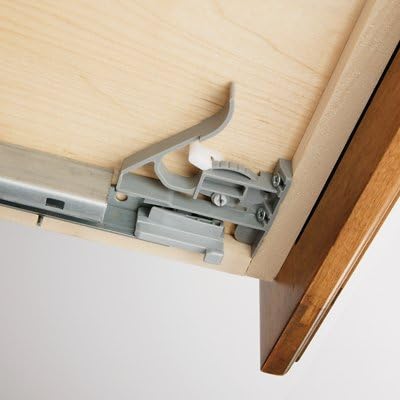
This image illustrates the Salice Futura A710.610 front clip securely attached to the underside of a wooden drawer. The clip is designed to engage with an undermount drawer slide, ensuring proper alignment and secure attachment of the drawer to the slide system. Visible components include the gray plastic clip, small screws for attachment to the drawer, and a portion of the metal drawer slide.
Step-by-Step Installation
- Prepare the Drawer Box: Ensure your wooden drawer box is constructed to the specifications required by your undermount drawer slides. The front clips attach to the underside of the drawer front.
- Position the Clips: Place one Salice Futura A710.610 front clip on each side of the drawer front, on the underside. The clips should align with the pre-drilled holes or markings provided by your drawer slide manufacturer for clip attachment.
- Secure the Clips: Using appropriate screws (typically small wood screws, often provided with the clips or slides), firmly attach each clip to the underside of the drawer front. Ensure the clips are flush and stable. Do not overtighten the screws.
- Engage with Drawer Slides: With the clips attached to the drawer, carefully align the drawer with the installed undermount drawer slides. Push the drawer into the cabinet opening until the clips engage with the slide mechanism. You should hear a distinct click as the clips lock into place.
- Test Drawer Function: Gently pull the drawer out and push it back in to ensure smooth operation and secure engagement. The drawer should move freely without excessive play or binding.
- Adjustments (if necessary): Many Salice clips feature adjustment screws for fine-tuning the drawer's vertical and horizontal alignment. Refer to the specific clip design for adjustment points. Typically, a small Phillips head screwdriver is used to turn these screws for minor adjustments to achieve perfect drawer alignment.
Operation
Once installed, the Salice Futura A710.610 clips facilitate the smooth operation of your drawer system.
Opening and Closing
To open the drawer, gently pull the drawer front outwards. To close, push the drawer front inwards until it is fully seated. If your undermount slides feature soft-close technology, the drawer will automatically pull itself shut during the final few inches of travel.
Drawer Removal
For cleaning or access, drawers can typically be removed from the slides. Locate the release levers or tabs on each front clip (these are often colored or clearly marked). Simultaneously depress or lift these levers on both clips, then lift the drawer front slightly and pull it away from the cabinet.
Maintenance
Regular maintenance helps ensure the longevity and optimal performance of your drawer clips and slide system.
- Cleaning: Periodically wipe down the clips and visible parts of the drawer slides with a soft, damp cloth to remove dust and debris. Avoid harsh chemical cleaners that may damage plastic components.
- Inspection: Every few months, inspect the clips for any signs of wear, cracks, or looseness. Ensure all screws are tight.
- Lubrication: The clips themselves do not typically require lubrication. If the drawer slides become stiff, consult the slide manufacturer's instructions for appropriate lubrication methods.
Troubleshooting
Refer to the table below for common issues and their potential solutions.
| Problem | Possible Cause | Solution |
|---|---|---|
| Drawer does not close smoothly or completely. | Obstruction in slide path; clips not fully engaged; drawer misalignment. | Check for debris in slides. Ensure clips are securely locked. Adjust drawer alignment using clip adjustment screws. |
| Drawer feels loose or wobbly. | Clips not securely fastened to drawer; clips not fully engaged with slides; worn clips. | Tighten screws securing clips to drawer. Re-engage drawer with slides, ensuring a click. Inspect clips for damage and replace if necessary. |
| Difficulty removing drawer. | Release levers not fully actuated; clips binding. | Ensure both release levers are fully depressed or lifted simultaneously. Apply gentle, even pressure when pulling the drawer. |
Specifications
- Brand: Salice
- Model Number: A710.610
- Part Number: A710.610
- Item Weight: 1.12 ounces (per pair)
- Number of Items: 2 (per package)
- Material: Stainless Steel (Note: Visible clip components are typically durable plastic, designed to work with stainless steel slide systems.)
- Color: Silver (Note: Clip color is typically gray plastic.)
- Mounting Type: Under Mount
Warranty and Support Information
For specific warranty details and customer support regarding your Salice Futura A710.610 Undermount Drawer Slide Front Clips, please refer to the documentation provided at the point of purchase or contact Salice directly through their official website. Keep your purchase receipt as proof of purchase.


