1. Introduction
The OSIM uKimono OS-3680 is an electric massager designed to provide targeted massage to the tummy, buttocks, and thighs. It incorporates Duo+ Technology, combining Twin Power Osimotion (TPO) and Double Kneading massage techniques to stimulate muscles and enhance circulation.
Please read this manual thoroughly before using the OSIM uKimono OS-3680 Massager to ensure safe and effective operation. Keep this manual for future reference.
2. Important Safety Instructions
WARNING: To reduce the risk of burns, fire, electric shock, or injury to persons:
- Always unplug the appliance from the electrical outlet immediately after using and before cleaning.
- Do not use while bathing or in a shower.
- Do not place or store appliance where it can fall or be pulled into a tub or sink.
- Do not place in or drop into water or other liquid.
- Never use pins or other metallic fasteners with this appliance.
- Close supervision is necessary when this appliance is used by, on, or near children, invalids, or disabled persons.
- Use this appliance only for its intended use as described in this manual. Do not use attachments not recommended by the manufacturer.
- Never operate this appliance if it has a damaged cord or plug, if it is not working properly, if it has been dropped or damaged, or dropped into water. Return the appliance to a service center for examination and repair.
- Keep the cord away from heated surfaces.
- Never use while sleeping or drowsy.
- Never drop or insert any object into any opening.
- Do not operate where aerosol (spray) products are being used or where oxygen is being administered.
- Do not use on sensitive skin areas or in the presence of poor circulation.
- Do not use on infants, invalids, or a sleeping or unconscious person.
- Do not crush. Avoid sharp folds.
- Consult your doctor before using if you have any medical conditions, are pregnant, or have a pacemaker.
3. Product Components
The OSIM uKimono OS-3680 Massager consists of the main massage belt unit and a wired remote control.

Image: The OSIM uKimono OS-3680 Massager, showing the red main belt unit with a white floral pattern and the attached white wired remote control.
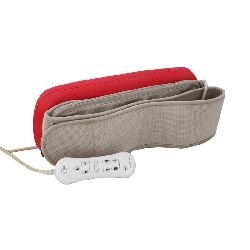
Image: The OSIM uKimono OS-3680 Massager belt folded, illustrating its compact design and the adjustable strap.
- Main Massage Belt Unit: Contains the Twin Power Osimotion and Double Kneading massage heads. Features an adjustable strap for secure fitting.
- Wired Remote Control: Used to power on/off, select massage programs, and adjust intensity levels.
- Power Adapter: Connects the massager to an electrical outlet.
4. Setup Instructions
- Unpack: Carefully remove the OSIM uKimono OS-3680 Massager and all its components from the packaging.
- Inspect: Check the massager and power cord for any visible damage. Do not use if damaged.
- Position: Place the massager around the desired body area (tummy, buttocks, or thighs). Ensure a comfortable and secure fit using the adjustable strap.
- Connect Power: Plug the power adapter into the massager's power input port. Then, plug the power adapter into a suitable electrical outlet (100-240 volts).
- Remote Control: Ensure the wired remote control is easily accessible for operation.
5. Operating Instructions
The OSIM uKimono OS-3680 offers both automatic and manual massage programs with adjustable intensity.
5.1 Power On/Off
- To turn on the massager, press the Power button on the remote control.
- To turn off the massager, press the Power button again. The device also features a 10-minute auto-timer and will switch off automatically after this duration.
5.2 Selecting Massage Programs
The massager includes 4 auto massage programmes and 3 manual massage programmes.
- Use the Mode button on the remote control to cycle through the available programs.
- Auto Programs: These programs are pre-set combinations of massage techniques and intensities, developed by a Japanese shiatsu massage expert.
- Manual Programs: These allow for more direct control over the massage type.
5.3 Adjusting Intensity
The OSIM uKimono OS-3680 offers 3 intensity levels.
- Press the Intensity Up (+) or Intensity Down (-) buttons on the remote control to adjust the massage strength to your preference.
5.4 Duo+ Technology Explained
The uKimono OS-3680 utilizes patent-pending Duo+ Technology, which combines two core massage techniques:
- Twin Power Osimotion (TPO): This involves symmetrical double-point massage using two oscillating massage heads. It works on both sides of the body simultaneously, providing a balanced treatment. TPO's oscillating motion differs from conventional vibration-only devices.
- Double Kneading: This technique uses kneading massage heads to target and stimulate muscles. It is designed to enhance blood circulation and can help in massaging sore and aching muscles.
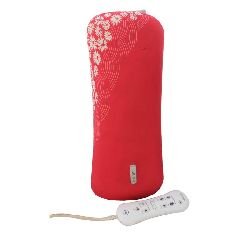
Image: The OSIM uKimono OS-3680 Massager shown in a vertical orientation, demonstrating its flexible application for various body parts.
6. Maintenance and Storage
6.1 Cleaning
- Always unplug the massager from the power outlet before cleaning.
- Wipe the surface of the massager with a soft, slightly damp cloth. Do not use abrasive cleaners, solvents, or harsh detergents.
- Do not immerse the massager or its remote control in water or any other liquid.
- Ensure the massager is completely dry before storing or next use.
6.2 Storage
- Store the massager in a cool, dry place, away from direct sunlight and extreme temperatures.
- Avoid placing heavy objects on the massager.
- Keep the power cord neatly coiled and avoid sharp bends or kinks.
7. Troubleshooting
If you encounter any issues with your OSIM uKimono OS-3680 Massager, please refer to the following common solutions:
| Problem | Possible Cause | Solution |
|---|---|---|
| Massager does not turn on. | Not plugged in correctly, power outlet issue, or power button not pressed. | Ensure the power adapter is securely plugged into both the massager and a working electrical outlet. Press the Power button firmly. |
| Massage feels weak or inconsistent. | Incorrect program selected, intensity too low, or improper positioning. | Adjust the intensity using the (+) button. Try different massage programs. Reposition the belt to ensure proper contact with the body. |
| Massager stops unexpectedly. | Auto-timer activated (10 minutes), or power interruption. | The massager has a 10-minute auto-timer. If it stops before 10 minutes, check the power connection. If the issue persists, contact customer support. |
If the problem persists after trying these solutions, please contact OSIM customer support for assistance.
8. Product Specifications
| Model Name: | uKimono OS-3680 |
| Brand: | Osim |
| Power Source: | Electric (100 - 240 Volts) |
| Massage Technology: | Duo+ Technology (Twin Power Osimotion & Double Kneading) |
| Massage Programs: | 4 Auto Programs, 3 Manual Programs |
| Intensity Levels: | 3 |
| Auto-Timer: | 10 minutes |
| Use For: | Body (Tummy, Buttocks, Thighs) |
| Cordless: | No |
9. Warranty and Support
9.1 Warranty Information
The OSIM uKimono OS-3680 Massager comes with a 1-year manufacturer's warranty from the date of purchase. Please retain your proof of purchase for warranty claims. The warranty covers manufacturing defects under normal use conditions.
For specific warranty terms and conditions, please refer to the warranty card included with your product or visit the official OSIM website.
9.2 Customer Support
For technical assistance, troubleshooting beyond this manual, or warranty service, please contact OSIM customer support. You can find contact information on the official OSIM website or through the retailer where you purchased the product.
When contacting support, please have your product model number (OS-3680) and proof of purchase readily available.


