
1. Product Overview
The Bentley BX-3 is a classic 35mm film camera designed for straightforward photographic capture. It features a fixed 50mm optical glass lens, providing a standard field of view suitable for various photography styles. This manual provides instructions for the proper use and care of your Bentley BX-3 camera.
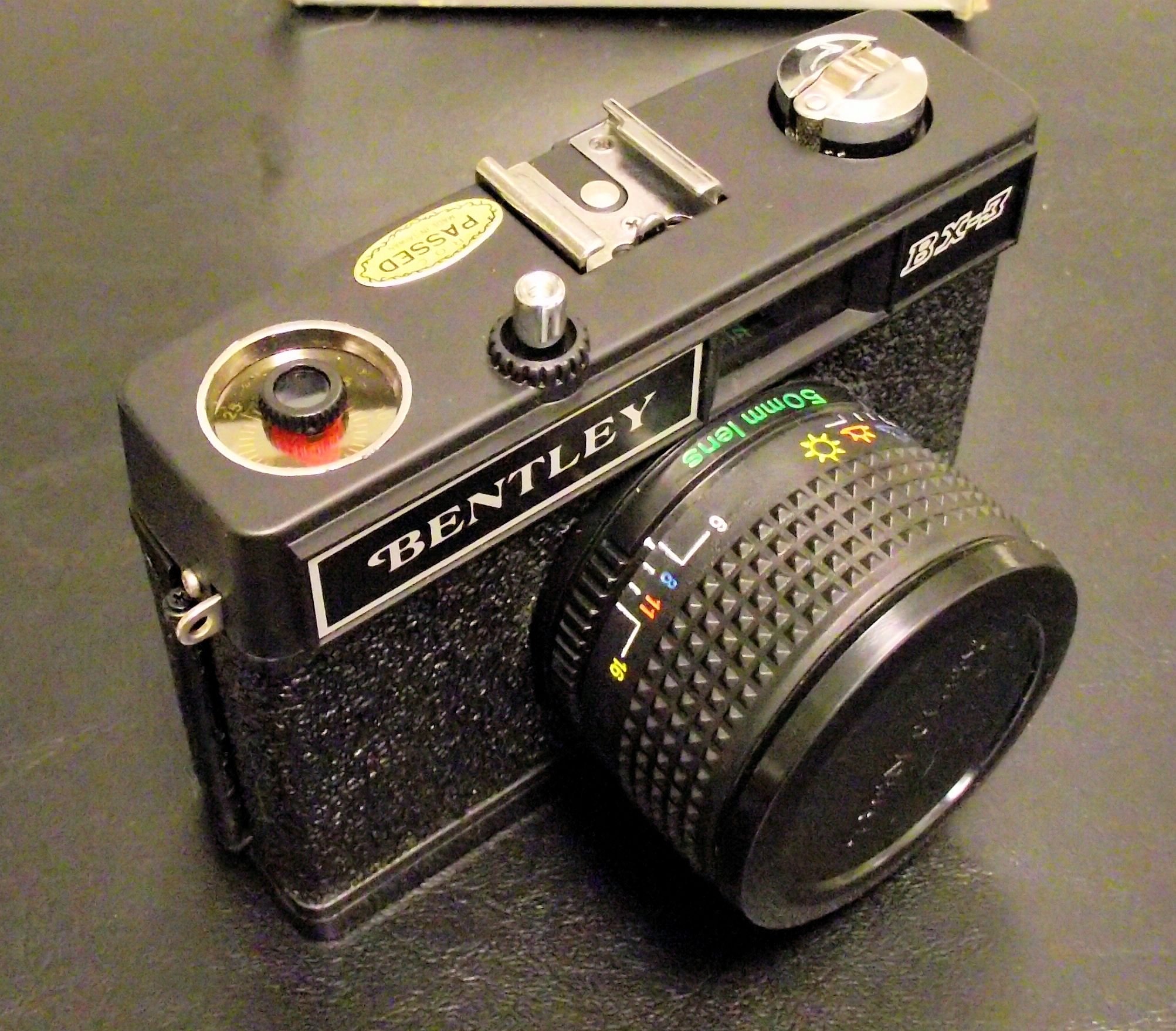
Figure 1.1: The Bentley BX-3 35mm Camera with its 50mm optical glass lens attached. This image shows the camera's front view, highlighting the lens, viewfinder, and film advance knob.
2. Setup
2.1. Loading Film
- Open the camera back by sliding the latch located on the side of the camera.
- Insert a 35mm film canister into the film chamber on the left side of the camera.
- Pull the film leader across to the take-up spool on the right side. Insert the tip of the film leader into one of the slots on the take-up spool.
- Rotate the film advance knob slightly to ensure the film is securely engaged with the take-up spool and the sprocket teeth.
- Close the camera back firmly until it latches.
- Advance the film two frames by repeatedly pressing the shutter button and turning the film advance knob. This ensures fresh film is positioned for the first shot.
- Set the film counter to '1'.

Figure 2.1: The camera back opened, revealing the film loading compartment, take-up spool, and film canister chamber.
2.2. Attaching the Lens
The Bentley BX-3 camera typically comes with its 50mm optical glass lens pre-attached. If the lens needs to be re-attached or removed for cleaning, align the lens mount with the camera body mount and rotate until it locks into place. Ensure it is securely fastened before use.

Figure 2.2: A close-up view of the Bentley 50mm Optical Lens, showing the branding and lens specifications.
3. Operating Instructions
3.1. Focusing
The 50mm lens features a manual focus ring. Rotate the textured ring on the lens barrel until your subject appears sharp in the viewfinder. The lens may have distance markings to assist with focusing.

Figure 3.1: Detail of the 50mm lens, showing the focus ring and aperture settings, which may include symbols for different lighting conditions.
3.2. Setting Exposure (Aperture/Shutter)
The Bentley BX-3 features automatic exposure control. The camera will automatically select the appropriate shutter speed and aperture based on available light. Some models may offer manual aperture selection via a ring on the lens, often indicated by f-numbers or weather symbols (e.g., sun, cloud).
3.3. Taking a Picture
- Look through the viewfinder and compose your shot.
- Focus the lens as described in Section 3.1.
- Gently press the shutter button located on the top of the camera to take the picture.
- After each shot, advance the film using the film advance knob until it stops, preparing the next frame.
3.4. Rewinding Film
Once all frames on the film roll have been exposed:
- Locate the film rewind button or lever, usually on the bottom or top of the camera. Press or engage it.
- Turn the film rewind crank (typically on the top left of the camera) clockwise until you feel the tension release, indicating the film is fully rewound into its canister.
- Open the camera back and remove the film canister.
4. Maintenance
4.1. Cleaning the Lens
Use a soft, lint-free microfiber cloth specifically designed for optical surfaces. Gently wipe the lens in a circular motion. For stubborn smudges, use a small amount of lens cleaning fluid applied to the cloth, not directly to the lens.
4.2. Cleaning the Camera Body
Wipe the camera body with a soft, dry cloth. Avoid using harsh chemicals or abrasive materials. Ensure no dust or debris enters the film compartment.
4.3. Storage
Store the camera in a cool, dry place away from direct sunlight and extreme temperatures. If storing for an extended period, remove any batteries (if applicable) and ensure the camera is clean and dry. Keep the lens cap on to protect the lens.
5. Troubleshooting
- Film not advancing: Ensure the film leader is properly engaged with the take-up spool and the film advance knob is fully rotated after each shot. Check if the film rewind button is accidentally engaged.
- Shutter not firing: Ensure the film is advanced. Some cameras have a safety mechanism that prevents the shutter from firing if the film is not advanced.
- Blurry photos: Verify that the lens is properly focused on your subject. Ensure the camera is held steady during exposure.
- Light leaks: Check the camera back for proper closure and inspect the light seals around the film door for damage.
6. Specifications
| Feature | Detail |
|---|---|
| Brand | Bentley |
| Model Name | BX-3 |
| Film Format Type | 35mm |
| Lens | 50mm Optical Glass Lens |
| Exposure Control | Automatic |
| Included Components | Camera Body & Lens |

Figure 6.1: The bottom of the Bentley BX-3 camera, showing the tripod mount and film rewind release.
7. Warranty and Support
For information regarding warranty coverage or technical support for your Bentley BX-3 camera, please refer to the documentation provided at the time of purchase or contact Bentley customer service. Keep your proof of purchase for warranty claims.


