
Panasonic DMC-FZ200
Panasonic Lumix DMC-FZ200 Digital Camera User Manual
Model: DMC-FZ200
Brand: Panasonic
1. Introduction and Overview
The Panasonic Lumix DMC-FZ200 is a high-performance digital camera designed to capture stunning photos and videos with ease. Featuring a 12.1 MP CMOS sensor and a powerful 24x optical zoom LEICA DC VARIO-ELMARIT lens with a constant F2.8 aperture across the entire 25-600mm equivalent focal range, this camera excels in various shooting conditions, including low light and long distances.
Key features include rapid 12 frames per second continuous shooting, 1080p HD video recording, a versatile 3.0-inch articulated LCD, and a high-resolution electronic viewfinder (EVF). Its advanced imaging technologies, such as the Venus Engine and Intelligent Noise Reduction, ensure clear and crisp imagery. The DMC-FZ200 offers both automatic and extensive manual controls, catering to both beginners and advanced photographers.
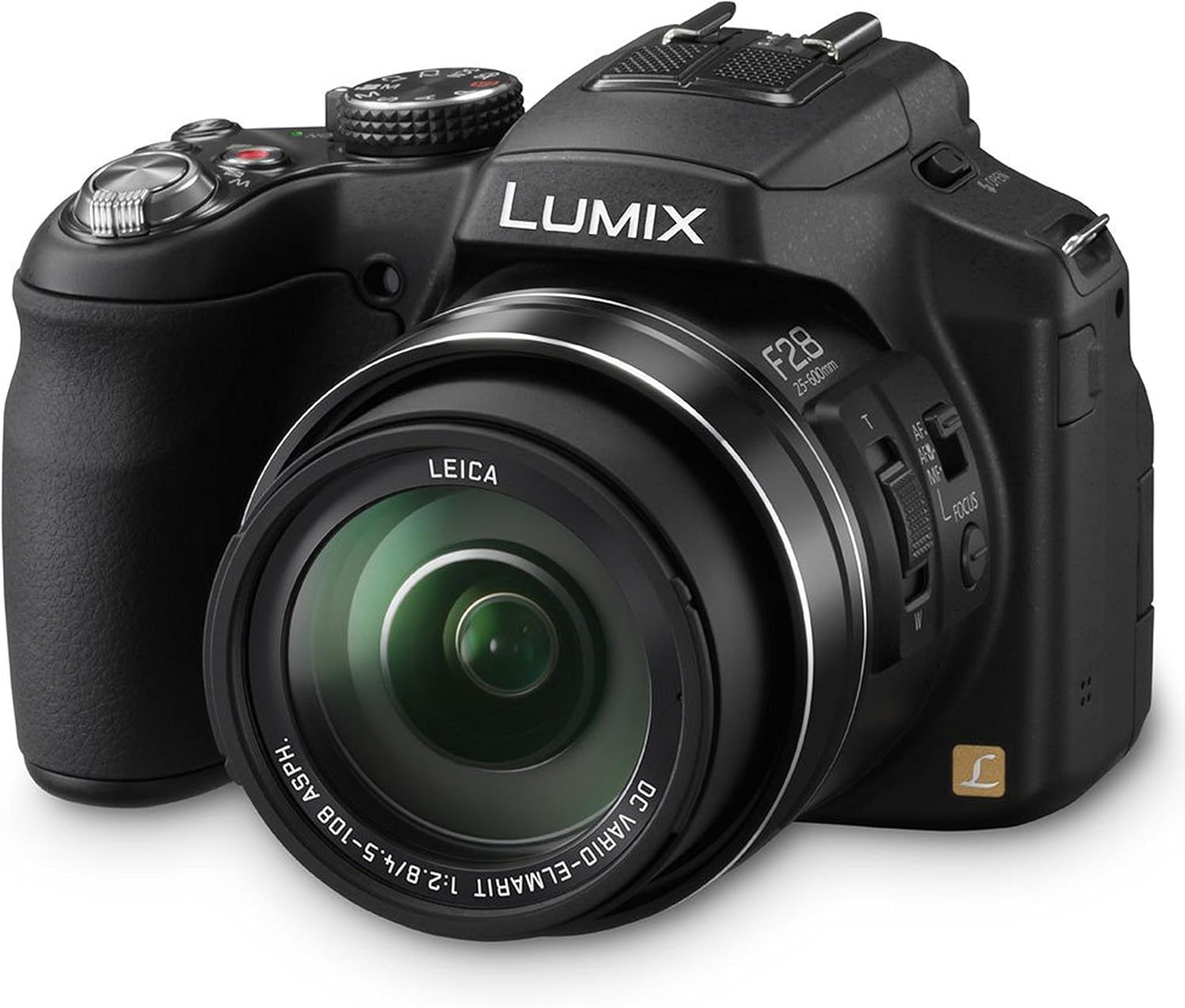
Figure 1.1: Front-right view of the Panasonic Lumix DMC-FZ200 camera.
2. Setup
2.1. Unpacking and Initial Inspection
Carefully unpack all components from the box. Ensure the following items are present:
- Panasonic Lumix FZ200 Digital Camera
- Li-ion Battery Pack
- Battery Charger
- USB Cable
- Shoulder Strap
- CD-ROM (for software)
- Lens Cap
- Lens Cap String
- Lens Hood
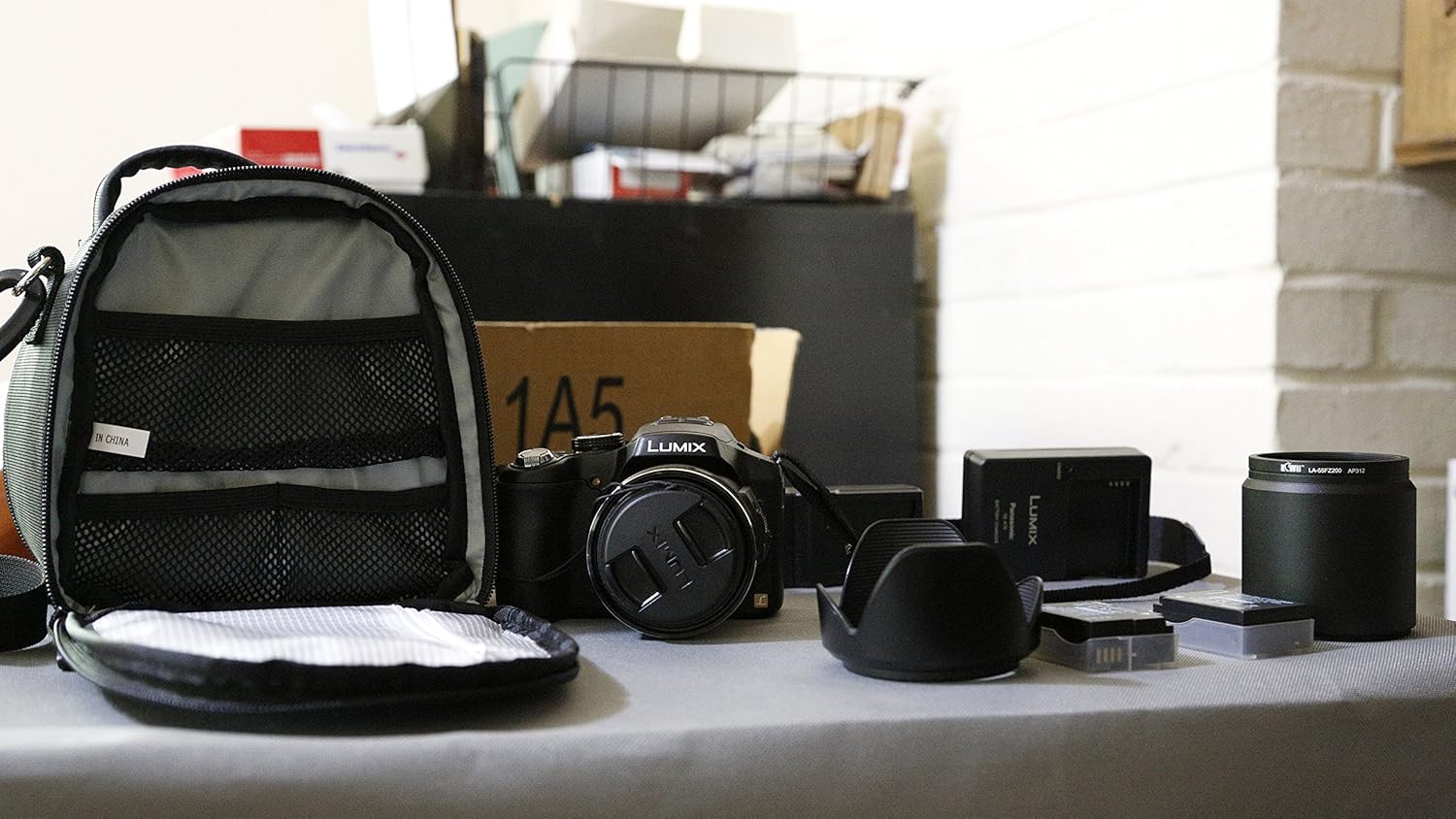
Figure 2.1: Unpacked components of the camera kit.
2.2. Charging and Installing the Battery
Before first use, fully charge the supplied Li-ion Battery Pack. Insert the battery into the charger and connect the charger to a power outlet. The charging indicator will show the charging status. Once fully charged, insert the battery into the camera's battery compartment, ensuring it clicks into place.
2.3. Inserting a Memory Card
The DMC-FZ200 supports SD, SDHC, and SDXC memory cards. Open the memory card slot cover and insert the memory card with the label facing the correct direction until it clicks. Close the cover securely. A high-speed card (Class 10 or UHS-I) is recommended for optimal performance, especially for video recording and continuous shooting.
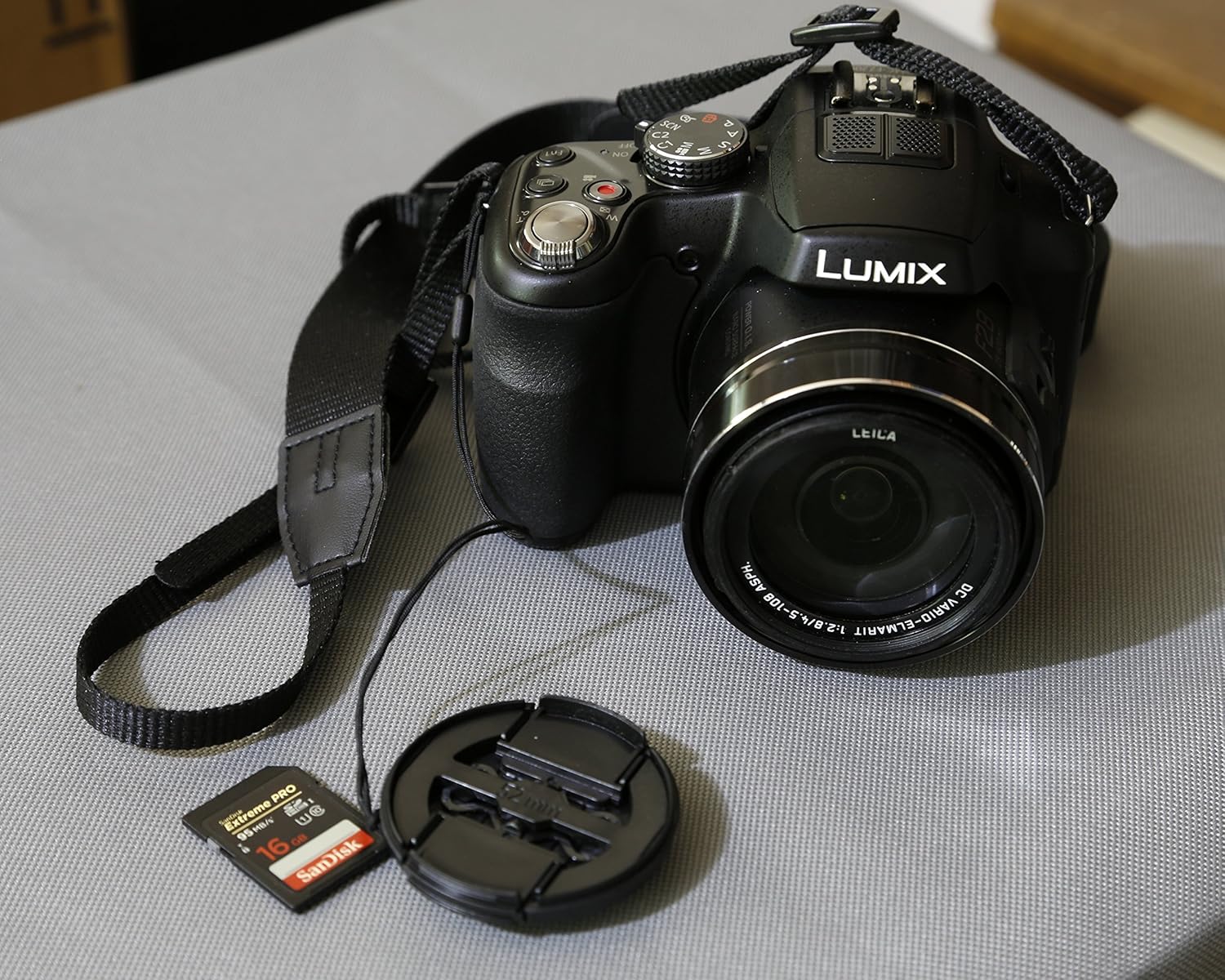
Figure 2.2: Camera with an SD card, ready for use.
2.4. Attaching the Shoulder Strap and Lens Cap
Attach the shoulder strap to the camera's strap lugs for secure carrying. Secure the lens cap to the lens using the provided string to prevent loss. The lens hood can be attached to the front of the lens to reduce flare and protect the lens.
3. Operating the Camera
3.1. Powering On/Off
To power on the camera, rotate the power switch located on the top of the camera. To power off, rotate the switch back to the OFF position. The camera has a quick start-up time of approximately 0.95 seconds.
3.2. Shooting Modes
The mode dial on top of the camera allows you to select various shooting modes:
- Intelligent Auto (iA) Mode: The camera automatically detects the scene and adjusts settings for optimal results.
- Program AE (P): The camera sets the aperture and shutter speed, but you can adjust other settings.
- Aperture Priority AE (A): You set the aperture, and the camera sets the shutter speed. Ideal for controlling depth of field.
- Shutter Priority AE (S): You set the shutter speed, and the camera sets the aperture. Ideal for controlling motion blur.
- Manual Exposure (M): You control both aperture and shutter speed for complete creative control.
- Creative Control: Apply various artistic filters and effects to your photos and videos (e.g., Expressive, Retro, High Key, Low Key, Sepia, Dynamic Monochrome, Impressive Art, High Dynamic, Cross Process, Toy Effect, Miniature Effect, Soft Focus, Star Filter, One Point Color).
- Scene Mode: Select from predefined scene settings (e.g., Portrait, Soft Skin, Scenery, Panorama Shot, Sports, Panning, Night Portrait, Night Scenery, Handheld Night Shot, HDR, Food, Baby, Pet, Sunset, High Sensitivity, Glass Through, 3D photo).
- Creative Video Mode: Adjust shutter speed and aperture while recording videos.
- Custom Modes (C1, C2): Save your preferred camera settings for quick recall.
3.3. Zoom and Focusing
The 24x optical zoom lens (25-600mm equivalent) allows for versatile shooting from wide-angle to super-telephoto. Use the zoom lever around the shutter button to adjust the zoom. A redesigned side lever also provides smoother zooming control and can be used to change focus.
The camera features Light Speed Auto Focus for quick and precise focusing. In addition, the AF Flexible mode automatically resets when your subject moves. For close-up shots, utilize the AF Macro mode. Manual focus is also available for precise control.
3.4. Image Stabilization
The POWER O.I.S. (Optical Image Stabilizer) minimizes blur caused by camera shake, especially at longer focal lengths. The Active Mode further suppresses handshake vibrations during video recording, ensuring smooth footage.
3.5. Video Recording
Record full HD videos in 1920x1080 60p in AVCHD Progressive (MPEG-4) and MP4 formats. A dedicated Motion Picture button allows you to start recording instantly without switching modes. The 24x optical zoom is fully functional during video recording. High-speed video recording (1280x720 pixels at 120fps or 640x480 pixels at 240fps) is available for dramatic slow-motion playback.
3.6. Display and Viewfinder
The 3.0-inch articulated LCD screen can rotate 180° on its side and tilt 270° up and down, offering flexibility for various shooting angles. The 0.2-inch EVF (Electronic Viewfinder) provides a 100% field-of-vision with high resolution, useful for shooting in bright sunlight or for more precise framing.
3.7. Advanced Features
- High Sensitivity MOS Sensor & Venus Engine: Deliver high-speed response, sensitivity, and superb image quality, even in low-light conditions.
- Intelligent Noise Reduction: Adjusts photos and videos taken in sensitive areas to create clear, crisp imagery.
- Intelligent HDR (High Dynamic Range): Overlays multiple exposures to produce a single composite picture, avoiding over or underexposure.
- Continuous Shooting: Capture fast-moving subjects with 12 fps full resolution, or 5.5 fps/2 fps with AF Tracking.
- RAW Shooting: For advanced users who desire maximum post-processing flexibility.
- Nano Surface Coating: Minimizes light reflection within the zoom range, reducing glare and producing clear pictures.
4. Maintenance and Care
Proper maintenance ensures the longevity and optimal performance of your Panasonic Lumix DMC-FZ200 camera.
- Cleaning the Lens: Use a soft, lint-free cloth or a lens brush to gently remove dust. For smudges, use a specialized lens cleaning solution applied to a cloth, not directly to the lens.
- Cleaning the Camera Body: Wipe the camera body with a soft, dry cloth. Avoid using strong cleaning agents or solvents.
- Storage: When not in use, store the camera in a cool, dry place, away from direct sunlight and extreme temperatures. Use a camera bag for protection during transport.
- Battery Care: Store batteries in a cool, dry place. If storing for extended periods, charge them periodically to maintain their health.
- Avoid Moisture and Dust: While the camera is robust, it is not water-resistant. Avoid exposing it to rain, splashes, or excessive dust.
5. Troubleshooting
This section addresses common issues you might encounter with your DMC-FZ200 camera.
5.1. Camera Does Not Power On or Shuts Off Immediately
If your camera fails to power on or turns off shortly after being switched on, accompanied by a motor sound, consider the following:
- Battery Charge: Ensure the battery is fully charged. A low battery can cause the camera to power off unexpectedly.
- Battery Insertion: Verify that the battery is inserted correctly and securely in its compartment.
- Battery Condition: If the battery is old or frequently used, its capacity might have degraded. Try using a different, fully charged battery if available.
- Lens Obstruction: Check if there is any obstruction preventing the lens from extending or retracting properly. Dust or debris can interfere with the lens mechanism.
- Memory Card: Although less common, a faulty memory card can sometimes interfere with camera operation. Try removing the memory card and powering on the camera.
If the issue persists after checking these points, it may indicate an internal malfunction. Please refer to the "7. Warranty and Support" section for further assistance.
5.2. Blurry Images
- Camera Shake: Ensure you are holding the camera steady. Use the POWER O.I.S. feature, or a tripod for very slow shutter speeds or long zoom shots.
- Focus: Confirm the camera has achieved focus on your subject. Re-focus if necessary.
- Low Light: In dim conditions, the camera might struggle to focus or require a slower shutter speed. Increase ISO or use the flash if appropriate.
- Lens Cleanliness: A dirty lens can cause blurry or hazy images. Clean the lens as described in the Maintenance section.
5.3. Memory Card Error
- Reinsert Card: Remove and reinsert the memory card.
- Format Card: If the error persists and you have backed up your data, format the card using the camera's menu.
- Try Another Card: Test with a different memory card to determine if the issue is with the card or the camera.
6. Specifications
| Feature | Specification |
|---|---|
| Model Name | Panasonic Lumix FZ200 |
| Effective Still Resolution | 12.1 MP |
| Photo Sensor Type | CMOS (1/2.3-inch) |
| Optical Zoom | 24x |
| Focal Length | 25-600mm (35mm equivalent) |
| Maximum Aperture | F2.8 (constant) |
| ISO Sensitivity | 100-3200 (expandable to 6400) |
| Video Resolution | FHD 1080p (60p) |
| Display Type | 3.0-inch Articulating LCD |
| Display Resolution | 460,000 dots |
| Viewfinder | Electronic (0.2-inch, 100% coverage) |
| Image Stabilization | Optical (POWER O.I.S.) |
| Continuous Shooting | 12 fps (full resolution) |
| Supported File Formats | JPEG (DCF/Exif2.3), RAW, MPO (for 3D) |
| Memory Card Slot | SD/SDHC/SDXC |
| Battery Type | Lithium Ion |
| Battery Average Life | 540 Photos (CIPA standard) |
| Connectivity | USB, HDMI |
| Weight | 1.3 Pounds (approx. 589g) |
| Color | Black |
7. Warranty and Support
Your Panasonic Lumix DMC-FZ200 camera comes with a 30-day warranty from the manufacturer. For detailed warranty terms and conditions, please refer to the documentation included with your product.
For comprehensive information and advanced usage instructions, you can download the official User Manual in PDF format:
For additional support, product information, and accessories, please visit the official Panasonic Store:
Related Documents - DMC-FZ200
 |
Panasonic DMC-G2 Series Service Manual Official Panasonic service manual for the DMC-G2 series digital cameras and lens kits. This guide provides in-depth technical details, repair procedures, safety information, schematics, and troubleshooting steps for models including DMC-G2KPP, DMC-G2KEB, and more. Essential for service technicians. |
 |
Panasonic Lumix DMC-FZ200 User Manual: Master Your Bridge Camera A comprehensive guide to the Panasonic Lumix DMC-FZ200 bridge camera. Learn photography techniques, settings, and controls from expert Graham Houghton to capture outstanding images. |
 |
Panasonic Lumix DMC-GX80/GX85 Series Service Manual Comprehensive service manual for Panasonic Lumix DMC-GX80 and DMC-GX85 series digital cameras. Includes safety precautions, disassembly instructions, troubleshooting, and technical specifications for professional repair. |
 |
Panasonic LUMIX DMC-GX8 Series Service Manual This comprehensive service manual provides detailed technical information for the Panasonic LUMIX DMC-GX8 series digital cameras and their interchangeable lens kits. Designed for experienced repair technicians, it offers essential guidance for servicing and maintaining these advanced photographic devices. |
 |
Panasonic Digital Camera Service Manual: DMC-TZ27, TZ30, TZ31, ZS19, ZS20 Series Comprehensive service manual for Panasonic Lumix digital cameras, including models DMC-TZ27EB, TZ27EC, TZ30EB, TZ30EE, TZ30EF, TZ30EG, TZ30EP, TZ30GA, TZ30GC, TZ30GN, TZ30SG, TZ31EG, ZS19P, ZS20P, ZS20PC, ZS20PU, ZS20GH, ZS20GK, ZS20GT. This guide provides detailed technical information, troubleshooting, disassembly, and maintenance procedures for experienced repair technicians. |
 |
Panasonic Lumix DMC-FX07 Digital Camera Service Manual Official service manual for the Panasonic Lumix DMC-FX07 digital camera series. Includes safety precautions, disassembly instructions, circuit diagrams, and maintenance procedures for professional repair technicians. |
Ask a question about this manual
Ask about setup, troubleshooting, compatibility, parts, safety, or missing instructions. Manuals+ will review the question and use this page’s manual context to help answer it.