
1. Introduction
Thank you for choosing the Fartools PRO ER1300 Electric Router. This manual provides essential information for the safe operation, maintenance, and troubleshooting of your new tool. Please read this manual thoroughly before using the router to ensure proper function and to prevent injury. Keep this manual in a safe place for future reference.
The Fartools PRO ER1300 is a powerful 1300 W electric router designed for precision woodworking tasks such as edge profiling, grooving, and decorative cuts. Its robust construction and ergonomic design ensure reliable performance and comfortable use.
2. General Safety Instructions
WARNING: Read all safety warnings, instructions, illustrations, and specifications provided with this power tool. Failure to follow all instructions listed below may result in electric shock, fire, and/or serious injury.
- Work Area Safety: Keep your work area clean and well-lit. Cluttered or dark areas invite accidents. Do not operate power tools in explosive atmospheres, such as in the presence of flammable liquids, gases, or dust.
- Electrical Safety: Power tool plugs must match the outlet. Never modify the plug in any way. Do not use any adapter plugs with earthed (grounded) power tools. Avoid body contact with earthed or grounded surfaces.
- Personal Safety: Always wear eye protection. Use dust masks, non-skid safety shoes, hard hats, or hearing protection for appropriate conditions. Dress properly. Do not wear loose clothing or jewelry. Keep hair and clothing away from moving parts.
- Power Tool Use and Care: Do not force the power tool. Use the correct power tool for your application. Disconnect the plug from the power source and/or remove the battery pack, if detachable, from the power tool before making any adjustments, changing accessories, or storing power tools.
- Service: Have your power tool serviced by a qualified repair person using only identical replacement parts. This will ensure that the safety of the power tool is maintained.
3. Setup
3.1 Unpacking and Inspection
Carefully remove the router and all accessories from the packaging. Inspect the tool for any signs of damage that may have occurred during shipping. Do not operate the tool if it appears damaged. Contact your dealer for assistance.
3.2 Component Identification
Familiarize yourself with the various parts of your Fartools PRO ER1300 router. Refer to the diagram below for common components.
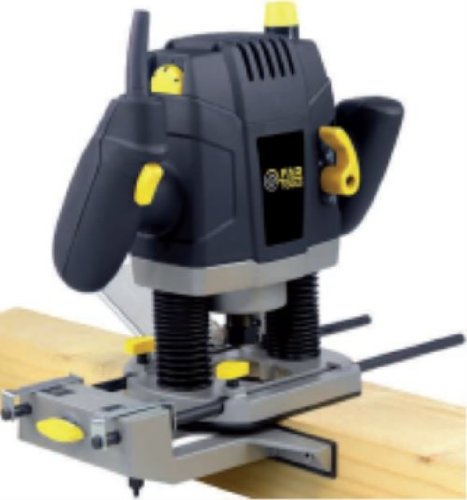
Figure 1: Fartools PRO ER1300 Electric Router. This image shows the overall design of the router, including its handles, base, and motor housing, providing a general overview of the product.
- Power Switch
- Depth Adjustment Knob
- Collet Nut
- Base Plate
- Handles
- Motor Housing
3.3 Installing a Router Bit
- Ensure the router is unplugged from the power source.
- Loosen the collet nut using the provided wrench.
- Insert the shank of the router bit into the collet, ensuring it is inserted at least two-thirds of the way to prevent slippage.
- Tighten the collet nut firmly with the wrench. Do not overtighten.
3.4 Adjusting Routing Depth
The routing depth can be adjusted for precise cuts.
- Place the router on a flat surface with the desired bit installed.
- Loosen the depth adjustment knob/lever.
- Lower the motor until the bit touches the surface.
- Set the depth stop to the desired measurement.
- Tighten the depth adjustment knob/lever securely.
4. Operating Instructions
4.1 Powering On/Off
- To turn on: Ensure the router is securely positioned and your hands are clear of the bit. Press the ON switch.
- To turn off: Release the ON switch. Allow the bit to come to a complete stop before setting the tool down.
4.2 Basic Routing Techniques
- Workpiece Securement: Always clamp your workpiece firmly to a stable surface.
- Direction of Cut: Always feed the router against the rotation of the bit. This provides better control and prevents the router from "climbing" over the workpiece.
- Feed Rate: Maintain a consistent, moderate feed rate. Too fast can lead to poor cut quality and motor strain; too slow can cause burning of the wood.
- Multiple Passes: For deep cuts, make several shallow passes rather than one deep pass. This reduces strain on the motor and bit, and improves cut quality.
4.3 Material Considerations
Different materials require different routing speeds and bit types. Always test on a scrap piece of the same material before making final cuts. Hardwoods generally require slower speeds than softwoods or plastics.
5. Maintenance
Regular maintenance ensures the longevity and optimal performance of your Fartools PRO ER1300 router.
- Cleaning: After each use, unplug the tool and clean off dust and debris from the motor vents and base plate using a soft brush or compressed air. Do not use solvents.
- Bit Care: Keep router bits sharp and clean. Dull bits can cause overheating and poor cut quality.
- Carbon Brush Inspection/Replacement: The carbon brushes (if applicable to this model) should be inspected periodically for wear. Replace them when they are worn down to approximately 1/4 inch (6mm) or if the motor performance decreases. Refer to a qualified service technician for brush replacement if you are unsure.
- Cord Inspection: Regularly inspect the power cord for damage. If damaged, have it replaced by a qualified technician.
- Storage: Store the router in a dry, secure location out of reach of children.
6. Troubleshooting
| Problem | Possible Cause | Solution |
|---|---|---|
| Router does not start | No power supply; Faulty switch; Worn carbon brushes. | Check power connection; Test outlet; Replace switch; Replace carbon brushes (consult service). |
| Excessive vibration | Loose bit; Damaged bit; Bent shaft. | Tighten collet nut; Replace bit; Consult service for bent shaft. |
| Poor cut quality / Burning wood | Dull bit; Incorrect feed rate; Wrong bit for material. | Replace or sharpen bit; Adjust feed rate; Use appropriate bit. |
| Motor overheating | Overloading; Blocked ventilation; Worn carbon brushes. | Reduce load/make shallower passes; Clean vents; Replace carbon brushes (consult service). |
7. Specifications
| Feature | Detail |
|---|---|
| Brand | Fartools |
| Model | ER1300 |
| Power | 1300 W |
| ASIN | B008J35EA6 |
| First Available on Amazon.es | 28 October 2013 |
Note: Specifications are subject to change without notice for product improvement.
8. Warranty and Support
Fartools products are manufactured to high-quality standards. In the unlikely event of a defect due to faulty materials or workmanship, please contact your retailer or the Fartools customer service department for assistance.
Please retain your proof of purchase for warranty claims. The warranty period and terms may vary by region. For detailed warranty information and technical support, please refer to the official Fartools website or contact their customer service.
Customer Service: Refer to your purchase documentation or the Fartools official website for contact information.