
Epilady EP-L4ES-C
Epilady Hair Removal Device Bundle User Manual
Models: Legend Series 2 (L4), Epi-Wand
Introduction
This manual provides essential information for the safe and effective use of your Epilady Hair Removal Device Bundle, which includes the Epilady Legend Series 2 (L4) and the Epilady Epi-Wand. These devices are designed to provide long-lasting hair removal by gently removing hair from the root, offering an alternative to traditional shaving or waxing methods.

Image: The Epilady Legend Series 2 (right) and the Epilady Epi-Wand (left), the two primary devices included in this bundle.
The Epilady Legend 4 is a rechargeable epilator suitable for use on arms, legs, underarms, bikini area, and face (excluding the eye area). The Epilady Esthetic (Epi-Wand) is specifically designed for removing fine facial hair, often referred to as "peach fuzz."
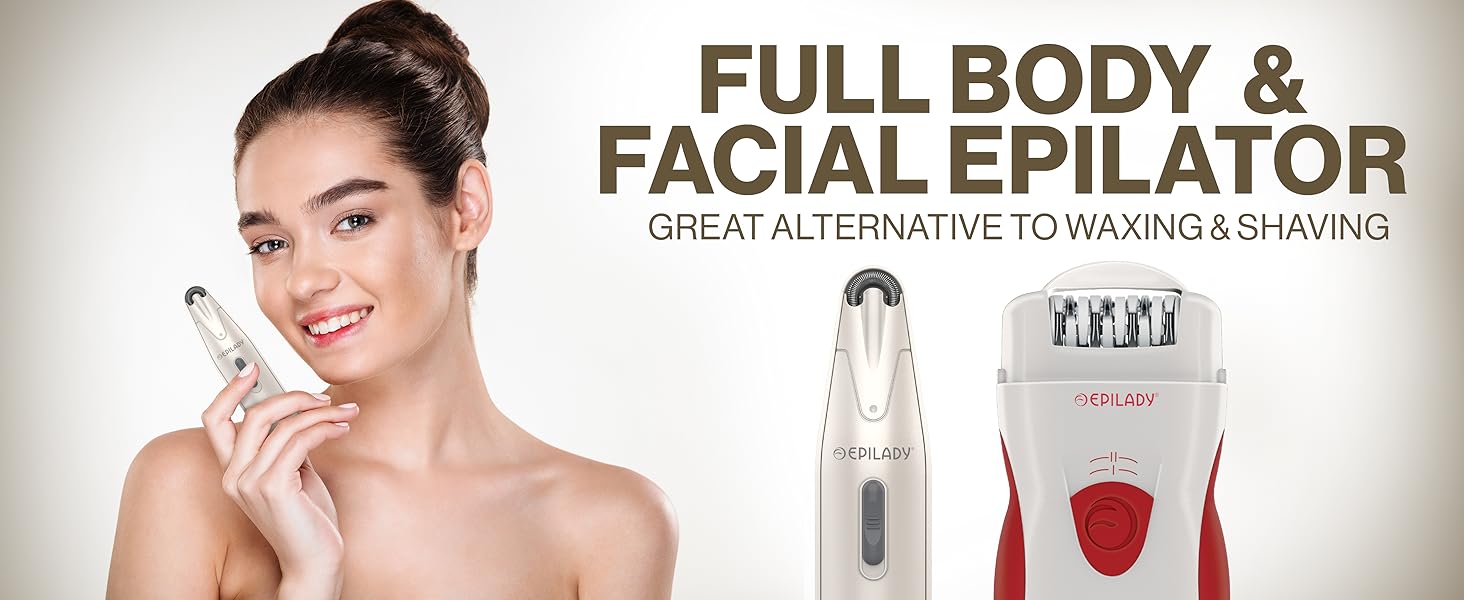
Image: A woman holding the Epi-Wand, illustrating the product's versatility for both full body and facial hair removal.
Please read this entire manual before first use to ensure proper operation and to maximize the lifespan of your devices.
Setup and First Use
Charging the Epilady Legend 4
- Before first use, fully charge the Epilady Legend 4 for at least 12 hours.
- Connect the power adapter to the charging port on the device and plug it into a standard electrical outlet.
- The charging indicator light will illuminate during charging.
- The Legend 4 can be used corded or cordless once charged.
Inserting Batteries into Epi-Wand
- The Epi-Wand requires 2 AA batteries (included).
- Locate the battery compartment on the device.
- Insert the batteries, ensuring correct polarity (+/-).
- Close the battery compartment securely.
Skin Preparation
For optimal results, ensure your skin is clean and dry before epilation. Avoid using lotions, oils, or creams immediately prior to use, as these can interfere with hair removal.
Operating Instructions
Using the Epilady Legend 4
- Turn on the device using the power switch. The Legend 4 has two speed settings; select the one most comfortable for you.
- Place the epilator head gently against your skin at a 90-degree angle.
- Slowly glide the epilator against the direction of hair growth. Do not press too hard.
- For best results, especially on legs, use the included Perfect Angle Guide (PAG). This accessory helps maintain the optimal angle for efficient hair removal.
- The Legend 4 is suitable for arms, legs, underarms, bikini area, and face (avoiding the eye area).

Image: Demonstrates the use of the Epilady Legend 4 on a leg, highlighting the Perfect Angle Guide for optimal efficiency.
Using the Epilady Epi-Wand
- Turn on the Epi-Wand using its power switch.
- Gently press the epilator head against the skin where fine facial hair is present.
- Move the device in small, circular motions or against the direction of hair growth.
- The Epi-Wand is specifically designed for fine facial hair, such as peach fuzz.

Image: A woman using the Epilady Epi-Wand on her face, with an inset diagram illustrating how the device removes hair from the root.
After epilation, some redness or irritation may occur, especially during initial uses. This is normal and should subside quickly. Applying a soothing lotion can help.
Maintenance and Care
Cleaning the Epilator Heads
- After each use, turn off the device and remove any accumulated hair from the epilator head using the provided cleaning brush.
- For thorough cleaning, the epilator heads can be detached (refer to specific device instructions for removal) and rinsed under running water. Ensure the device body does not get wet, as it is not water-resistant.
- Allow the epilator head to air dry completely before reattaching it to the device or storing.
Battery Care (Legend 4)
- To maintain battery life, fully discharge the Legend 4 occasionally before recharging.
- Store the device in a cool, dry place when not in use.
Storage
Store both devices in their original packaging or a protective pouch to prevent damage to the epilator heads and ensure longevity.

Image: The Epilady Legend 4 and Epi-Wand being stored in a compact travel pouch, emphasizing portability and ease of storage.
Troubleshooting
| Problem | Possible Cause | Solution |
|---|---|---|
| Device not turning on (Legend 4) | Battery is low or depleted. | Charge the device for at least 12 hours. Try using it while plugged in. |
| Device not turning on (Epi-Wand) | Batteries are depleted or incorrectly inserted. | Replace AA batteries, ensuring correct polarity. |
| Hair not being removed effectively | Device not held at correct angle; hair too short or too long; skin not clean/dry. | Ensure device is at a 90-degree angle to the skin. Use the Perfect Angle Guide for Legend 4. Ensure hair is 2-5mm long. Clean and dry skin before use. |
| Excessive skin irritation | Pressing too hard; sensitive skin; first-time use. | Apply less pressure. Use a soothing lotion after epilation. Irritation often decreases with regular use. |
Specifications
Epilady Legend Series 2 (L4)
- Model Number: EP-L4ES-C
- Power Source: Rechargeable Battery (can be used corded or cordless)
- Speeds: 2
- Dimensions: Approximately 6 x 8 x 5 inches
- Weight: Approximately 0.4 Pounds
- Water Resistance: Not Water Resistant
Epilady Epi-Wand
- Power Source: 2 AA Batteries (included)
- Designed for: Fine facial hair
- Water Resistance: Not Water Resistant
Warranty and Support
For information regarding product warranty, returns, or technical support, please refer to the warranty card included with your product packaging or visit the official Epilady website. Keep your purchase receipt as proof of purchase for any warranty claims.
Note: No official product videos were available from the seller for embedding in this manual.
Related documentsEP-L4ES-C

Ask a question about this manual
Ask about setup, troubleshooting, compatibility, parts, safety, or missing instructions. Manuals+ will review the question and use this page’s manual context to help answer it.