
Broyhill 3597-81
Attic Heirlooms Entertainment Console, 48"
Model: 3597-81
Introduction
The Broyhill Attic Heirlooms 3597-81S 48" Entertainment Console is designed to provide a functional and aesthetically pleasing solution for your entertainment area. Crafted from durable oak solids and veneers, this console features a natural oak stain that highlights the wood's inherent beauty. It offers ample storage with a central glass-faced cabinet and side cabinets, including a pull-out DVD shelf. Integrated ventilation and cable management features ensure optimal performance for your electronic devices.
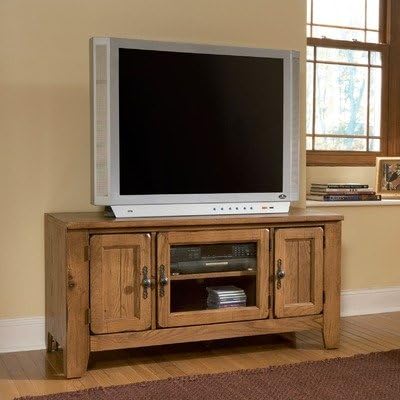
Figure 1: The Broyhill Attic Heirlooms Entertainment Console, 48", showcasing its design with a television placed on top. The console features three doors, with the central door being glass-faced, and two solid wood doors on the sides. The natural oak finish and traditional hardware are visible.
Safety Information
Please read and understand all safety instructions before using this product. Failure to follow these instructions may result in injury or damage to the product.
- Ensure the console is placed on a stable, level surface to prevent tipping.
- Do not overload shelves or cabinets beyond their weight capacity.
- Keep ventilation openings clear to prevent overheating of electronic devices.
- Avoid exposing the console to excessive moisture or direct sunlight.
- For safety, consider securing the console to a wall, especially in homes with children or pets, using appropriate anti-tip hardware (not included).
Setup
The Broyhill Attic Heirlooms Entertainment Console comes fully assembled, requiring no complex setup. Follow these steps for initial placement:
- Unpacking: Carefully remove the console from its packaging. Inspect for any shipping damage.
- Placement: Choose a suitable location in your living space. Ensure the floor is level and capable of supporting the console's weight (approximately 150 pounds) plus the weight of your entertainment equipment.
- Leveling: If the console wobbles, adjust its position or place shims under the legs to ensure stability.
- Cable Management: Utilize the pre-drilled ventilation holes at the back of the unit to route cables and cords for your electronic devices. This helps in reducing overheating and maintaining an organized appearance.
Operating the Console
This entertainment console is designed for straightforward use. Here are guidelines for optimal functionality:
- Central Cabinet: The glass-faced central cabinet is ideal for housing small electronic devices such as DVD players, cable boxes, or gaming consoles. The glass allows for remote control signals to pass through.
- Side Cabinets: The two side cabinets feature solid wood doors and provide concealed storage. The right-side cabinet includes a pull-out DVD shelf for organizing your media collection.
- Ventilation: The strategically placed ventilation holes at the back of the unit are crucial for air circulation around your electronic components. Ensure these holes are not blocked.
- Weight Distribution: Distribute the weight of your electronics evenly across the top surface and within the cabinets to maintain stability.
Maintenance
Proper care will help maintain the beauty and longevity of your entertainment console.
- Cleaning:
- Dust regularly with a soft, dry, lint-free cloth.
- For spills, wipe immediately with a clean, damp cloth and then dry thoroughly.
- Avoid using harsh chemicals, abrasive cleaners, or silicone-based polishes, as these can damage the wood finish.
- Protection:
- Use coasters or protective pads under hot or wet items to prevent watermarks and heat damage.
- Keep the console out of direct sunlight to prevent fading or cracking of the wood.
- Maintain a consistent humidity level in the room to prevent wood from expanding or contracting excessively.
- Hardware: Periodically check and tighten any loose screws on hinges or handles to ensure proper function and stability.
Troubleshooting
This section addresses common concerns you might encounter with your entertainment console.
| Problem | Possible Cause | Solution |
|---|---|---|
| Console wobbles or is unstable. | Uneven floor surface; uneven weight distribution. | Relocate to a level surface. Use shims under legs if necessary. Redistribute items inside and on top of the console. |
| Doors do not close properly. | Loose hinges; obstruction. | Check and tighten hinge screws. Ensure nothing is blocking the door's path. |
| Electronic devices overheating. | Blocked ventilation holes; insufficient airflow. | Ensure ventilation holes at the back are clear. Do not place devices directly against the back panel. Consider adding small risers under devices for better airflow. |
| Scratches or minor blemishes on wood. | Accidental impact; abrasive cleaning. | For minor scratches, use a wood repair marker or furniture polish designed for natural oak finishes. Consult a professional for significant damage. |
Specifications
| Feature | Detail |
|---|---|
| Brand | Broyhill |
| Model Number | 3597-81 |
| Product Dimensions | 48 x 22 x 24 inches (Width x Depth x Height) |
| Item Weight | 150 pounds |
| Material | Oak Solids and Veneers |
| Finish Type | Natural Oak Stain (Medium Wood) |
| Color | Brown |
| Number of Doors | 3 (1 glass-faced, 2 solid) |
| Number of Shelves | 1 (pull-out DVD shelf in side cabinet) |
| Mounting Type | Floor Mount (Freestanding) |
| Assembly Required | No |
| Manufacturer | Heritage Home |
| UPC | 662675102740 |
Warranty and Support
For specific warranty information regarding your Broyhill Attic Heirlooms Entertainment Console, please refer to the documentation included with your purchase or visit the official Broyhill website. Warranty terms typically cover manufacturing defects for a limited period from the date of purchase.
For customer support, technical assistance, or to inquire about replacement parts, please contact Broyhill customer service. Contact details can usually be found on the manufacturer's website or on your purchase receipt.
Online Resources:
- Broyhill Official Website (Please note: This is a placeholder link. Refer to your product documentation for the exact support URL.)
Ask a question about this manual
Ask about setup, troubleshooting, compatibility, parts, safety, or missing instructions. Manuals+ will review the question and use this page’s manual context to help answer it.