
1. Product Overview
The CENTURY iRemote Shutter CIA-BTMR-BK is a versatile Bluetooth remote control designed for use with iPhone, iPad, and iPod touch devices. It allows users to remotely operate the camera shutter, as well as control music and video playback functions from a distance.
This device offers convenient control over your media and camera, enhancing your mobile device experience.
2. Setup
2.1. Battery Installation
The iRemote Shutter uses two CR2025 coin cell batteries. To install or replace batteries:
- Locate the battery compartment cover on the back of the remote.
- Use a small coin or tool to gently pry open the cover.
- Insert two CR2025 batteries, ensuring correct polarity (+/-).
- Replace the battery compartment cover securely.
2.2. Powering On/Off
To power on the device, slide the switch located on the side of the remote to the ON position. To power off, slide the switch to the OFF position.
2.3. Bluetooth Pairing
To connect the iRemote Shutter to your device via Bluetooth:
- Ensure the iRemote Shutter is powered on.
- On your iPhone, iPad, or iPod touch, navigate to Settings > Bluetooth.
- Enable Bluetooth if it is not already active.
- The device will appear in the list of available devices, typically as "iRemote Shutter" or a similar identifier.
- Tap on the device name to initiate pairing. Once paired, the status will change to "Connected".
For a visual guide on connecting a remote control, please refer to the video below:
Video: Remote Control Connection Method. This video demonstrates the steps to connect a Bluetooth remote control to a mobile device, including the pairing process.
2.4. Multi-Pairing (If Supported)
Some versions of this remote may support multi-pairing, allowing it to connect to multiple devices and switch between them. Refer to the video below for a demonstration of multi-pairing functionality.
Video: How to Use Multi-Pairing. This video illustrates the process of pairing the remote control with multiple devices and switching between them.
3. Operating Instructions
3.1. Camera Shutter Control
Once paired, open your device's camera application. Press the designated shutter button on the iRemote Shutter to capture photos or start/stop video recording.
3.2. Multimedia Control
The iRemote Shutter can control music and video playback:
- Play/Pause: Press the central play/pause button.
- Volume Up/Down: Use the volume buttons (usually marked with + and -).
- Next/Previous Track: Use the track skip buttons (usually marked with << and >>).
3.3. Other Functions
Depending on your device and application, the remote may also support functions such as activating voice commands or turning pages in e-books. Refer to your device's manual or app settings for compatibility.
4. Maintenance
4.1. Battery Replacement
When the remote's performance degrades or it stops responding, it may be time to replace the batteries. Follow the battery installation steps in Section 2.1.
4.2. Cleaning
Wipe the remote with a soft, dry cloth. Avoid using harsh chemicals or abrasive materials that could damage the device.
5. Troubleshooting
5.1. Device Not Connecting
- Ensure the remote is powered on and has fresh batteries.
- Check that Bluetooth is enabled on your mobile device.
- Try unpairing and re-pairing the remote from your device's Bluetooth settings.
- Restart both your mobile device and the remote.
5.2. Functions Not Working
- Verify that the remote is successfully paired.
- Ensure the application you are using (camera, music player, etc.) is active and in the foreground.
- Some applications may not fully support all remote functions. Check the app's settings or documentation.
6. Specifications
| Brand | CENTURY |
| Model | CIA-BTMR-BK |
| Color | Black |
| Connectivity | Bluetooth |
| Number of Buttons | 11 |
| Battery Type | CR2025 x 2 |
| Product Weight | Approximately 99.79 grams (0.22 pounds) |
7. Warranty and Disclaimer
When using this product, it is highly recommended to create a backup of your data. The manufacturer is not responsible for any data corruption or loss, regardless of the nature or cause of the malfunction or damage.
This product is provided for use with compatible electronic devices. The manufacturer is not affiliated with, authorized by, or approved by the manufacturers of these devices.
8. Support
For inquiries regarding this product, please contact the manufacturer or their authorized dealer directly. As this is not an authorized dealership, direct inquiries to the product manufacturer or their authorized representative are recommended.
9. Product Image
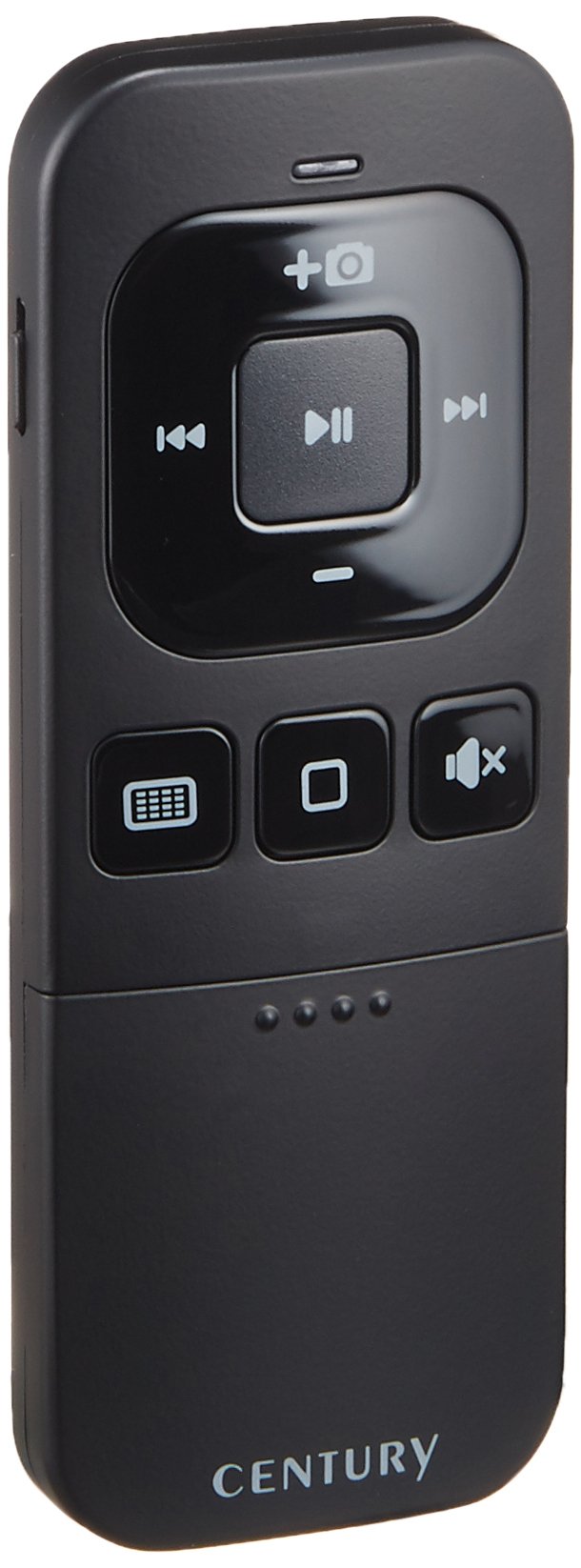
Image: Back view of the CENTURY iRemote Shutter CIA-BTMR-BK. The image displays the model number CIA-BTMR-BK, indicates it uses two CR2025 batteries, states it is manufactured by 株式会社 センチュリー (CENTURY Corporation) in Korea, and shows regulatory compliance marks (FC CE). An ON/OFF switch is visible on the right side of the device.