Introduction
This manual provides essential information for the proper setup, operation, and maintenance of your Seismic Audio SALS-12x4x100 12-Channel 100ft Pro Stage XLR Snake Cable. Please read these instructions carefully before using the product to ensure optimal performance and longevity.
The SALS-12x4x100 is a professional-grade audio snake designed for stage, studio, and recording applications. It features 12 XLR sends and 4 return channels, with the returns available as both XLR and 1/4" TRS connections on the box, and 2 XLR and 2 TRS connections on the fantail.
Product Features
- Model: SALS-12x4x100
- Sends: 12 XLR Connectors
- Returns (Box): 4 XLR Connectors paralleled with 1/4" TRS
- Returns (Fantail): 4 Connectors (2 XLR and 2 TRS)
- Length: 100 Feet
- Cable Type: XLR
- Indoor/Outdoor Usage: Suitable for both indoor and outdoor environments
Setup
Proper setup is crucial for reliable audio transmission. Follow these steps to connect your snake cable:
- Position the Stage Box: Place the main stage box (the larger metal enclosure) near your stage or input sources. Ensure it is in a stable location where it will not be tripped over or damaged.
- Connect Inputs to Stage Box: Connect your microphones, instruments, or other audio sources to the 12 XLR input connectors on the stage box. These are typically labeled 1 through 12.
- Run the Main Cable: Uncoil the main snake cable carefully, running it from the stage box to your mixing console or recording interface. Avoid kinking or excessive bending of the cable.
- Connect Fantail to Mixer: At the mixer end, connect the individual XLR and TRS connectors (the fantail) to the corresponding input channels on your mixing console. The fantail includes 12 XLR male connectors for sends and 4 return connectors (2 XLR male and 2 1/4" TRS male).
- Connect Returns: If using return channels (e.g., for monitor mixes or effects sends), connect the XLR or 1/4" TRS outputs from your mixer to the corresponding return inputs on the fantail. On the stage box, these returns are paralleled, meaning you can use either the XLR or 1/4" TRS jack for each return channel.

Image: The main stage box of the SALS-12x4x100, showing 12 numbered XLR input jacks and 4 return jacks (XLR and 1/4" TRS).
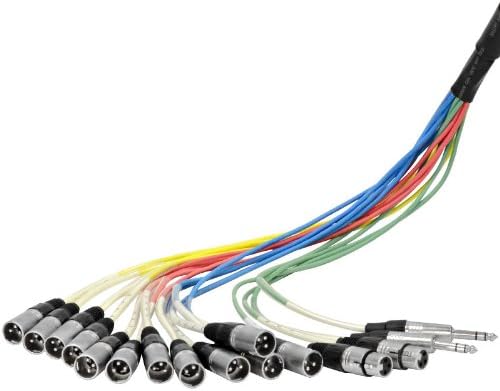
Image: The fantail end of the snake cable, featuring 12 color-coded XLR male connectors for sends and 4 connectors (2 XLR male and 2 1/4" TRS male) for returns.

Image: A close-up view of a standard 3-pin XLR connector, used for balanced audio signals.

Image: A close-up view of a 1/4 inch TRS (Tip-Ring-Sleeve) connector, used for balanced audio signals or stereo unbalanced signals.
Operating
Once the snake cable is properly connected, operating it is straightforward:
- Signal Flow: Audio signals from your stage inputs (microphones, instruments) travel through the 12 XLR send channels to your mixing console.
- Return Channels: Signals from your mixing console (e.g., monitor mixes, effects) can be sent back to the stage via the 4 return channels. These can be connected to stage monitors, in-ear monitor systems, or other stage equipment.
- Cable Management: Always ensure cables are neatly organized and secured to prevent tripping hazards and damage. Use cable ties or wraps to keep the fantail organized.
Maintenance
Proper maintenance extends the life of your snake cable:
- Cleaning: Keep connectors free of dust and debris. Use a dry, lint-free cloth to wipe down the cable and connectors. Avoid using liquid cleaners directly on connectors.
- Storage: When not in use, coil the cable neatly. Avoid tight coiling or kinking. Store the snake in a cool, dry place, away from extreme temperatures and direct sunlight.
- Inspection: Periodically inspect the cable for any signs of wear, cuts, or damage to the jacket or connectors. Address any issues promptly to prevent further damage or signal loss.
- Connector Care: Ensure all XLR and TRS connectors are securely fastened. If any screws on the stage box connectors become loose, gently tighten them. Avoid over-tightening.
Troubleshooting
If you encounter issues with your snake cable, consider the following:
- No Signal:
- Verify all connections are secure at both the stage box and mixer ends.
- Check the audio source (microphone, instrument) and the receiving device (mixer channel) to ensure they are functioning correctly.
- Test individual cables if possible to isolate the issue.
- Intermittent Signal or Noise:
- Inspect connectors for dirt, corrosion, or damage.
- Ensure the cable is not running parallel to power cables, which can induce hum or interference.
- Check for loose connections within the stage box or fantail connectors.
- Damaged Connectors: If a connector is physically damaged, it may need to be repaired or replaced by a qualified technician.
Specifications
| Model Number | SALS-12x4x100 |
| Sends | 12 XLR Connectors |
| Returns (Box) | 4 XLR Connectors paralleled with 1/4" TRS |
| Returns (Fantail) | 4 Connectors (2 XLR and 2 TRS) |
| Length | 100 Feet |
| Connector Type | XLR, 1/4" TRS |
| Cable Type | XLR |
| Compatible Devices | Stage equipment, mixing consoles, recording interfaces |
| Special Feature | Braided cable for durability |
| Color | Black |
| Connector Gender | Male-to-Male (XLR sends), Male (TRS returns) |
| Number of Pins | 3 (XLR) |
| Item Weight | 36.6 Pounds |
| Indoor/Outdoor Usage | Indoor, Outdoor |
| Manufacturer | Seismic Audio Speakers, Inc. |
| UPC | 847861006723 |
Warranty and Support
For warranty information and technical support, please refer to the official Seismic Audio website or contact their customer service directly. Keep your purchase receipt as proof of purchase.
You can find more information and contact details on the Seismic Audio Store.